EasyManua.ls Logo

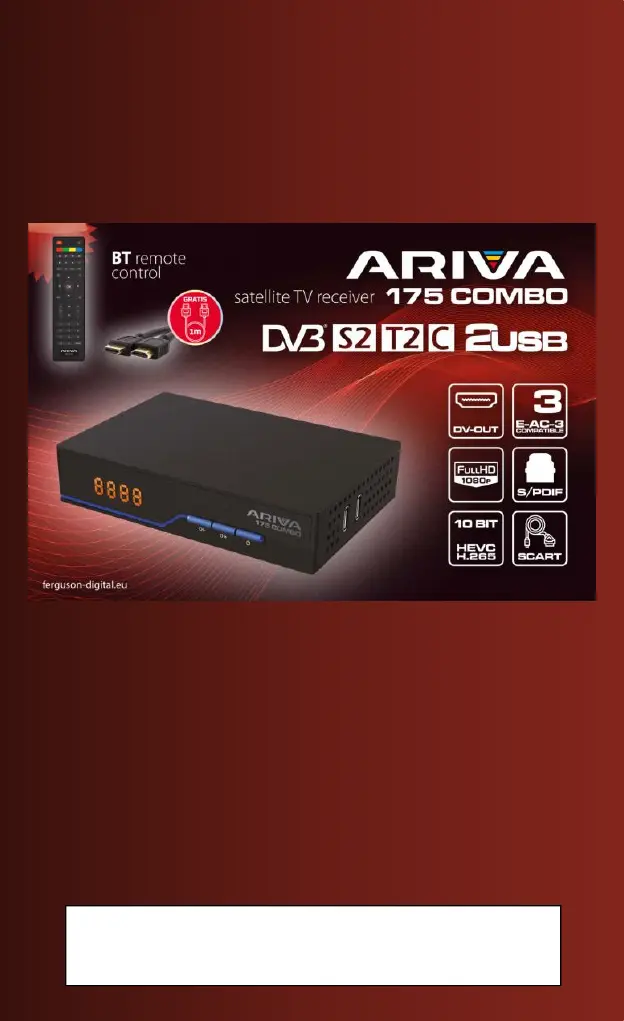
Ariva 175 COMBO - User Manual

Ariva 175 COMBO
51 pages
Go to English
Print Icon
To Next Page IconTo Next Page
Loading...
Ferguson Sp. z o.o.
[PL] Instrukcja obsługi
[DE] Benutzerhandbuch
[ES] Manual de uso
[IT] Manuale utente
[EN] User manual
Wir möchten Sie darauf hinweisen, dass der Ihnen zur Verfügung gestellte
Receiver (betrifft den deutschen Markt) nicht PVR fähig ist. Die USB-
Schnittstelle dient nur zu Software-Aktualisierung und Medienwiedergabe.

Questions and Answers

  • D
    Daniel SilvaJul 29, 2025
    What to do if Ariva TV Receiver shows no signal?
    • A
      Alexander RoweJul 29, 2025
      If your Ariva TV Receiver displays a 'no signal' message, several factors could be responsible. Heavy rain or clouds might be interfering with the signal reception, in which case you should wait until the weather clears. Ensure that the AV/DV-OUT is correctly connected to your TV. Verify that you've selected the correct source on your TV. Check that the LNB IN or ANT IN is properly connected for DVB-S or DVB-T. Finally, if you're using a DiSEqC switch, confirm that the correct port is selected.
  • D
    Deborah MartinezAug 6, 2025
    What to do if Ariva 175 COMBO TV Receiver has sound but no screen image?
    • N
      Nathan AndersenAug 6, 2025
      If your Ariva TV Receiver has sound but no image, check the AV/HD output connection to ensure it's correctly connected. It's also possible that the current program is a radio program; press the button to switch to TV mode.
  • A
    Amber MccarthyAug 13, 2025
    Why Ariva 175 COMBO TV Receiver has no sound from speakers?
    • L
      Lori BennettAug 13, 2025
      If you're not getting any sound from the speakers connected to your Ariva TV Receiver, first verify that the audio connection to the TV is correctly set up. Next, make sure the audio isn't muted and adjust the volume accordingly. Finally, the issue might be with the soundtrack of the current channel; try selecting a different channel soundtrack.
  • R
    ryanphelpsAug 21, 2025
    What to do if Ariva 175 COMBO image stops or has artifacts?
    • E
      Eric BoydAug 21, 2025
      If the image on your Ariva TV Receiver keeps stopping or shows artifacts, the signal might be too weak. If it's raining, wait for the rain to stop, as this can interfere with the signal. Try rescanning for channels. Ensure that your antenna is correctly positioned to receive the strongest signal.

Summary

Security Measures

General Safety Precautions

Device placement, handling power plug, cleaning, ventilation.

Electrical Safety and Warranty

Avoiding shock, opening case, warranty voiding, lightning protection.

Environmental and Handling Safety

Avoiding direct sunlight, heat, humidity, and proper placement.

Cable Connection Safety

Connecting cables with power off, checking cable integrity.

Contents of the Box

Important Tips for Operating the Receiver

On-Screen Menu (OSD) Navigation

Explains how to navigate menus using function keys and colored buttons.

Device Description - Rear Panel

Remote Control Buttons Description

Basic Button Functions

Describes buttons like Mute, Function buttons, Recording, List, Subtitle, Text, Recall, Audio, Info.

Remote Control Pairing

Battery Installation

First Installation - Connect

First Installation - Run

Initial Setup Options

Configuration of language, country, TV system, resolution, video format, and time.

Connecting a Satellite Antenna

Main Menu Overview

Installation Menu

List of Satellites Management

How to select, edit, add, or delete satellites for channel scanning.

Search for Channels (Single Satellite)

Methods for scanning channels from one satellite (Automatic, TP list, FastScan).

Search for Channels (Multiple Satellites)

Scanning channels from several satellites sequentially.

Installation - Terrestrial and Cable TV

System Settings

AV Settings

Configuring audio-video parameters like TV system, resolution, and audio output.

Card Reader and Update

Update via USB

Instructions for updating the receiver's software using a USB drive.

PVR Recording Configuration

Recording Configuration

Preferences for recording to USB, including TimeShift mode.

Multimedia Features

Edit Channels

Basic Remote Control Functions

Recording Broadcasts (REC)

Function to record programs to a USB flash drive.

Troubleshooting

Common Problems and Solutions

A table listing issues, potential causes, and corrective actions.

Technical Specifications

Tuner Specifications

Details frequency range, impedance, and input level for the tuner.

Technical Specifications - Demodulation and Power

Ariva 175 COMBO Specifications

General IconGeneral
USBYes
USB Ports1
Card ReaderYes
CI SlotYes
EPGYes
TeletextYes
Weight0.8 kg
Video DecodingH.264
Audio DecodingMPEG, AAC
Video OutputHDMI
Audio OutputHDMI
ConnectorsHDMI, USB, SCART
FeaturesPVR, Timeshift
Power Supply12V DC
Tuner TypeDVB-S2 / DVB-T2 / DVB-C
Supported StandardsMPEG-2, MPEG-4, H.264, HEVC/H.265

Related product manuals