Ferguson Sp. z o.o.
42
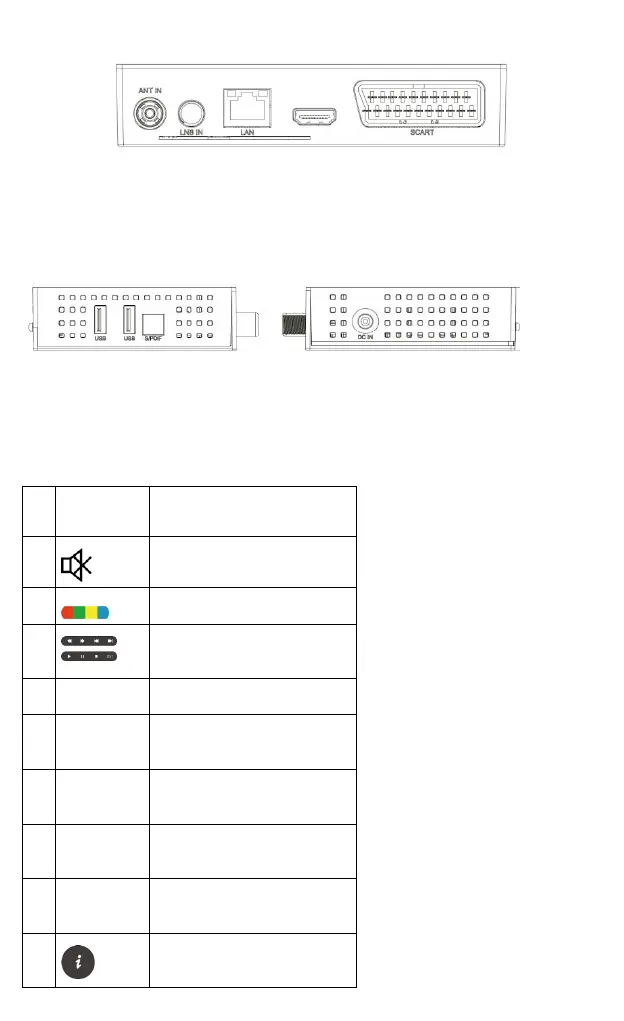
7.2 REAR PANEL
5) ANT IN – antenna input
6) LBN IN – antenna input
7) DV-Out – digital audio and video output
8) LAN – Ethernet port
9) SCART – analog audio and video signal output
7.3 SIDE PANELS
10) Power supply connector DC IN – to connect the power supply.
11) USB – for connecting external devices
12) S/PdiF – optical audio output
8 REMOTE CONTROL
8.1 BUTTONS DESCRIPTION
Turn audio on or off, muting
Buttons for recording, playback
and TimeShift mode
Turn on or off subtitles, if
available
Enables teletext to appear on
the screen, if available
Switch to a previously displayed
channel
Switch the version of the audio
track if available
Displays information about the
current program


 To Next Page