Ariva 175 Combo
49
16.6 SUBTITLE
The "yellow" button displays a window
with available subtitles. You can select any
of the broadcasts. If subtitles have been
started for a given language in the menu –
they will be selected in this list by default.
However, you can select any of the
subtitles that are broadcast. Remember
that the availability of subtitles and how
they are displayed depends on the sender!
16.7 FAV
Pressing the FAV button displays a
window with groups of favorites (if the
user has
created one).
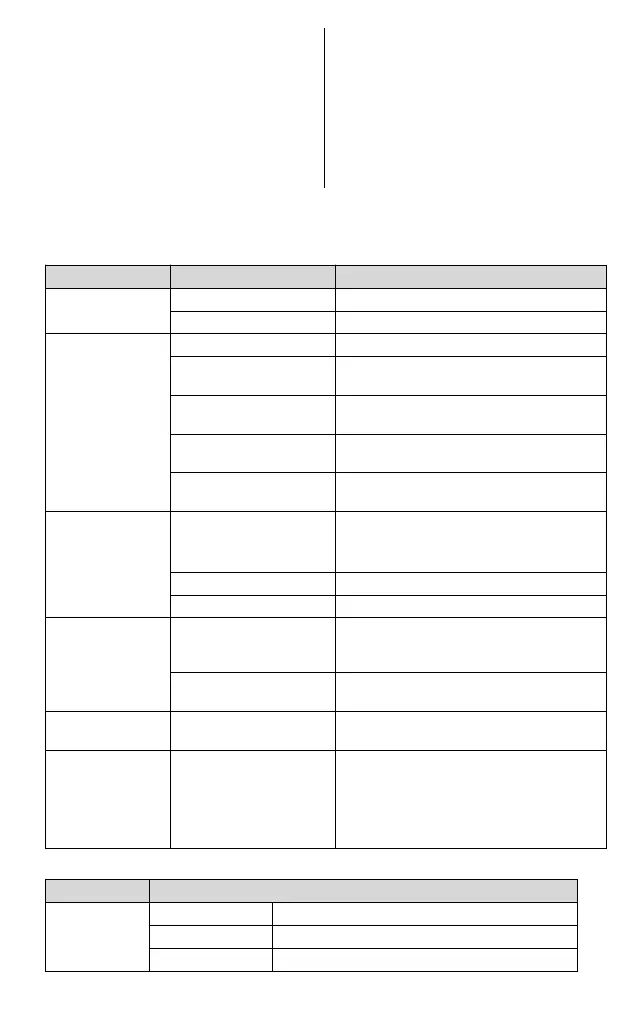
17 TROUBLESHOOTING
Below is a list of sample problems and ways to solve them.
The power strip is not on
Turn on the power supply to the strip
The screen shows
no signal
If it's raining, wait until the rain stops
AV/DV-OUT is not
connected to the TV
Connect AV/DV-OUT properly
Improperly selected TV
source
Choose the right source on TV
LNB IN or ANT IN is not
connected
If you are using a DiSEqC switch, make sure the
correct port is selected
Missing or incorrect
connection
with audio
Check that the sound is properly connected to
the TV
Turn on or off the volume correctly
Try a different channel soundtrack
Sound only, no
screen image
Missing or incorrect
connection to AV/HD
output
The program is a radio
program
Press <TV/RADIO> to enter TV mode
The remote control
does not work
Image stops or has
artifacts
If it is raining, wait until the rain stops.
Search for channels again.
Make sure the antenna is positioned correctly.
Call a technician for help if the problem
persists.
18 TECHNICAL SPECIFICATIONS


 To Next Page