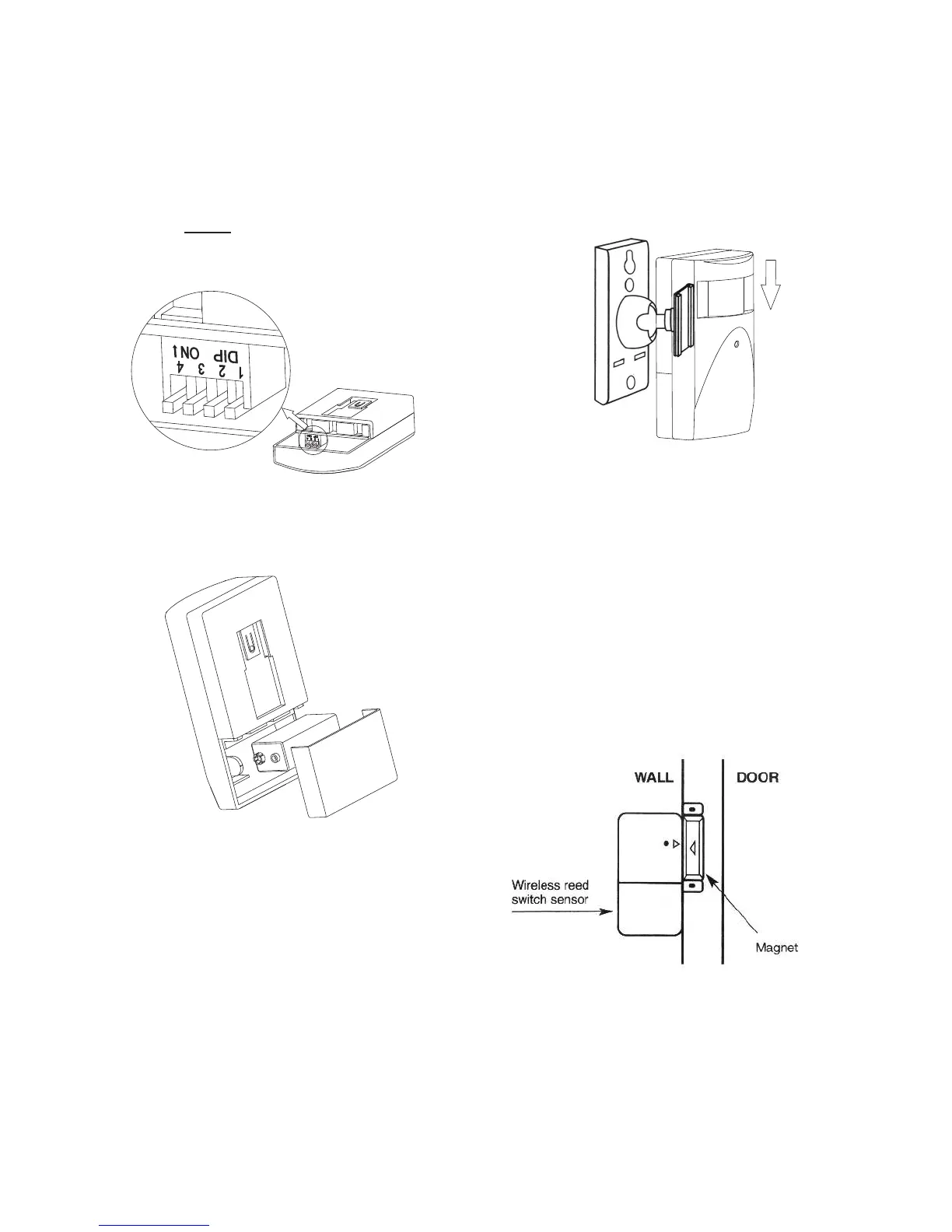
6. On the rear side of both the
Movement Sensors, open the
battery compartment. Set the
house code.
7. Insert one 9V battery into the
slot provided (over the house
code switch bank).
8. Decide the location of the
components as per the Layout
Guidelines.
9. Fix the Control Panel at the
desired location by putting two
screws in the wall 137mm
apart, at a convenient height
above the floor. Plug in the
adaptor into an electrical
socket.
10. Fix the Wall Brackets at the
selected location with screws.
Slide the Movement Sensors
on to the brackets and adjust
them to face the centre of the
room.
11. Fix the Door Sensor on the
wall with screws and its
magnet-part on the adjoining
door/window surface with the
help of double-sided tape
strips supplied. Ensure that
the Door Sensor and magnet
are parallel and the arrows
are pointing directly at one
another. Separation between
the pieces must not exceed
12mm.
12. Switch on the AC adaptor.
The system is now ready to
be programmed.
Note : All switches by default are
away from the 1234 position.
The ‘ON’ position is opposite in this
switch bank.
(OFF)


 To Next Page