INSTALLATION
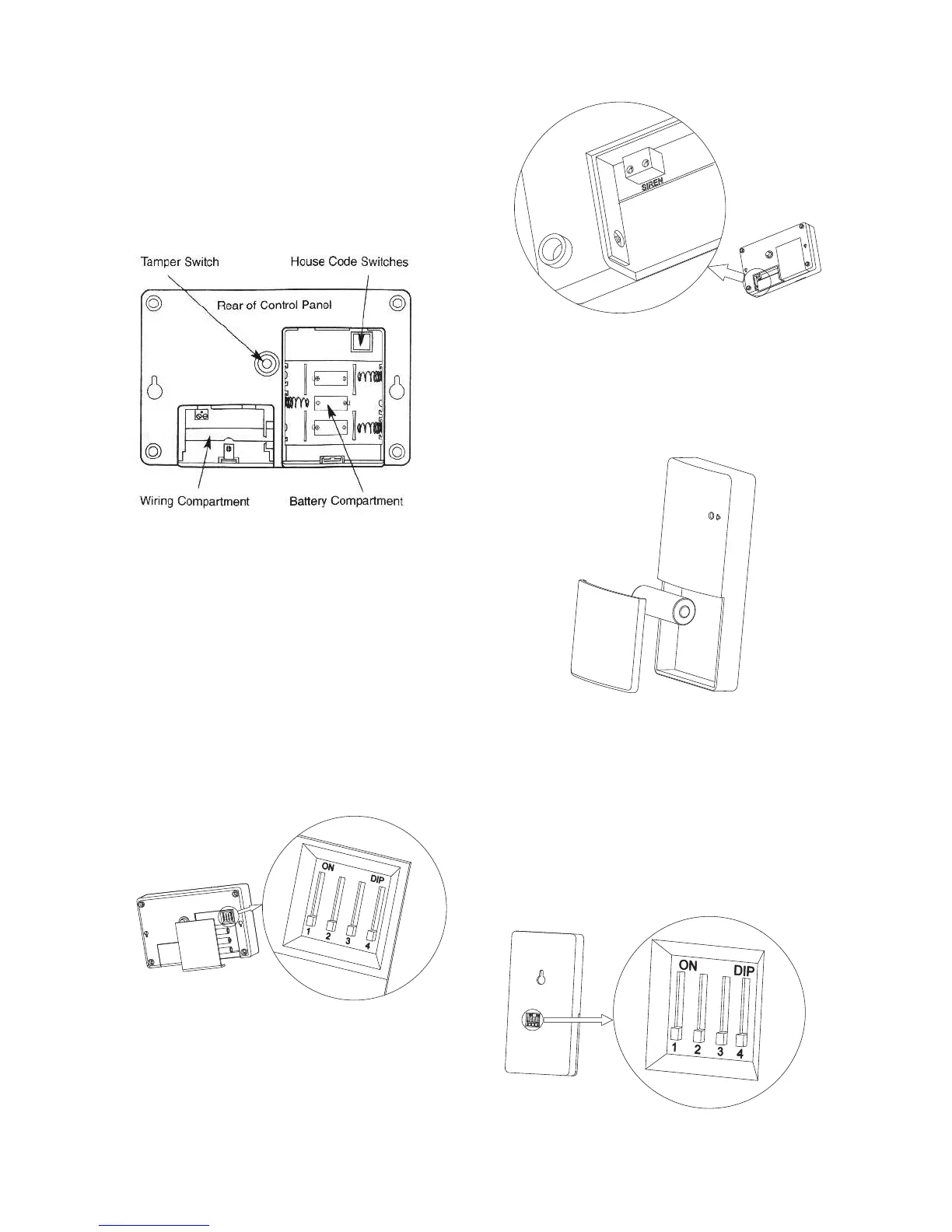
1. On the rear side of the Control
Panel, open the larger
compartment. Insert three AA
alkaline batteries into the slots
provided.
2. Above the battery slots is a
House Code switch bank.
Each of the four switches in it
can be turned on or off. Set an
on/off combination and
remember it. This same code
has to be set on the other
components of the security
system so that they work in
sync.
3. Now open the smaller
compartment on the rear side
of the Control Panel. Insert the
AC Adapter plug and External
Siren connections (optional)
into the slots provided.
4. On the front side of the Door
Sensor, open the battery
compartment and insert the
supplied 12V battery in place.
5. On the rear side of the Door
Sensor, set the house code in
the same manner as in the
Control Panel.
Note : All switches by default are
towards 1234 position (OFF).
Note : All switches by default are
towards the 1234 position (OFF).


 To Next Page