a) Current time set:Press the button“ ”for 3 seconds to enter into the time setting
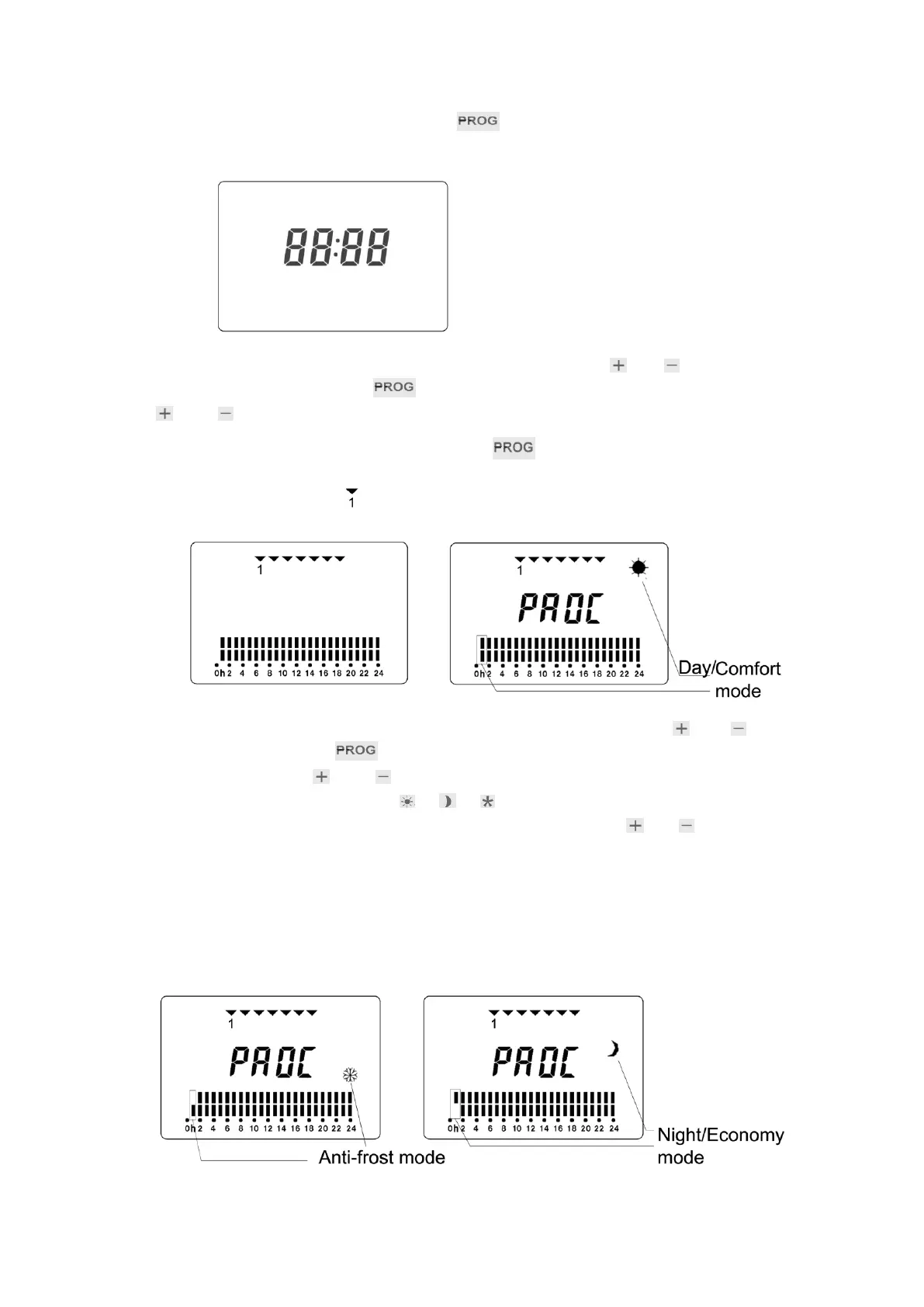
interface (shown as below):
The first two digits are for the hour flash, by pressing the button“ ”or“ ”to regulate the
current hour then press the button“ ”to enter into the minute setting. By pressing the button
“ ”or“ ”to regulate the current minute.
b) After the time setting, press the button“ ”to enter into the week calendar set
interface (shown as below). “ ”stands for Monday (first day to program).
1. Set the day of the week (1 for Mon. and 7 for Sun.) by using the button“ ”or“ ”and
pressing the button“ ”to set.
2. By pressing the“ ”or“ ”to regulate the working time (0-24hrs) of each mode.
3. By pressing the mode button “ ”、“ ”、“ ”to choose the working mode for every time
period. When a time period’s setting is finished, press the button“ ”or“ ”to enter into
the next time period’s setting. For example, the left picture shown as below means that
the anti-frost mode starts to work on Monday at 0:00 hour, and the right picture shown as
below means that the economy mode starts to work on Monday at 0:00 hour, and the right
picture shown as above means that the comfort mode starts to work on Monday at 0:00
hour.


 To Next Page