20 21
Timer Settings
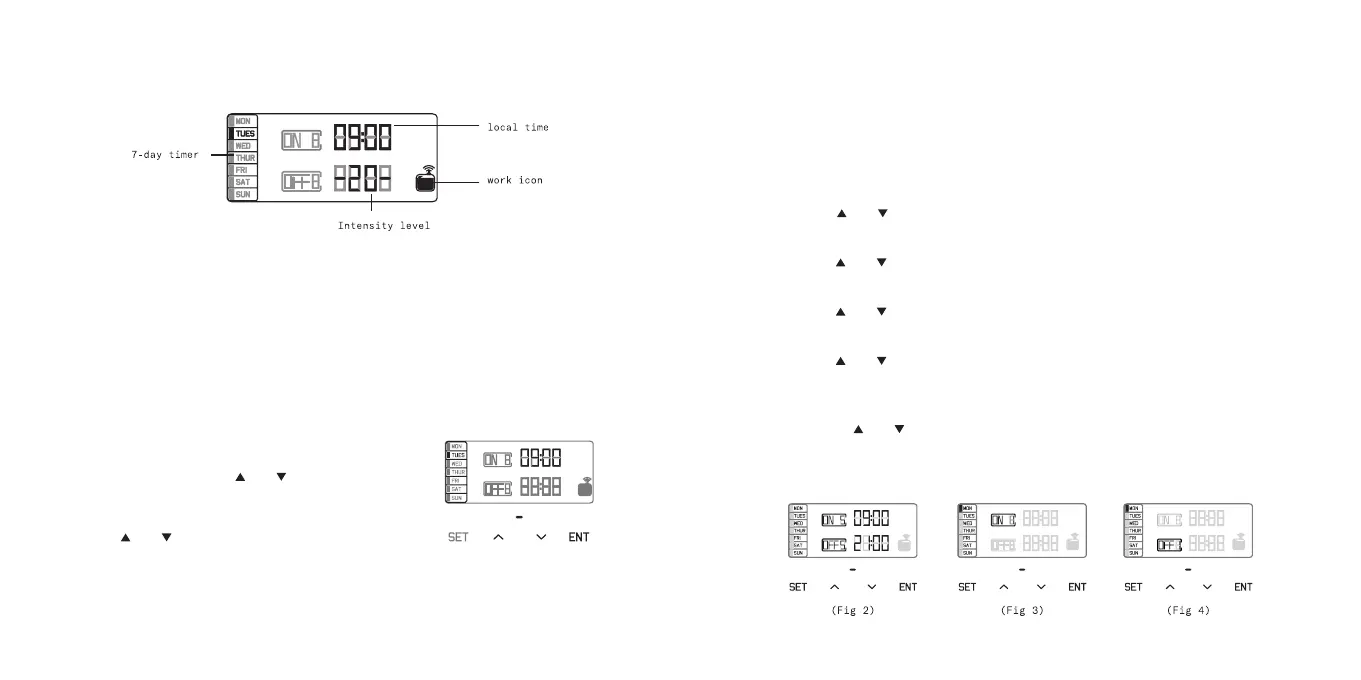
POWER ON
Connect the 12V adaptor to the outlet and turn ON the power
switch. Local time and scent intensity level will appear.
SCREEN LOCK AND UNLOCK
The LCD screen will automatically lock itself after 10 seconds if
not used. Press SET and hold for 5 seconds to unlock the display.
LOCAL TIME SETTING
Press SET button for 3 seconds until
you hear a beep to enter local time
setting menu. Press or button to
choose the correct day. Then press ENT
button to move to local time setting.
Press or button to change the number.
Press ENT button to move to another
position. Press SET to confirm
SETTING HOURS OF OPERATION
There are 5 working periods available to set the hours of
operation (Figure 2).
(The first working period is set to factory default setting, 7 am
ON and 21:00 OFF. The rest are at set to 00:00)
— Touch SET button to set working period 1 (ON 1 & OFF 1).
— Press or button to adjust the ON time hours,
then press ENT to move to the next position.
— Press or button to adjust the ON time minutes,
then press ENT to move to the next position.
— Press or button to adjust the OFF hours,
then press ENT to move to the next position.
— Press or button to adjust the OFF minutes,
then press ENT to move to the next position.
— Now select the Day(s) of the Week for this working period.
Use the or button to turn ON (Figure 3) or OFF (Figure 4)
the day for this time period. Press ENT to move to the next
day. When you have your day(s) selected press SET to move to
Time Period
Fig 1


 To Next Page