Setting Hours of Operation
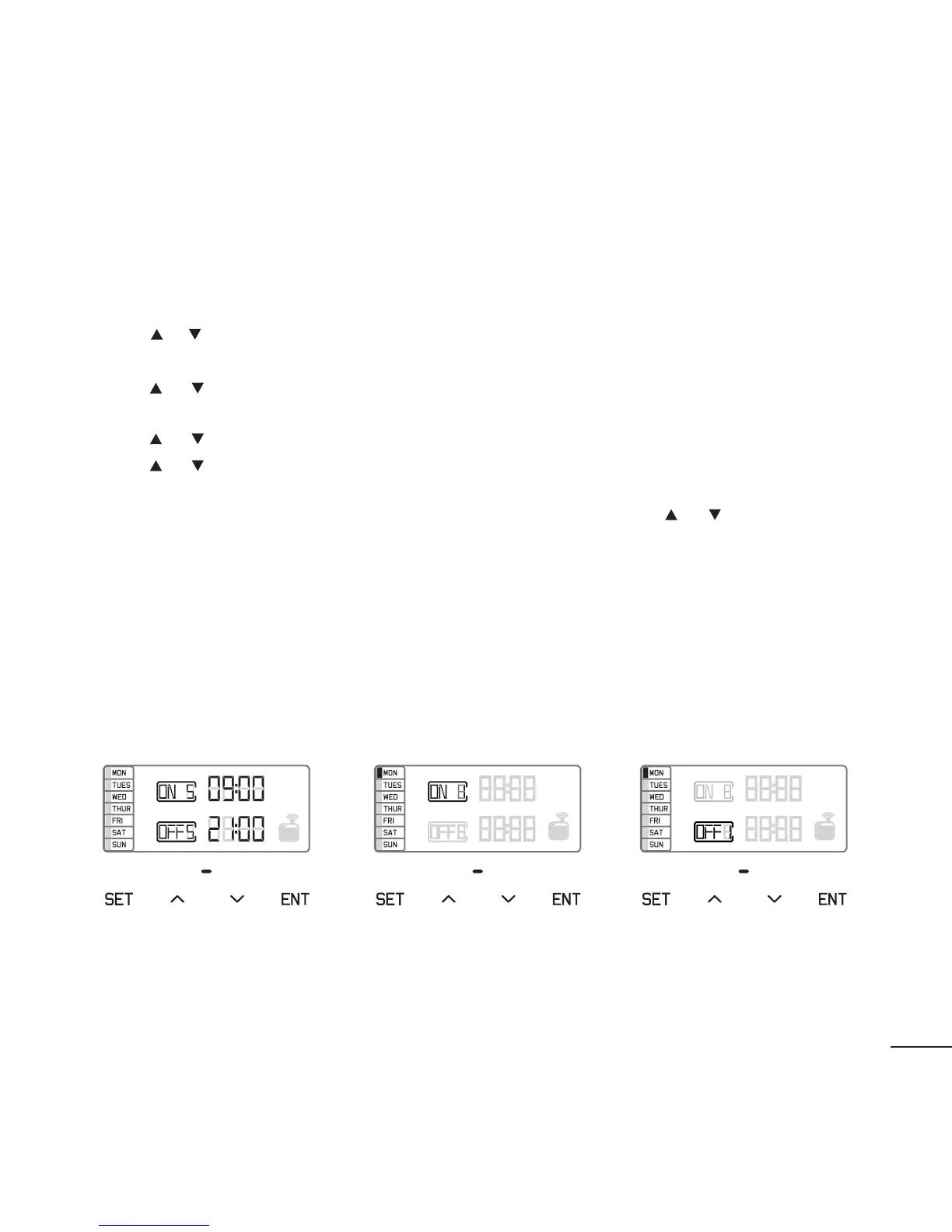
There are 5 working periods available to set the hours of operation (Figure 2).
Touch SET button to set working period 1 (ON 1 & OFF 1).
Press or button to adjust the ON time hours, then press ENT to move to the next
position.
Press or button to adjust the ON time minutes, then press ENT to move to the next
position.
Press or button to adjust the OFF hours, then press ENT to move to the next position.
Press or button to adjust the OFF minutes, then press ENT to move to the next position.
Now select the Day(s) of the Week for this working period. Use the or button to turn
ON (Figure 3) or OFF (Figure 4) the day for this time period. Press ENT to move to the next
day. When you have your day(s) selected press SET to move to Time Period 2.
For multiple start and stop times, repeat the above for time periods 2 through 5 as
desired. Please note that if you only want one start and stop time per day, you can touch
SET several times until the display shows the current time of day.
(Figure 2)
(Figure 3) (Figure 4)
16


 To Next Page