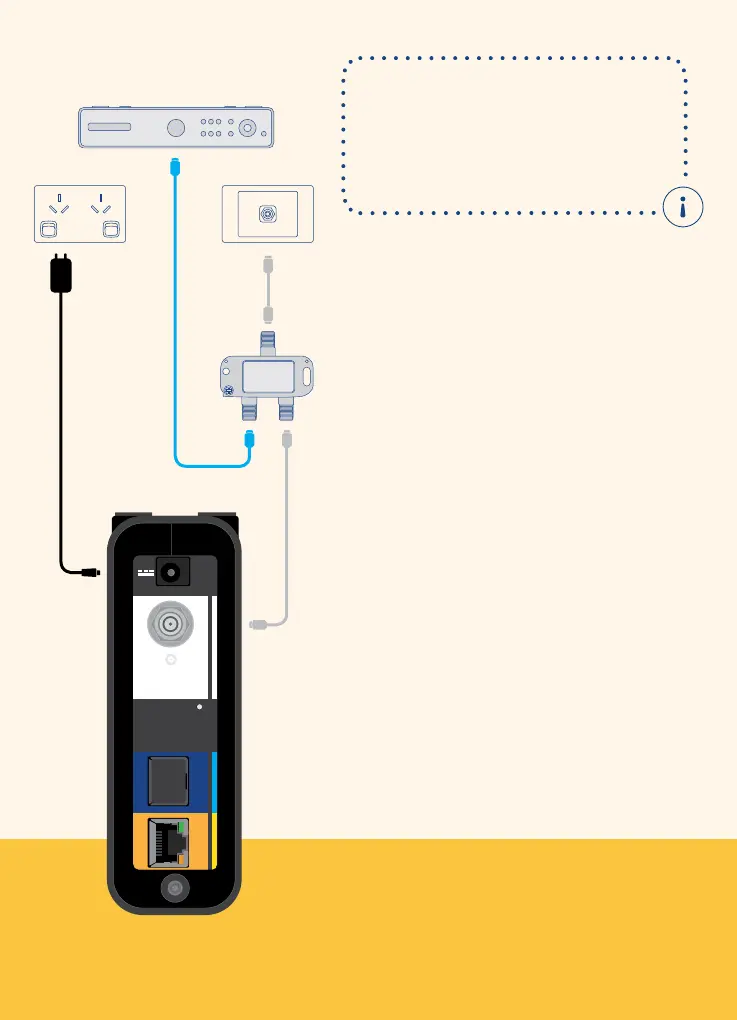
To connect your nbn
™
connection box to
the coaxial wall outlet:
1. Switch o your pay TV set top box
and existing cable internet service
and unscrew the coaxial cable from
thecoaxial wall outlet
2. Screw one end of the short nbn
™
supplied white coaxial cable into the
coaxial wall outlet and the other end to
the splitter where it’s marked ‘IN’
3. Screw one end of the long nbn
™
supplied white coaxial cable to the
splitter where it’s marked ‘OUT’ and the
other end to the corresponding white
panel on the
nbn
™
connection box
4.
Screw the coaxial cable connected to
your pay TV or existing cable internet
to the end of the splitter where it’s
marked ‘OUT’
5. Plug the power adaptor into a
poweroutlet to turn on the
nbn
™
connection box
When you install the splitter,
your existing pay TV and
cable internet service will be
temporarily interrupted, until you
complete step 4 above.
Pay TV
UNI-D1 UNI-D2
Property of nbn
Please do not remove
Reset
Back panel
OUT
IN
OUT
Splitter
Connect your nbn
™
connection box
2
Connecting to the nbn
™
network 6













 To Next Page