4
4. Volume pot
The pot controls the individual channels volume levels.
5. Zone selector
Zone’s 1-4 can be assigned when these switches are engaged. Engage the button Z1 and the signal
is assigned to ZONE1. Release the button to disengage the signal from ZONE1. Zones 2-4 can be
assigned the same way.
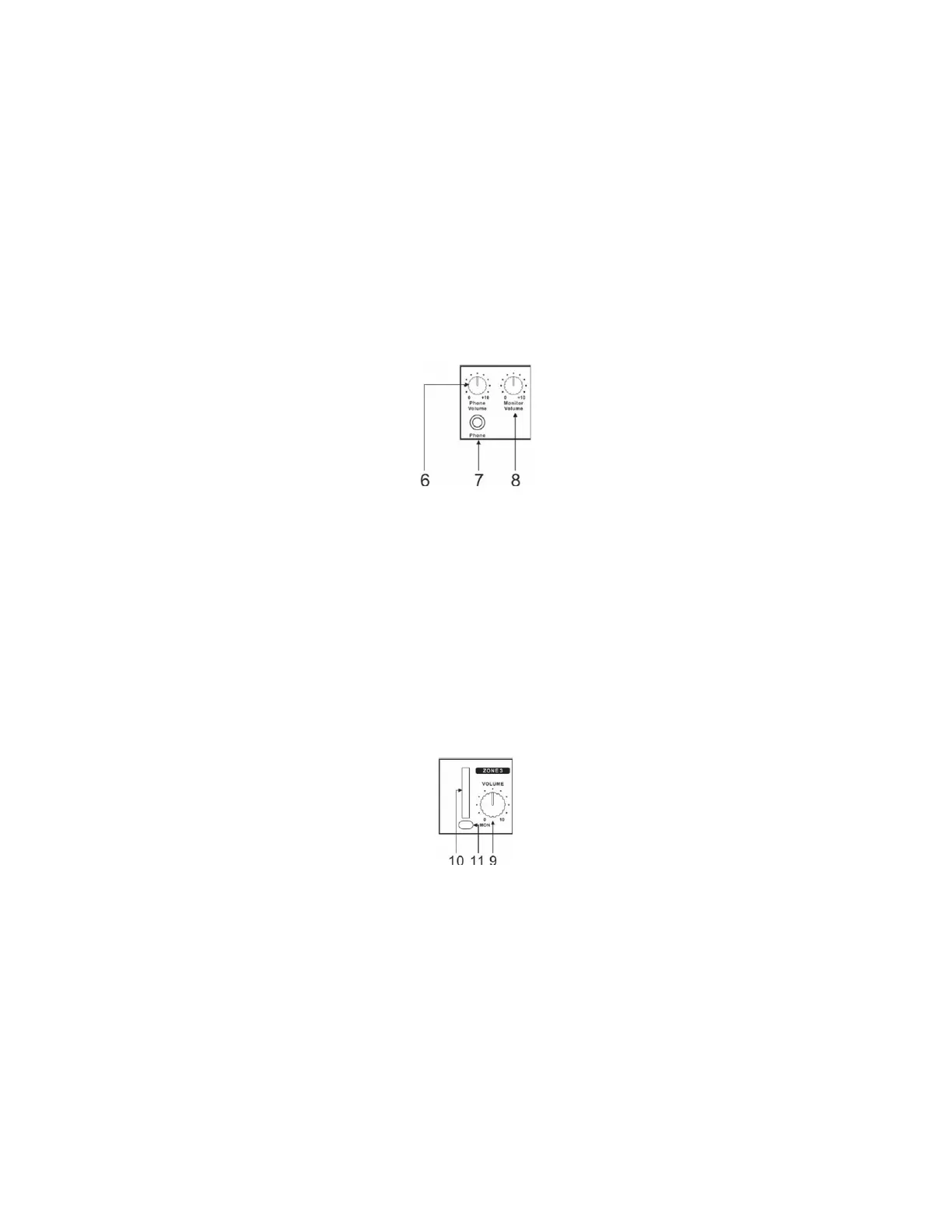
6. Phone volume
The pot controls the monitor level of the Headphone jack.
7. Phone
The monitor signal of the mixer can be sent to a pair of headphones.
8. Monitor Volume
This pot controls the output level to the monitor outputs on the rear panel.
9. Zone 1 Volume
The pot controls the volume level of ZONE1.
10. LED VU-meter
This is the 6-segment stereo LED-meter that indicates the level of the overall signal.
11. MONITOR selector
Engaging the MONITOR switch, allows you to listen to a any selected of zone outputs. If multiple
switches are selected the monitor output is a summation of all of them.



 To Next Page