3
CONNECTIONS
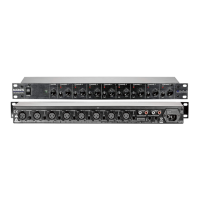
Rear Panel Connections
Mono CHANNEL Inputs (1-8)
MIC
Each of these eight female XLR connectors provides a balanced input for lower level microphone
signals. An additional 26 dB of gain is provided for use with low output level mics. 48V phantom
power is available to operate microphones that contain active electronic circuitry (such as condenser
mics) and may be applied by setting the corresponding +48V PHANTOM POWER switch in the down
(ON) position. These switches are located towards the right of the rear panel. Note: Do not apply
phantom power unless the microphone is designed to use it.
LINE
Each of these eight 1/4-inch jacks normally provides an unbalanced input for line level signals. Use
shielded cables with 1/4-inch TS plugs to connect to these jacks.
To convert the 1/4-inch line input on any channel to a direct line output for that channel, unplug the
MX821S’s AC cord from the wall and remove the top cover. Inside you will see a row of jumpers
towards the rear of the unit. Move the jumper for the desired channel to the left (when viewed from
the front). Now that channel’s line input is converted to a direct line output and may be connected to
the input of another mixer. A signal from the MIC input on any converted channel is still included in
the main output mix as well. Do not connect the output of a mixer or any other signal source to the
1/4-inch jack on this channel now or the channel may sustain damage. Be sure to replace the lid
before connecting the unit to AC again.
Both the MIC and LINE inputs accept a mono signal that may be routed to either the left or right
channels or a combination of both by means of the corresponding front panel PAN control.


 To Next Page