4
OPERATION
Front Panel Controls
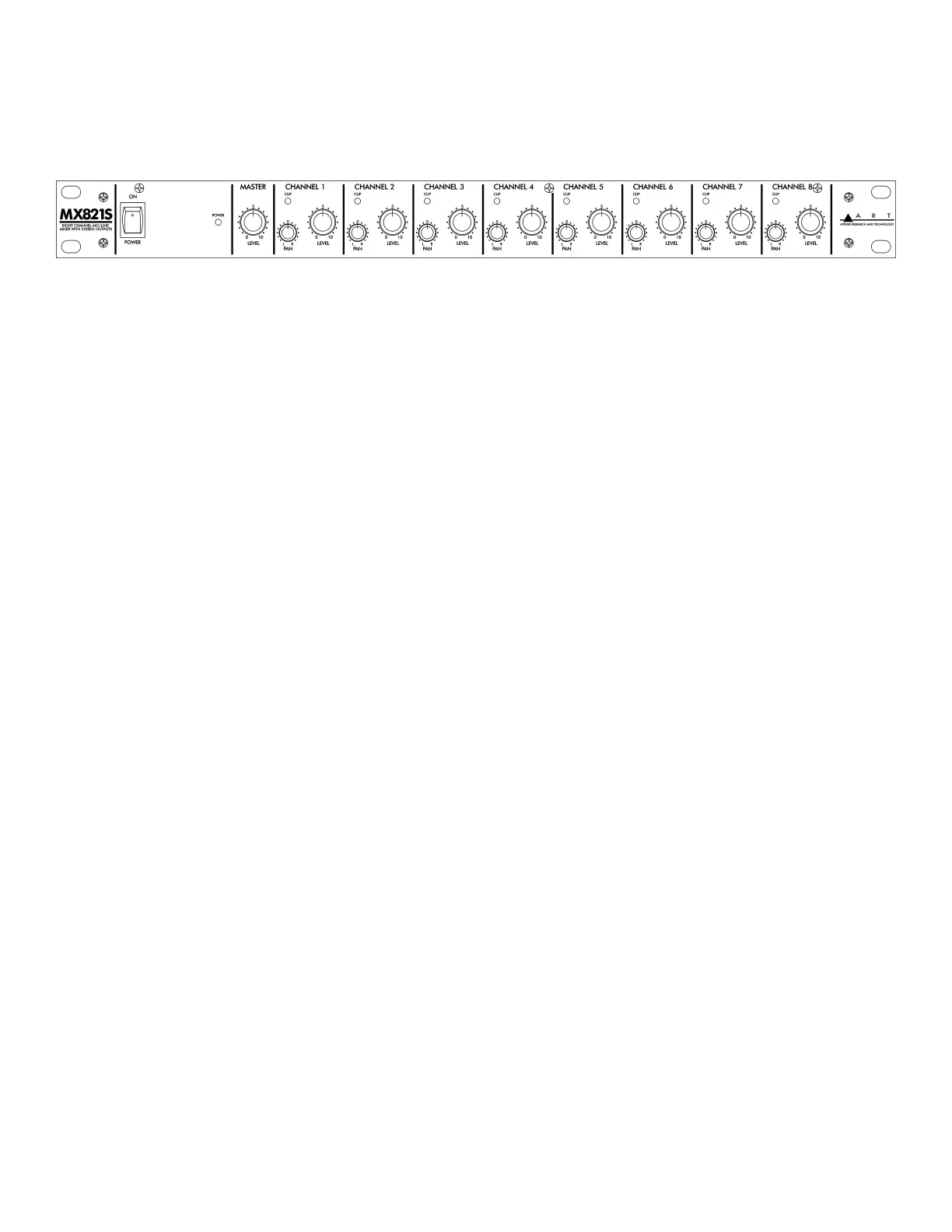
POWER Switch
Controls the application of AC power to the MX821S. When the switch is pushed in at the top (ON
position), the green POWER LED lights, showing power is applied.
MASTER LEVEL Control
This control adjusts the overall level of the mixed signal output to the MAIN OUTPUTS (LEFT and
RIGHT) jacks.
CHANNEL Controls (1-8)
LEVEL
Each of these controls adjusts the level of the associated input channel and determines its
contribution to the overall mix. Each control should be adjusted for the desired level of the associated
input in the overall mix. Unused inputs should have their associated level control turned off (0 position
or fully counterclockwise) to minimize potential stray noise pickup.
Keep in mind that the best noise performance, while keeping distortion to a minimum, is obtained
with each control adjusted to the maximum desired level (towards 10) so that its associated red CLIP
LED either does not come on or just comes on very briefly only during the loudest passages. In other
words, in general, keep the CHANNEL LEVEL controls turned up and turn the MASTER LEVEL
control down to compensate, rather than the opposite.


 To Next Page