The Noki Electronic Lock is a sophisticated security system designed to provide enhanced protection for various storage solutions, surpassing the capabilities of conventional key locks. It offers efficient and cost-effective security management for both users and administrators. The system is available in several models, including multi-user and single-user configurations, with options for 3-digit or 4-digit codes.
Function Description:
The Noki Electronic Lock operates through a digital keypad or touchscreen interface, allowing users to set and modify personal access codes. The multi-user model is designed for shared environments, where multiple individuals may need access, each with their own unique code. The single-user models, available in 3-digit and 4-digit versions, are ideal for personal storage, providing a secure and private locking mechanism.
For multi-user locks, the default code is 1-2-3-4. Users can modify this default code to a new 4-digit combination by entering the default code twice, then inputting their new code once, and confirming with the OK button. A long "BEEP" sound indicates successful code activation. To lock or unlock, users dial their 4-digit code, press OK, and then turn the lock knob.
Single-user locks (3-digit) have a default code of 1-2-3. To program a new code, users enter the default code, press OK twice, then enter their desired 1 to 8-digit code, and press OK. The indicator light must be on when entering the new code. To unlock, the latch is turned 180° clockwise after entering the correct code and pressing OK. The lock remains unlocked until the latch is returned to the locked position (180° counter-clockwise).
Single-user locks (4-digit) also have a default combination of 1-2-3-4 upon delivery. To assign a new combination, users enter the default code, press OK twice, then enter a new 1 to 8-digit combination when the confirmation light comes on, and press OK again. This new combination then becomes active. The operation for locking and unlocking is similar to the 3-digit single-user model, involving entering the code, pressing OK, and turning the latch.
Important Technical Specifications:
- Battery Type: CR2032 button cell battery.
- Battery Life Indicator: For multi-user locks, three sounds after unlocking indicate that the battery needs to be changed soon, with approximately 200 uses remaining.
- Alarm System: A 60-second alarm is activated after 4 attempts to open the lock with an incorrect code.
- Emergency Power: In case of power outage or exhausted batteries, a back-up power supply (BPS) can be plugged into an outlet located under the confirmation light on the lock. It is crucial not to leave the BPS inside the cabinet.
- Compliance: Compliant with ANSI/BIFMA standards.
- Warranty: Mechanism guaranteed for 10 years.
- Intellectual Property: Patent and industrial drawings pending.
Usage Features:
- Code Modification: All models allow users to easily change their access codes. For multi-user locks, the process involves entering the current code twice, then the new code once. For single-user locks, the process is similar, requiring the current combination to be entered twice, followed by the new combination.
- Master Key/Code Access:
- Multi-User (Master Code): If a user forgets their code, the last eight digits of the serial number (located on the side of the lock) can be used to obtain a master code from the Noki troubleshooting portal (www.noki.artopex.com). Entering this 8-digit master code and pressing OK will unlock the device.
- Multi-User (Master Key): Alternatively, a master key can be used. Contact the master key responsible person, insert the key, press OK, and turn the lock to unlock.
- Single-User (Forgotten Code): For single-user locks, the Noki troubleshooting portal (www.noki.artopex.com) can also provide solutions for forgotten codes using the last 8 digits of the lock's serial number (located on top of the lock). This allows for reconfiguring the combination.
- Intuitive Interface: The locks feature a clear digital keypad or touchscreen, LED indicators, and an OK button for straightforward operation.
- Locking/Unlocking Mechanism: A simple turn of the lock knob or latch (180° clockwise for unlock, 180° counter-clockwise for lock) engages or disengages the locking mechanism.
Maintenance Features:
- Battery Replacement:
- Multi-User: To change the battery, slide open the battery cover, place a CR2032 button cell battery with the positive side up, and press any number on the touchscreen. A "BEEP" and LED light up confirm correct installation.
- Single-User (3-digit): Insert a thin object (like a paper clip or thumbtack) into the cavity on the right-hand side of the battery case to open it. Replace the CR2032 battery. The Noki troubleshooting portal also provides instructions for this procedure.
- Electrical Circuit Removal: For multi-user locks, the electrical circuit can be easily removed and sent to an electrical recycling center, facilitating maintenance or disposal.
- Troubleshooting Portal: The dedicated Noki troubleshooting portal (www.noki.artopex.com) serves as a comprehensive resource for users, offering solutions for forgotten codes, battery replacement procedures, and other operational queries.
The Noki Electronic Lock system is designed for ease of use, robust security, and simple maintenance, making it an excellent choice for securing various items and environments.

 Need help?
 General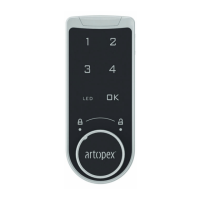

 To Next Page