EasyManua.ls Logo

Artsound Smart Stream - User Manual

Artsound Smart Stream
8 pages
Print Icon
To Next Page IconTo Next Page
Loading...
1
Smart Stream
MANUAL
Thank your for buying our Smart Stream. We hope you’ll enjoy it for years to come. Please read these instructions
carefully and keep this manual for later reference.
1. WARNINGS AND SAFETY
To prevent fire or electric shocks, the device must not be exposed to rain or humidity.
For your own safety: to prevent electric shocks do not remove the housing.
Do not try to repair any malfunctioning parts of the device yourself. Ask a professional expert to do this for you.
When plugged into the mains, the device remains electrically charged even when switched o.
Smart Stream
User instructions
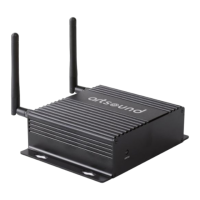
2 x antennas for Wi-Fi and Bluetooth
2 x RCA-cables
12V/1A Power adapter
Check whether the box contains the following components:
3. INTRODUCTION
2. CONTENTS OF THE BOX
The Smart Stream is a high-quality streaming pre-amplifier with network and Bluetooth-connectivity. By connec-
ting the Smart Stream to your current stereo-system, you can stream music from your smartphone, tablet, USB,
NAS or from streaming services, such as Spotify, Tidal or Qobuz. Use the 4STREAM app, or stream via AirPlay and
Bluetooth.
The Smart Stream is a multi-room system that allows you to enjoy your favourite music anywhere in your home.
1. Alerts and safety! 1
2. Contents of the box 1
3. Introduction 1
4. System requirements 2
5. Interface and functions 2
6. Diagram 2
7. Downloading the 4Stream app 3
8. Installation 3
8.1 First use via wireless setup 3
8.2 Connection via LAN 3
8.3 Connection via Bluetooth 3
9. Functions of the app 4
9.1 Device settings 4
9.2 Playing local music 4
9.3 Playing music from line in 5
9.4 Playing music via Bluetooth 5
9.5 Using music services 5
9.6 Spotify 5
9.7 Airplay 5
9.8 Multiroom and multizone 6
9.9 Choice of source 6
9.10
Resetting the factory settings 6
9.11 Updating firmware 6
10. Specifications 7
11. Warranty conditions 7
Question and Answer IconNeed help?

Do you have a question about the Artsound Smart Stream and is the answer not in the manual?

Summary

1. Alerts and Safety

2. Contents of the Box

3. Introduction

4. System Requirements

Wireless Router Connectivity

Requirements for Wi-Fi network and router.

4 Stream Control App

Using the 4Stream app for device control.

5. Interface and Functions

Device Port and Indicator Descriptions

Detailed explanation of physical ports and LED indicators on the Smart Stream.

6. Diagram

7. Download the 4 Stream App

8. Installation and Setup

Wireless Setup Procedure

Step-by-step guide for initial wireless setup of the Smart Stream.

LAN Connection

Instructions for establishing a wired network connection using an Ethernet cable.

Bluetooth Connection

Method for connecting the device via Bluetooth.

9. App Functions and Operation

Device Settings Customization

Overview of settings available in the app, such as renaming and speaker info.

Playing Local Music Files

Guide to playing music stored on phones, tablets, USB, or NAS.

Line-In Audio Playback

Connecting and playing audio from external devices using the line-in port.

Bluetooth Music Streaming

Streaming audio from your smartphone or tablet via Bluetooth.

Online Music Service Integration

How to use popular streaming services like Spotify, Tidal, and others.

Spotify and AirPlay Usage

Specific instructions for using Spotify premium and Apple AirPlay.

Multiroom and Multizone Setup

How to group multiple ArtSound devices for synchronized or zone-based playback.

Selecting Audio Source

Ways to switch between different audio input sources for playback.

Factory Reset Procedure

Instructions on how to reset the Smart Stream to its default factory settings.

Firmware Update Guide

Process for updating the device's firmware for improved performance and new features.

10. Specifications

11. Warranty Conditions

Artsound Smart Stream Specifications

General IconGeneral
BrandArtsound
ModelSmart Stream
CategoryMedia Player
LanguageEnglish