5
SMART STREAM
9.3 PLAYING MUSIC FROM LINE IN
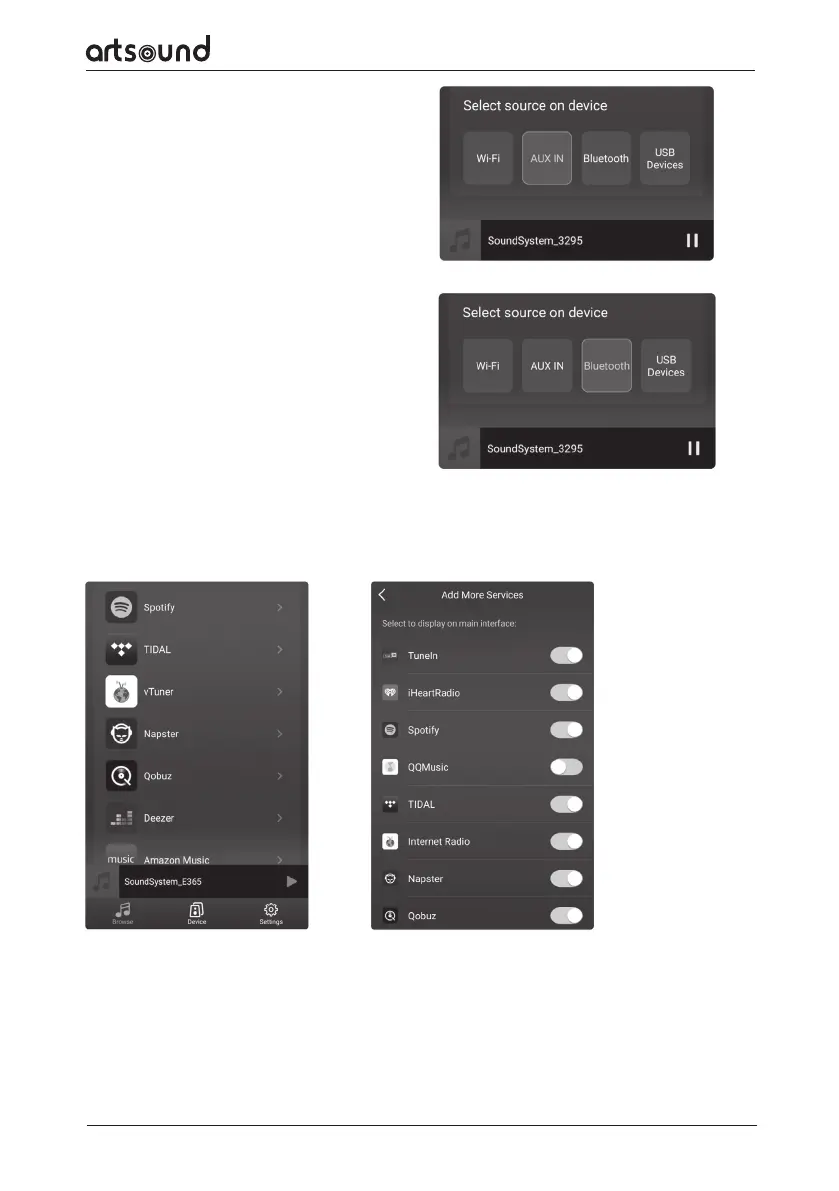
Connect an external audio source to the line-in port
by use of an RCA-cable. Click on the line in-button
at the bottom of the ‘Browse’-screen in the 4Stream
app, to switch to the line in-mode.
9.4 PLAYING MUSIC VIA BLUETOOTH
Click on the Bluetooth-button at the bottom of the
‘Browse’-screen. The LED will start flashing in blue.
On your smartphone or tablet, look for the Smart
Stream and connect. The LED-light will now light up
in blue and stop flashing.
9.5 USING MUSIC SERVICES
Smart Stream is able to cooperate with dierent online streaming music services, such as Spotify, Tidal, Qobuz,
Deezer, Amazon Music, QQ Music, TuneIn, vTuner Internalt radio, iHeartradio and many others. You may need to
make use of a paid account for some of them.
9.6 SPOTIFY
To be able to use Spotify, you will need a Spotify premium account. You can find the Smart Stream in the device
list of the Spotify app.
9.7 AIRPLAY
The device supports Airplay1, select Airplay in your iOS-device or Mac and play music.


 To Next Page