2 Aruba 220 Series Access Points | Installation Guide
The AP-220 Series is equipped with five LEDs that indicate the status of the various components of the AP.
External Antenna Connectors
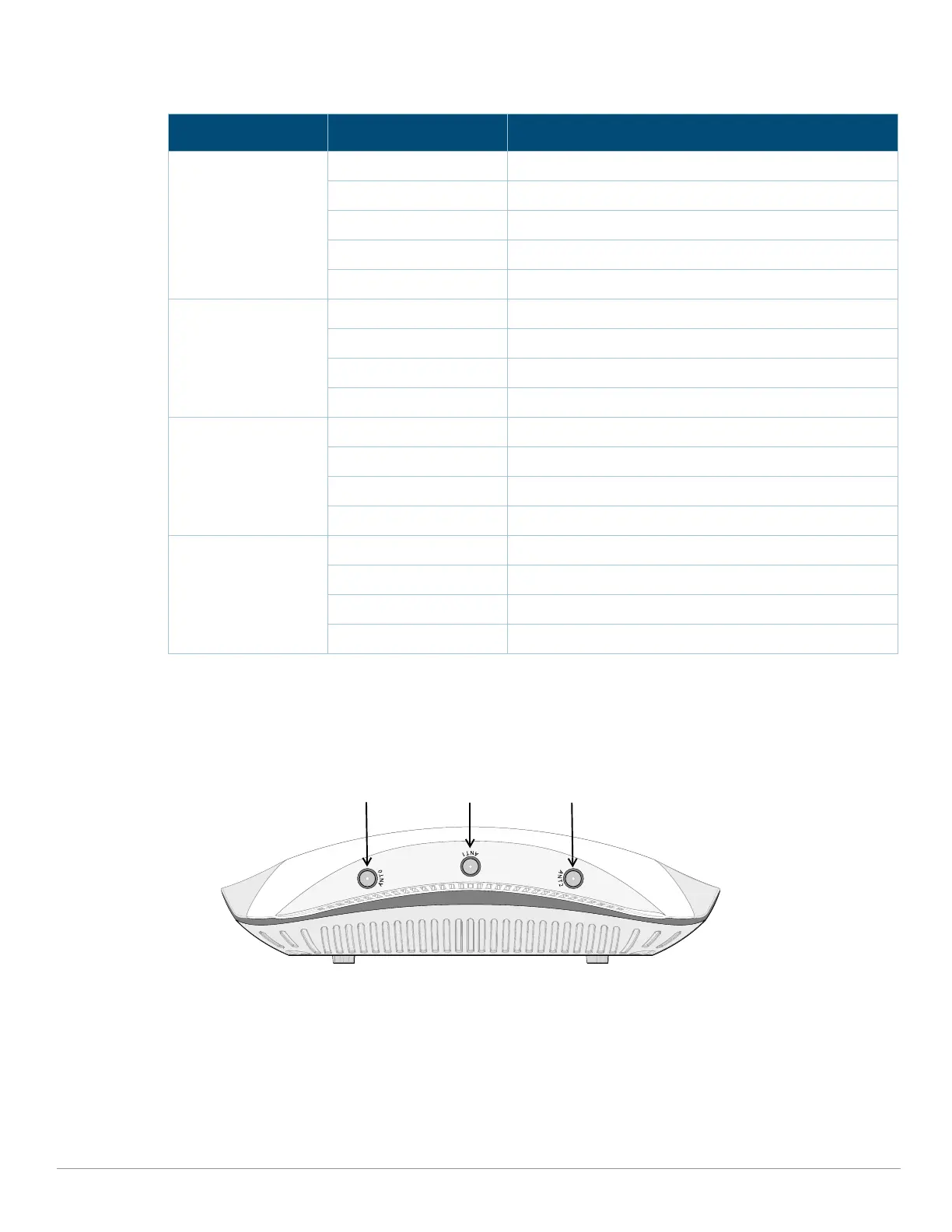
The AP-224 is equipped with three external antenna connectors. The connectors are labeled ANT0, ANT1, and
ANT2, and correspond to radio chains 0, 1, and 2.
Figure 2 AP-224 External Antenna Connectors)
Table 1 AP-220 Series Series LED Meanings
LED Color/State Meaning
PWR Off No power to the AP
Red Error Condition
Flashing Device booting, not ready
Green Device operating in unrestricted mode
Orange Device operating in power-saving mode
ENET0, ENET1 Off Ethernet link unavailable
Amber - Steady 10/100Mbps Ethernet link established
Green - Steady 1000Mbps Ethernet link established
Flashing Ethernet link activity
5GHz Off 5GHz radio disabled
Amber - Steady 5Ghz radio enabled in non-HT WLAN mode
Green - Steady 5Ghz radio enabled in HT WLAN mode
Flashing - Green 5Ghz Air or Spectrum Monitor
2.4GHz Off 2.4GHz radio disabled
Amber - Steady 2.4Ghz radio enabled in non-HT WLAN mode
Green - Steady 2.4Ghz radio enabled in HT WLAN mode
Flashing - Green 2.4Ghz Air or Spectrum Monitor


 To Next Page