Aruba 220 Series Access Points | Installation Guide 3
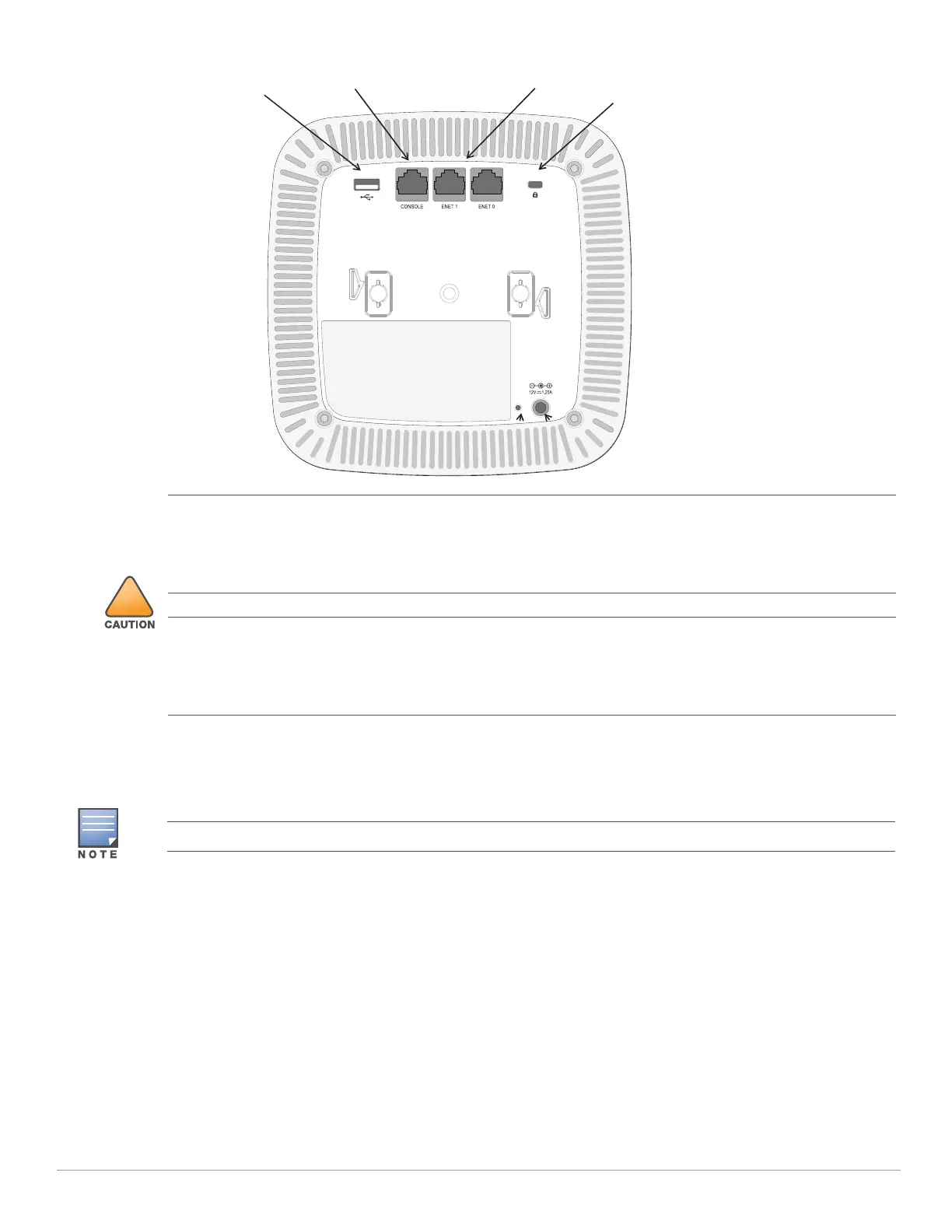
Figure 3 External Antenna Connectors
USB Interface
The AP-220 Series is equipped with a USB interface for connectivity with cellular modems.
Console Port
The serial console port allows you to connect the AP to a serial terminal or a laptop from direct local
management. This port is an RJ45 female connector with the pinouts described in Figure 4. Connect it directly to
a terminal or terminal server using an Ethernet cable.
Kensington Lock
USB Interface
Console Port
Ethernet Ports
External antennas for this device must be installed by an Aruba Certified Mobility Professional (ACMP) or other
Aruba-certified technician, using manufacturer-approved antennas only.
The Equivalent Isotropically Radiated Power (EIRP) levels for all external antenna devices must not exceed the
regulatory limit set by the host country/domain.
Installers are required to record the antenna gain for this device in the system management software.
Les antennes externes pour cet appareil doivent être installées par un professionnel de la mobilité certifié Aruba
(ACMP) ou un autre technicien certifié Aruba, en utilisant uniquement des antennes approuvées par le fabricant.
Les niveaux équivalents de puissance à rayonnement isotrope (EIRP) pour tous les périphériques d'antenne
externe ne doivent pas dépasser la limite réglementaire définie par le pays hôte / domaine.
Les installateurs doivent enregistrer le gain d'antenne pour cet appareil dans le logiciel de gestion du système.
The USB interface is disabled when the AP-220 Series is powered from 802.3af PoE.


 To Next Page