4 Aruba 220 Series Access Points | Installation Guide
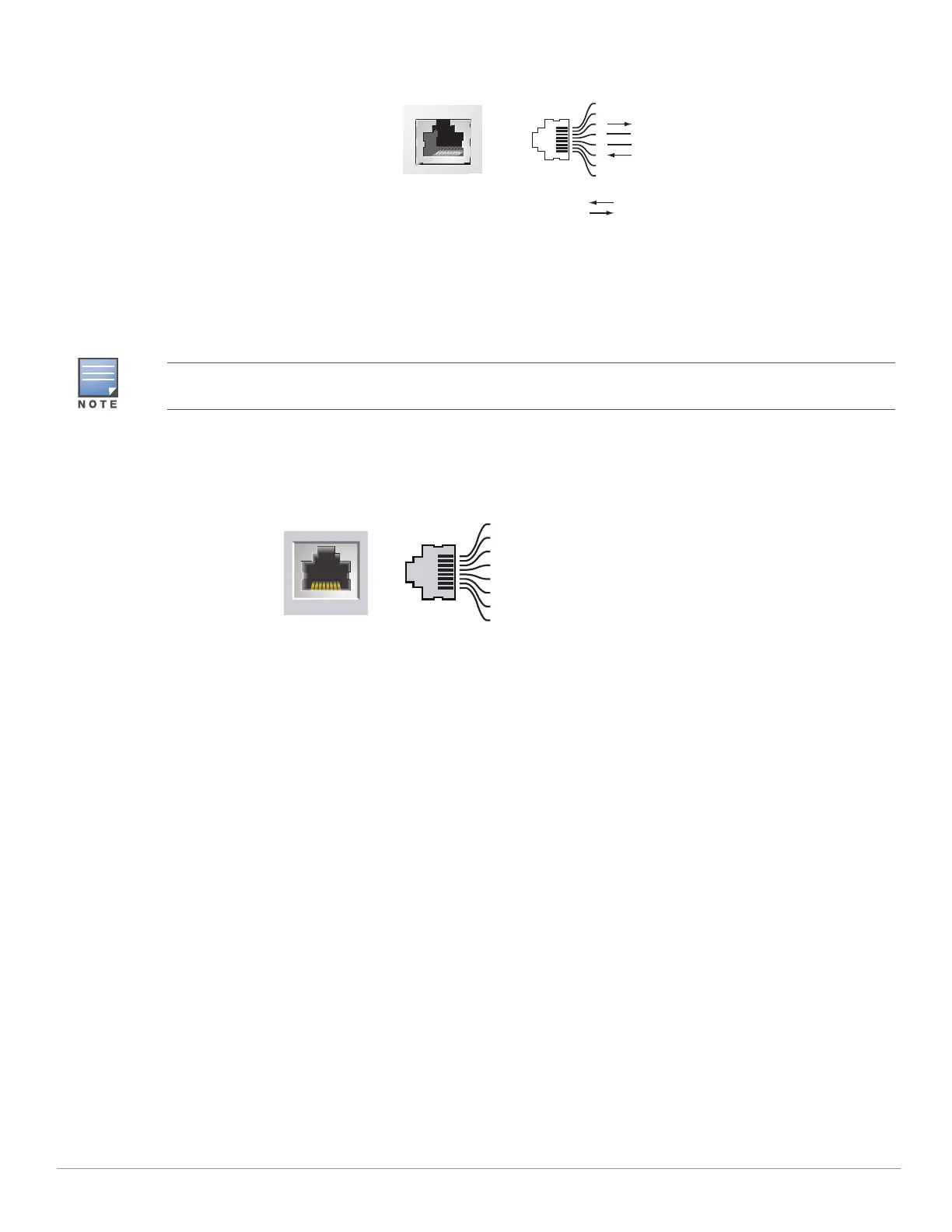
Figure 4 Micro-B Port Pin-out
Ethernet Ports
AP-220 Series is equipped with two10/100/1000Base-T (RJ45) auto-sensing, MDI/MDX wired-network connectivity
port. These ports support IEEE 802.3af and 802.3at Power over Ethernet (PoE) compliance, accepting 48 VDC
(nominal) as a standard defined Powered Device (PD) from a Power Sourcing Equipment (PSE) such as a PoE
midspan injector, or network infrastructure that supports PoE.
The 10/100/1000 Mbps Ethernet ports are on the bottom of the AP. These ports have RJ45 female connectors
with the pin-outs shown in Figure 5.
Figure 5 Gigabit Ethernet Port Pin-Out
Kensington Lock Slot
The 220 Series is equipped with a Kensington lock slot for additional security
Reset Button
The reset button can be used to return the AP to factory default settings. To reset the AP:
1. Power off the AP.
2. Press and hold the reset button using a small, narrow object, such as a paperclip.
3. Power-on the AP without releasing the reset button. The power LED will flash within 5 seconds.
4. Release the reset button.
The power LED will flash again within 15 seconds indicating that the reset is completed. The AP will now continue
to boot with the factory default settings.
DC Power Socket
If PoE is not available, an optional Aruba AP AC-DC adapter kit (sold separately) can be used to power the AP-220
Series.
Additionally, a locally-sourced AC-to-DC adapter (or any DC source) can be used to power this device, as long as it
complies with all applicable local regulatory requirements and the DC interface meets the following
specifications:
12 VDC (+/- 5%)/18W
Center-positive 1.7/4.0 mm circular plug, 9.5 mm length
Serial
Console Port
1
2
3
4
5
6
7
8
TxD
GND
RxD
RJ-45 Female
Pin-Out
Direction
Input
Output
GND
When operating on 802.3af, only the port connected to power is usable. For example, if the source of power is
connected to ENET0, ENET1 will not work.
1000Base-T Gigabit
Ethernet Port
RJ45 Female
Pin-Out
Signal Name
1
2
3
4
5
6
7
8
BI_DC+
BI_DC-
BI_DD+
BI_DD-
BI_DA+
BI_DA-
BI_DB+
BI_DB-
Function
Bi-directional pair +C
Bi-directional pair -C
Bi-directional pair +D
Bi-directional pair -D
Bi-directional pair +A
Bi-directional pair -A
Bi-directional pair +B
Bi-directional pair -B



 To Next Page