8 Aruba 220 Series Access Points | Installation Guide
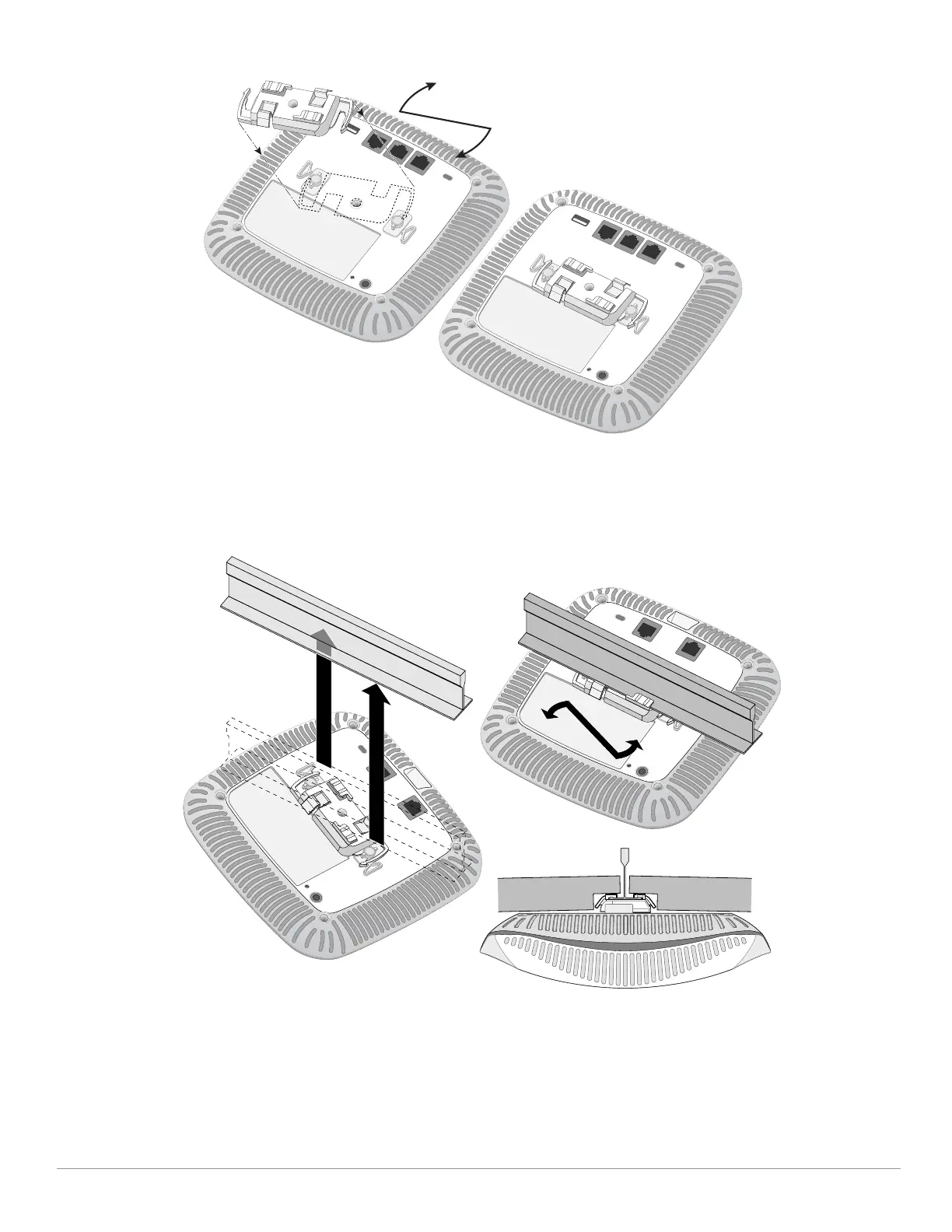
Figure 6 Attaching the Ceiling Rail Adapter
4. If necessary, connect the console cable to the console port on the back of the AP.
5. Hold the AP next to the ceiling tile rail with the ceiling tile rail mounting slots at approximately a 30-degree
angle to the ceiling tile rail (see Figure 7). Make sure that any cable slack is above the ceiling tile.
6. Pushing toward the ceiling tile, rotate the AP clockwise until the device clicks into place on the ceiling tile rail.
Figure 7 Mounting the AP
7. On the AP-224, install the external antennas according to the manufacturer’s instructions, and connect the
antennas to the antenna interfaces of the AP.
Connecting Required Cables
Install cables in accordance with all applicable local and national regulations and practices.


 To Next Page