
 Need help?
Do you have a question about the Arzel Heat PumPro and is the answer not in the manual?
System stages up automatically to avoid low supply air temps when heat pump capacity is insufficient.
Air handler stages independently from compressor/aux heaters, matching CFM to ductwork.
Compatible with any conventional 24VAC thermostat including wireless, auto/manual, and programmable.
Controls 24VAC humidifier and can function as a whole house dehumidifier.
Includes Dual Fuel control, Leaving Air Temperature settings, and Outdoor Air Temperature sensor.
Disconnect power before wiring, ensure HVAC compatibility, comply with codes, use safety gear.
Indoor use only, touch ground before handling, install between 40-140°F, check operations.
Thermostat calls initiate HVAC operation and damper positioning. Mini pump activates dampers.
Install dampers into ductwork, orient port upstream, use one tubing run per zone.
Mount vertically on exterior non-condensing wall, away from ductwork or equipment.
Install thermostat per zone, use 18-gauge wire, and document locations.
Connect HVAC outputs to equipment using 18-gauge wire for air handler and condenser.
Connect R and C power input terminals to the 40VAC transformer.
Install LAT in supply duct and OAT outdoors; connect wires to terminals.
Power on the panel and follow the on-screen Set-Up Wizard instructions.
Sensors are identical; connect to board, use 18-3 wire if needed, keep power off.
Install in supply trunk, downstream of heat exchanger, before dampers; avoid direct line of sight.
Choose location: out of sunlight, above snow level, accessible; drill hole and mount sensor.
Mount sensor inside outdoor condensing unit, away from equipment influence.
Pumps start with calls, position dampers, stop 3 min after last thermostat satisfied.
Test damper system, bypass zoning. Starts pumps manually, opens dampers with Power switch OFF.
Steps to bypass system: turn PWR OFF, disconnect thermostat, turn MPS to manual.
Explains status messages like Below Balance Point, Capacity Stage-Up, Resistance Lockout OAT.
Details thermostat signals, pump activation, and system staging for heating calls.
Details thermostat signals, pump activation, and system staging for cooling calls.
Determines temperature display scale: Fahrenheit or Centigrade.
Allows mode interruption: Automatic, Heating, Cooling, or Zone Weight Priority.
Type of T-Stat used on Zone 1: Heat Pump or Heating/Cooling.
Enter ductwork % to system capacity for each zone to set priority.
Air handler stage-up threshold for Y2/W2 engagement based on ductwork percentage.
Min leaving air temp for comfort at 30°F OAT; adjusts with OAT.
Max cooling supply air temp for Y2 energization if LAT not met.
Sets OAT for heat pump operation vs. fossil fuel furnace operation.
Sets OAT to lock out Aux Heat (Electric Resistance).
Min supply air temp in cooling cycle to prevent coil freezing.
Specify Aux 'Back-Up' heat type when heat pump can't maintain threshold.
Required voltage for dehumidification call; set to 24v if unused.
End-of-cycle purge time to diffuse residual heating/cooling; opens all dampers.
On Cycle time limit to prevent over-cooling space after cooling set-points.
Min OAT for mechanical cooling operation; locks out Y output.
Set mode for reversing valve energization in heating or cooling.
Allows Balance Point to be used on all-electric systems.
Verify damper operation: set thermostats OFF, turn system ON, check airflow at registers.
Adjust bypass for noise, verify closure with larger zone calls.
Checkout staging: remove LAT sensor, initiate heat calls, observe Y1, G, Y2, W1, W2 signals.
Checkout cooling staging: remove LAT sensor, initiate cooling calls, observe Y1, G, O, Y2 signals.
Checkout balance point: adjust setting or submerge sensor, initiate heat call, observe W1 signal.
Review Set-Up Wizard, explain system function, advise on energy-saving settings.
Wire remote switch across Zone 1 'R' & 'E' terminals to engage emergency heat.
Apply template with Air Flow Arrow pointed towards register for damper installation.
Drill 3/4" holes at corners and 4-1/8" screw holes for template opening.
Hold damper closed, insert blade at wide end of triangle.
Rotate damper 180 degrees with tubing port facing main duct after insertion.
Secure damper at two corners, add two more screws, tighten to seal gasket.
Cut 3/4" section from 'Homerun Tube', insert tee to connect to damper.
Check tubing neatness and organization for quality workmanship.
Angle blade corner to corner, slide into opening, align and screw into duct.
Access marketing, literature, videos, guides, manuals, and webinar recordings online.
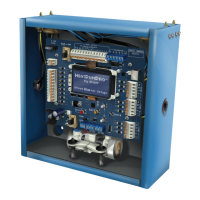
The Arzel HeatPumPro is a non-proprietary residential and light commercial zoning system designed for heat pump or standard heat/cool control. It aims to enhance system performance and deliver precise heating and cooling to different areas of a home or building, maximizing efficiency and effectiveness.
The HeatPumPro system allows users to increase comfort by directing conditioned air to separate areas (zones) based on each zone's thermostat setting. It conserves energy by adjusting thermostat settings in unoccupied areas to energy-saving levels. When a zone calls for heating or cooling, the appropriate HVAC equipment is activated, and dampers in non-calling zones close, directing conditioned air to the calling zone(s) until the thermostat is satisfied. The system responds to each thermostat on a first-call/first-serve basis, but can be programmed for alternate priority approaches such as Automatic Priority (first-call/first-serve), Heat Priority, Cool Priority, or Zone Weight Priority. Users can also circulate air in individual zones by selecting the "Fan ON" function on each thermostat.
Pro-Active Staging: The system automatically "stages-up" to prevent low supply air temperatures when the heat pump's capacity is insufficient. It measures outdoor air temperature to control staging decisions based on calculated heating requirements, reducing or eliminating the need for two-stage thermostats.
Staging Based upon Zone Weight: The air handler or blower stages independently from the compressor and electric auxiliary heaters. Zone Weight staging of the blower reduces or eliminates the need for a bypass and matches the CFM to available ductwork. The HeatPumPro can also slow the air handler speed to increase latent heat removal during dehumidification cycles.
Broad Thermostat Compatibility: It is compatible with any conventional 24VAC thermostat, including wireless, auto/manual changeover, programmable, and non-programmable models. Zone 1 accepts any heat/cool or heat pump thermostat, allowing for convenient control of emergency heat. Zones 2-4 require standard four or five-wire single-stage heat/cool thermostats only.
Humidification and Dehumidification: With a simple humidistat, the HeatPumPro can control a 24VAC humidifier, including opening and closing a humidifier bypass damper. It can also act as a whole-house dehumidifier, engaging low-stage cooling (Y1) with low-stage blower speed (G) and opening all zone dampers. When used with equipment that has a dehumidification function, the HeatPumPro passes the dehumidify signal from Zone 1 through the output terminals.
The HeatPumPro is designed for indoor use only, and proper grounding and adherence to electrical codes are essential for safe and effective operation.
 General
| Brand | Arzel |
|---|---|
| Model | Heat PumPro |
| Category | Fire and Smoke Dampers |
| Language | English |

 To Next Page