Installat ion Guide
—04—
Customer Service Toll Free: 1-800-248-5988
4
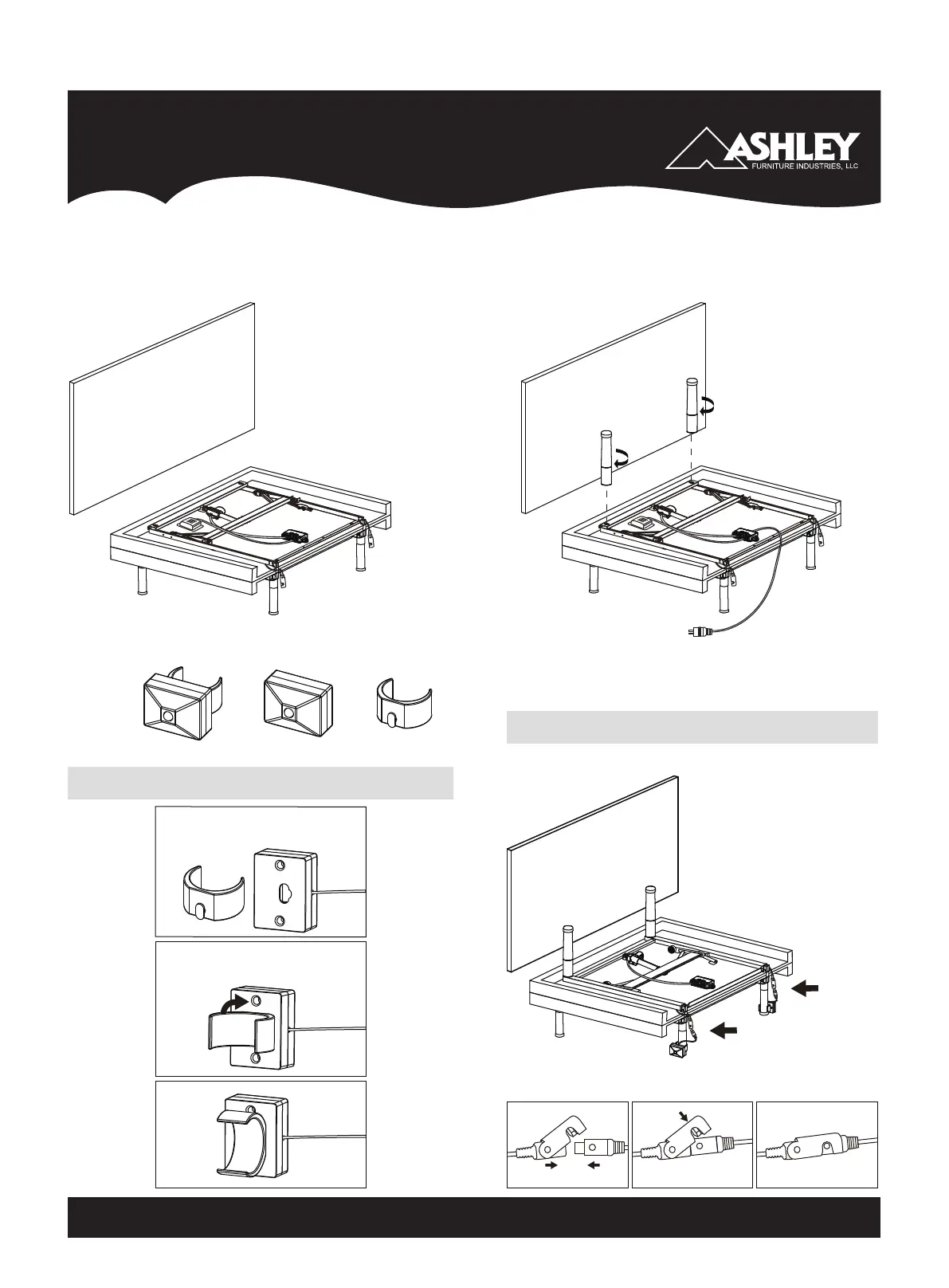
Keep the bed folded. Flip over the
bed with the bottom box on and let
the bed stand on the 4 legs. Discard
the bottom box.
5
Install the remaining 2 legs on the foot
end of the bed, make sure the legs are tight.
Uncoil the DC power cord (connected to the
control box) and put it to the side of the bed.
HEADBOARD
DC Power Cord
Control Box
HEADBOARD
6
Motion sensor installation
Motion
Sensor
Mounting
Bracket
= +
Prepare The Motion Sensor Hardware.
STEP 1: Connect the motion sensor
to the mounting bracket.
STEP 2: Rotate the mounting
bracket 90 degrees clockwise
STEP 3:
DONE !
Connect The Motion Sensor Connectors.
STEP 2: Connect the motion sensor connectors as illustrated.
Note there are two connectors, one on each side of the bed.
STEP 1: Clip the mounting bracket onto the center adjustable legs
as illustrated.
HEADBOARD


 To Next Page