24
Settings
Setting water hardness
If you have a dishwasher with a water softener, you may need to change the setting, depending
on the degree of hardness of the water. Phone your local Water Board to check the water hard-
ness in your area. The dishwasher is set for low water hardness on delivery.
1
Switch off the dishwasher with the main switch.
+
2
Hold in the Start/Stop and Drying buttons at the same time
as pressing the main switch. Release the Start/Stop button.
3
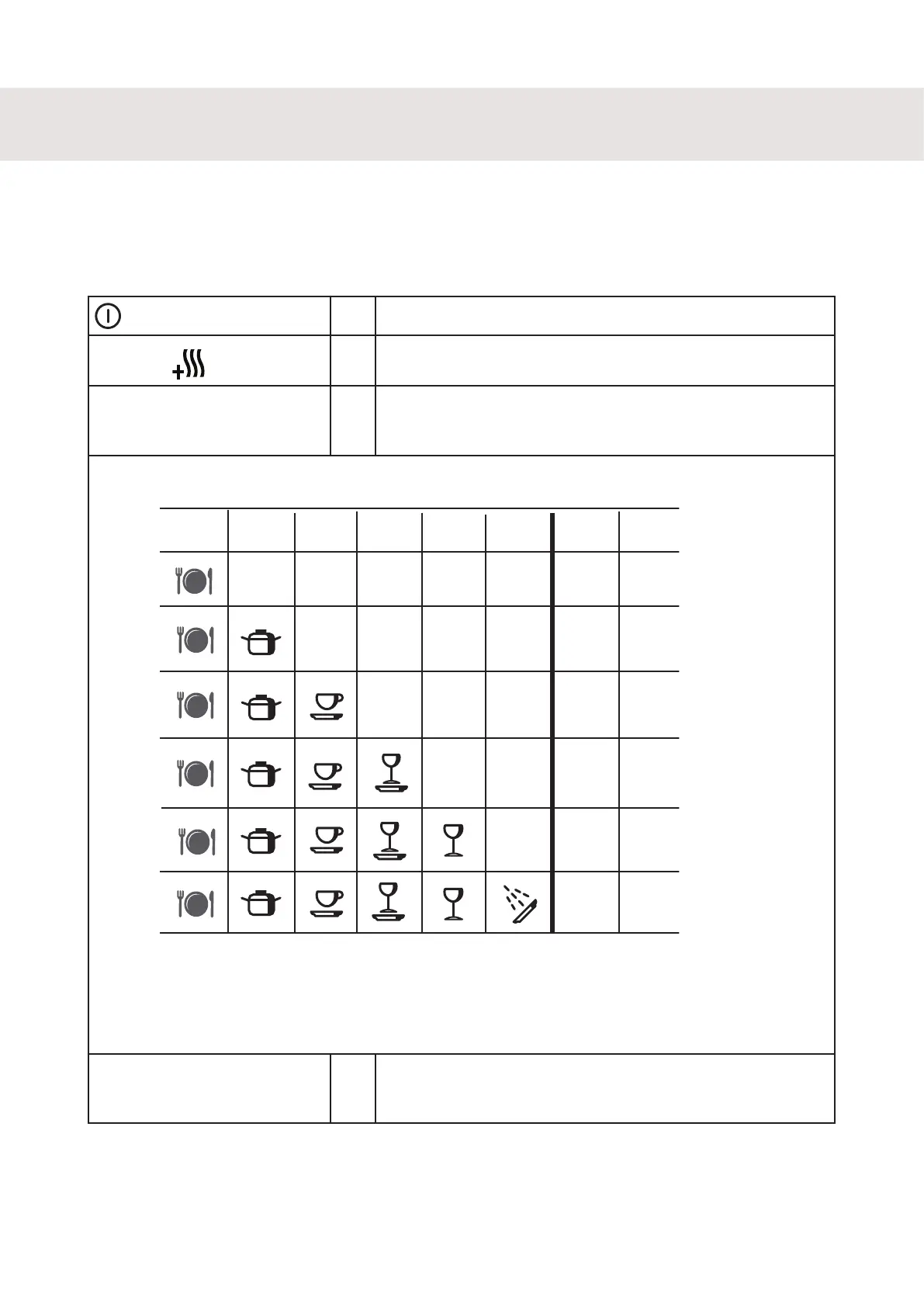
Press the Program button from one to six times depending
on the hardness of the water. Program symbols will light up
as you press. See illustration.
*
˚dH
˚fH
* All program indicators extinguished: Machines without
water softeners and machines with water softeners and
low water hardness.
0-5 0-9
9-14
15-25
26-34
35-52
53-79
80+
6-8
9-14
15-19
20-29
30-44
45+
Setting water hardness
*
* *
*
*
4
Press the Start/Stop button and the setting will be stored
until next time you want to make a change.



 To Next Page