
 To Next Page
R
Robert SmithSep 23, 2025
Does Asko D5424WH detergent expire?
- SShawn PetersonSep 23, 2025
Yes, detergent is a perishable product. To ensure optimal cleaning performance, avoid buying large packages of detergent.

Does Asko D5424WH detergent expire?
Yes, detergent is a perishable product. To ensure optimal cleaning performance, avoid buying large packages of detergent.
What to do if water remains in my Asko D5424WH Dishwasher?
If water remains in your dishwasher, it could be due to a blocked drainage hose. Loosen the hose where it connects to the sink unit's water trap and check for debris, ensuring the cone-shaped part of the pipe is cut to at least 14 mm inner diameter. Also, check for kinks in the drainage hose. Blocked filters can also cause this; clean the coarse and fine filters, and ensure the filter is completely locked with the handle pointing towards the door. Finally, check for debris in the drainage pump.
Why are my dishes not dry enough in Asko Dishwasher?
If your dishes aren't drying properly, activate the Long dry option. Ensure the dishwasher is fully loaded. Check the rinse aid level and dosage, topping up if necessary or increasing the dosage. You can also open the door a little once the program has finished.
Why is my Asko D5424WH not starting?
Your Asko Dishwasher might not start due to several reasons: * The main power switch might be off: press the main power switch. * The door might not be properly closed: check the door. * A fuse/circuit breaker might have been tripped: check the fuse/circuit breaker. * The plug might not be plugged into the wall socket: check the plug. * The water tap might be turned off: check the water tap. * There might be overflow/leaks: check for any leaks. * A whirring sound (drainage pump) is heard and doesn't stop when the power switch is off: turn off the water tap, pull out the plug, and call the service division.
What to do if water remains in Asko Dishwasher?
If water remains in your Asko Dishwasher, consider the following: * Check for a blocked drainage hose by loosening it where it connects to the sink unit's water trap, ensuring no debris is present, and verifying the cone-shaped part of the pipe is cut to an inner diameter of at least 14 mm. * Ensure the drainage hose is free from kinks and sharp bends. * Clean the coarse and fine filters. * Ensure the filter is completely locked with the handle pointing towards the door. * Clean the drainage pump.
What to do if Asko Dishwasher leaves a sticky white/blue film on dishes?
If your Asko Dishwasher leaves a sticky white/blue film on the dishes, the rinse aid dosage setting might be too high. Reduce the amount, referring to the Rinse aid and Settings sections. If you have very soft water, you may want to dilute the rinse aid 50:50 with water.
What to do if the touch buttons do not react when pressed on my Asko D5424WH?
If the touch buttons aren't responding, wait a moment and try again, especially if you've just opened the door. Clean the buttons with a dry or slightly damp cloth. Also, check if the child lock (button lock) is activated.
What to do if Asko Dishwasher leaves spots or films on the dishes?
If you notice spots or films on your dishes after using your Asko Dishwasher, it could be due to an incorrect rinse aid dosage setting. Please refer to the Rinse aid and Settings sections of the manual. Also, high temperatures or too much detergent can cause etching on crystal. To prevent this, wash crystal at a low temperature with a conservative amount of detergent, and consider contacting the detergent manufacturer.
Why is there a sticky white/blue film on the dishes from my Asko D5424WH Dishwasher?
A sticky white/blue film on the dishes is often due to a rinse aid dosage setting that is too high. Reduce the amount. If you have very soft water, consider diluting the rinse aid 50:50 with water.
Why does my Asko D5424WH leave spots on stainless steel or silver?
Spots on stainless steel can occur if some foodstuffs, such as mustard, mayonnaise, lemon, vinegar, salt, and dressings, are left for too long; rinse these off if you're not starting the dishwasher immediately. Spots can also appear on silver if it comes into contact with stainless steel during dishwashing; avoid contact between silver and stainless steel items.
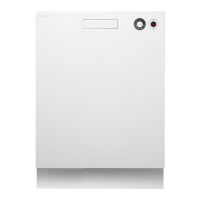
This document describes the ASKO D5424 dishwasher, a household appliance designed for washing dishes. It emphasizes Scandinavian design principles, combining clean lines with everyday functionality and high quality.
The ASKO D5424 dishwasher offers a range of programs and options to suit various dishwashing needs, from lightly soiled items to heavily encrusted pots. The machine operates by spraying water and detergent onto dishes, followed by rinsing and drying cycles. It features a main power switch to initiate operation, and a display that shows program status and remaining time.
Programs:
Options:
Rinse Aid System: The dishwasher includes a rinse aid compartment. Rinse aid is crucial for improving drying results and achieving better dishwashing performance, especially with glassware. The dosage can be adjusted from off to a high dose, depending on water hardness and desired results. An indicator on the display signals when rinse aid needs refilling.
Detergent Dispenser: The detergent compartment has two sections: one for prewash and one for the main wash. Detergent dosage should be based on water hardness and the instructions on the detergent packaging. The manual advises against using too much detergent, as it can reduce effectiveness and increase environmental impact. For dishwasher tablets, it suggests halving them if the dispenser lid is tight, and notes that tablets are not recommended for short programs (under 75 minutes).
Overflow Guard Function: The dishwasher is equipped with an overflow protection system. If the water level exceeds normal, the system automatically pumps out water and shuts off the water supply. If triggered, the user should turn off the water supply and contact service.
Starting the Dishwasher: To start, press and hold the main power switch until the display lights up. Then, select a program and any desired options. Press and hold the Start button until the display flashes three times with the remaining time, then close the door. If the door is open, the display will indicate this.
Adding Dishes Mid-Cycle: The dishwasher can be paused to add more dishes by simply opening the door. It will stop automatically, and resume the program once the door is closed again.
Stopping or Changing a Program: To stop or change a program after it has started, press and hold the Stop button for five seconds. This prevents accidental cancellations. If detergent has already been dispensed, more should be added before selecting a new program.
Child Safety Lock (Kid Lock™): Certain models feature a child safety lock to prevent the door from being opened by children. It involves turning a screw slot to a vertical position. To open the door, a white plastic catch must be pressed while lifting the door latch.
Child Lock (Button Lock - Kid Safe™): This feature prevents children from starting the dishwasher. It can be activated in the settings menu. To temporarily deactivate it, press the High temperature and Long dry buttons simultaneously. It reactivates automatically after two minutes.
Economic Dishwashing: The manual encourages economic dishwashing practices:
Loading Baskets:
Care and Cleaning:
Troubleshooting: The manual provides a comprehensive troubleshooting guide for common issues, including:
Winter Storage/Transport: Store the dishwasher above freezing temperatures. Avoid long transport distances in very cold weather. Transport upright or laying on its back.
Disposal: When disposing of the dishwasher, it should be made unusable by pulling and cutting the power cable. The appliance is manufactured for recycling, and local authorities should be contacted for proper recycling information.
 General
| Type | Freestanding |
|---|---|
| Width | 60 cm |
| Energy Efficiency Class | A++ |
| Noise Level | 46 dB |
| Water Consumption | 10.5 L |
| Height | 85 cm |
| Depth | 60 cm |
| Color | White |
| Delay Start | Yes |
| Child Lock | Yes |
| Dimensions (H x W x D) | 85 x 60 x 60 cm |
| Drying System | Condensation |