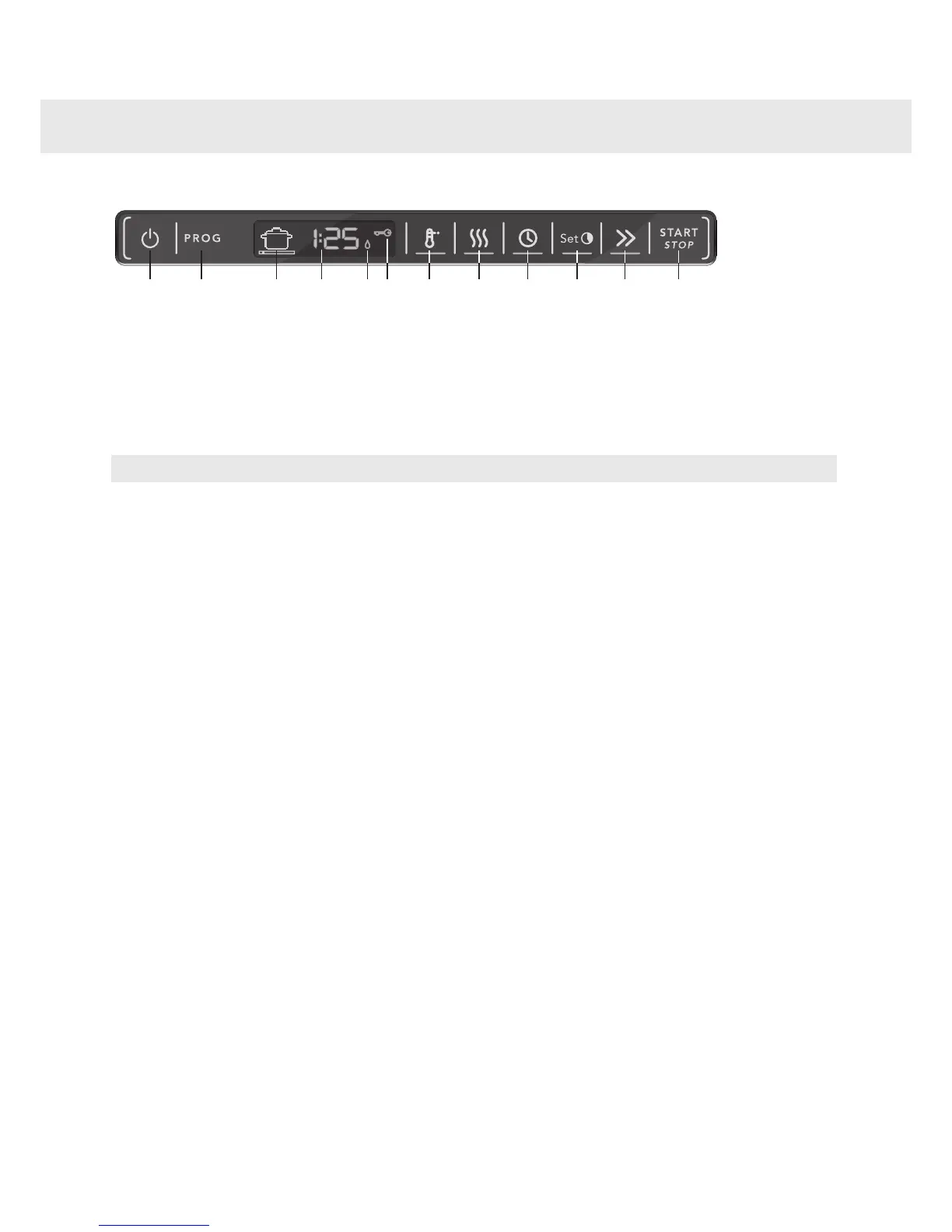
High temperature7.Main power switch1.
Long dry8.Program selector2.
Delayed start9.Program symbol3.
Set time (for the Time program)10.Display4.
Time saver11.Rinse aid indicator5.
Start/Stop12.Child lock (button lock)6.
NOTE!
• The touch buttons only react to use when the door is open. Wait a moment before pressing the touch buttons
after opening the door.
• Two minutes after the last button press, the panel backlight enters energy saving mode. Close and reopen
the door, or press the main power switch, to reactivate the panel.
• Keep the touch buttons clean and free from grease. Wipe them clean with a dry or slightly damp cloth. Never
use cleaners – they can scratch the surface. Use the main power switch to turn off the dishwasher before
cleaning the touch buttons to avoid activating any buttons unintentionally.
9Customer Care Center
1-800-898-1879
www.askousa.com
Front panel


 To Next Page