Service menu cont.
Turn/
Push
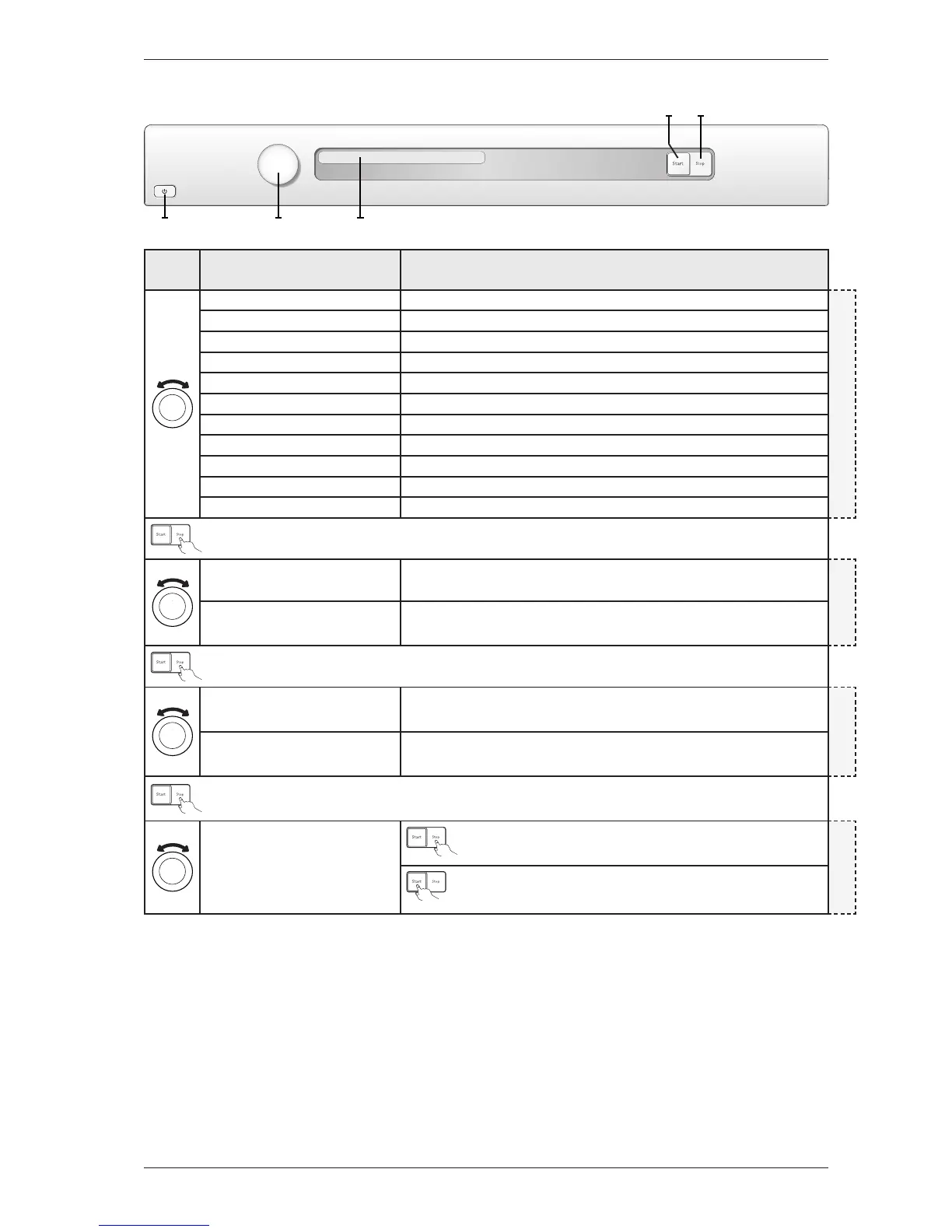
Display Comments/instructions
Condense Interval 0 Interval for indication ”Clean condense”, default setting (not shown)
CLEAN CONDENSE (Heat Pump)
Condense Interval 1 Interval for indication ”Clean condense” (every 100th cycle)
Condense Interval 2 Interval for indication ”Clean condense” (every 200th cycle)
Condense Interval 3 Interval for indication ”Clean condense” (every 300th cycle)
Condense Interval 4 Interval for indication ”Clean condense” (every 400th cycle)
Condense Interval 5 Interval for indication ”Clean condense” (every 500th cycle)
Condense Interval 6 Interval for indication ”Clean condense” (every 600th cycle)
Condense Interval 7 Interval for indication ”Clean condense” (every 700th cycle)
Condense Interval 8 Interval for indication ”Clean condense” (every 800th cycle)
Condense Interval 9 Interval for indication ”Clean condense” (every 900th cycle)
Condense Interval 10 Interval for indication ”Clean condense” (every 1000th cycle)
Auto extratorrt
Auto skåptorrt
Tidsprogram
Auto normaltorrt
Auto stryktorrt
Luftningsprogram
T 7 5 3 C
B U T T E R F L Y D R Y I N G
Heat pump Off Setting for Heat pump Off, default setting
HE AT PUMP
Heat pump On Setting for Heat pump On
Auto extratorrt
Auto skåptorrt
Tidsprogram
Auto normaltorrt
Auto stryktorrt
Luftningsprogram
T 7 5 3 C
B U T T E R F L Y D R Y I N G
Auto filter Off Setting for self-cleaning filter Off, default setting
AUTO FILTER
Auto filter On Setting for self-cleaning filter On
Auto extratorrt
Auto skåptorrt
Tidsprogram
Auto normaltorrt
Auto stryktorrt
Luftningsprogram
T 7 5 3 C
B U T T E R F L Y D R Y I N G
Auto extratorrt
Auto skåptorrt
Tidsprogram
Auto normaltorrt
Auto stryktorrt
Luftningsprogram
T 7 5 3 C
B U T T E R F L Y D R Y I N G
Press the Stop button (S3) to return to the beginning of the service
menu.
TOTAL RESET
Auto extratorrt
Auto skåptorrt
Tidsprogram
Auto normaltorrt
Auto stryktorrt
Luftningsprogram
T 7 5 3 C
B U T T E R F L Y D R Y I N G
Total reset if Start button (S2) is pressed.
After restart language setting is shown. Turn programme selector (J1)
to select language and confirm by pressing Start button (S2).
S3
J1 DISPLAY
S2
S1
Panel key: S = Push button, J = Knob
Service Manual TD70.C
28


 To Next Page