V400 – Installation Guide
U-0398-0607.doc – Issue: 03 complete, approved
Page 17 of 24
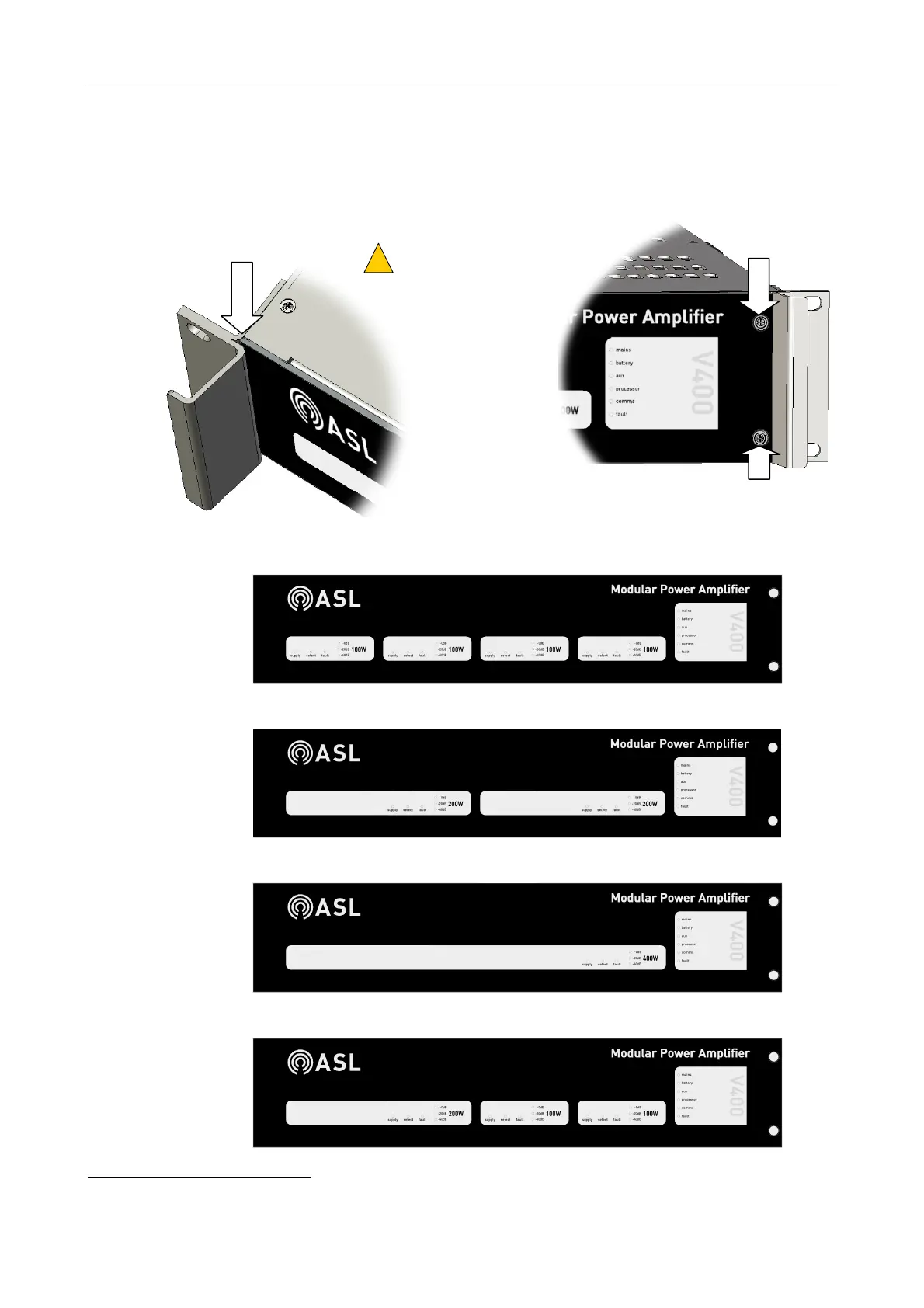
18. Fit the mainframe front panel by sliding its left end under the left V400 handle, and fixing its right
end using the two captive M3 Pozidriv screws; see Figure 12.
Figure 12 Fixing the mainframe front panel
LEFT END UNDER HANDLE
CAPTIVE M3 SCREW
(POZIDRIV)
CAPTIVE M3 SCREW
(POZIDRIV)
THE FRONT PANEL SHOULD
MATCH THE CONFIGURATION OF
AMPLIFIER MODULES.
!
!
4 x 100 W FRONT PANEL
1
2 x 200 W FRONT PANEL
1 x 400W FRONT PANEL
1 x 200 W + 2 x 100 W FRONT PANEL
1
The mainframe does not need to be fully populated with amplifiers, for example three M100 amplifiers could be fitted, or a single
M200 amplifier.
STANDARD FRONT PANELS



 To Next Page