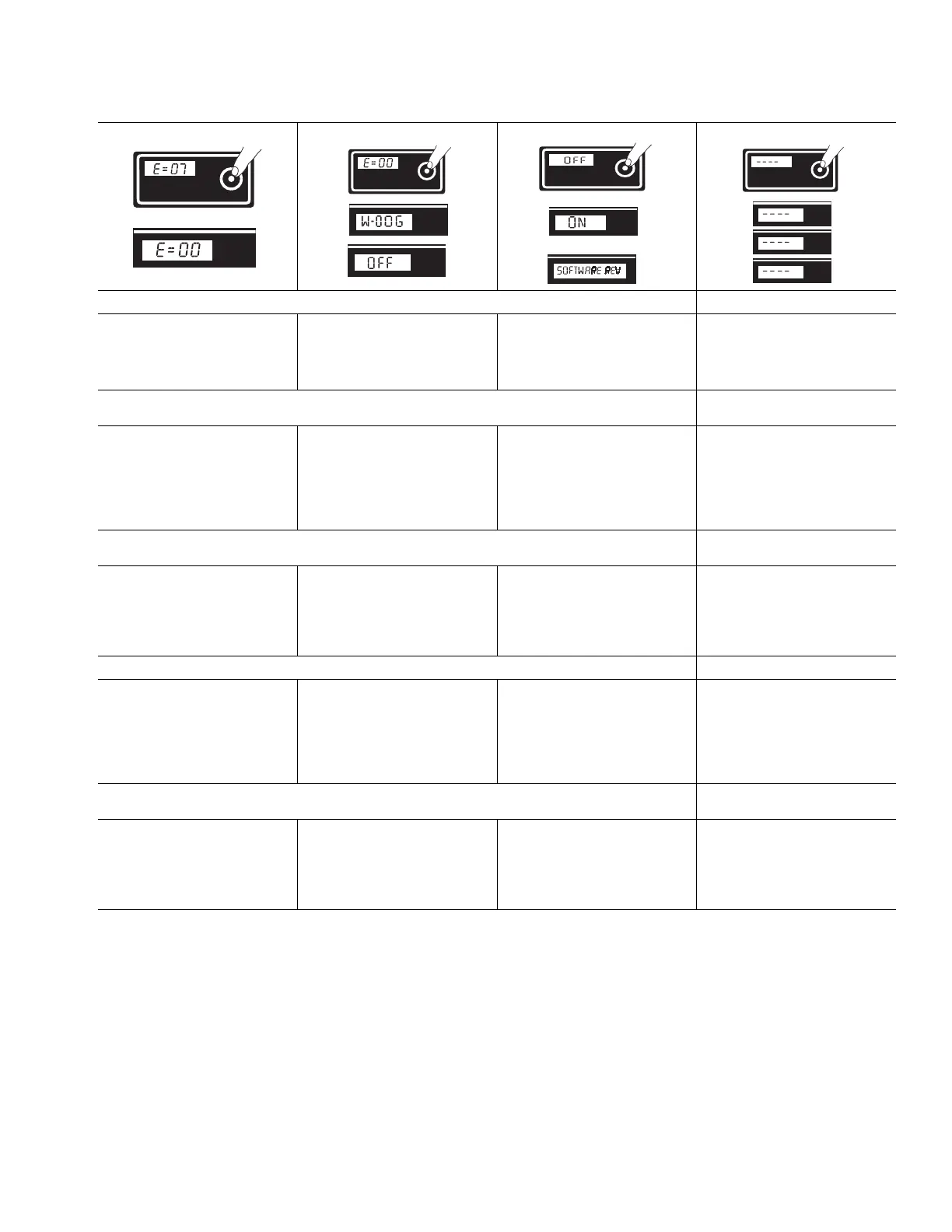
Digital Tracking System / Système de suivi numérique / Sistema de rastreo digital / Digital Tracking System / Digitaal Tracking Systeem
310989E 23
Secondary Menu
Change Display Units:
5 Press and hold DTS button to
clear error code to zero.
6 Short press DTS button. The
W-DOG scrolls past and OFF is
displayed. OFF is the default. To
turn the W-DOG feature ON, go
to step 7.
7 Press and hold DTS button to
turn W-DOG feature ON
or
Short press to move to
SOFTWARE REV
Press and hold DTS button for
8 seconds to change pressure units
(psi, bar, MPa) to desired units.
Selection of bar or MPa changes
gallons to liters x 10.
Menu secondaire
Changement des unités affi-
chées:
5 Appuyer sur le bouton DTS et le
maintenir enfoncé pour effacer le
code d’erreurs et le ramener à
zéro.
6 Appuyer un coup bref sur le bou-
ton DTS. Le W-DOG défile et
ARRET s’affiche. ARRET est
l’affichage par défaut. Pour
mettre le W-DOG en MARCHE,
passer au point 7.
7 Appuyer sur le bouton DTS et le
maintenir enfoncé pour mettre le
W-DOG en MARCHE
ou
Appuyer un bref instant pour
passer à SOFTWARE REV
Appuyer sur le bouton DTS et le main-
tenir enfoncé pendant 8 secondes pour
changer les unités de pression (psi,
bar, MPa) et opter pour les unités dési-
rées.
Sélectionner les bars ou MPa change
les gallons en litres x 10.
Menú secundario
Cambiar las unidades de la
visualización:
5 Pulse y mantenga pulsado el
botón DTS para borrar el código
de error.
6 Pulse brevemente el botón DTS.
Desaparece de la pantalla
W-DOG y aparece visualizado
OFF. OFF es el valor predetermi-
nado. Para ACTIVAR la función
W-DOG, vaya al paso 7.
7 Pulse y mantenga pulsado el
botón DTS para ACTIVAR la
función W-DOG
O
Pulse brevemente para avan-
zar hasta SOFTWARE REV
Pulse y mantenga pulsado el botón
DTS durante 8 segundos para cambiar
las unidades de presión (psi, bar,
MPa), a las unidades deseadas.
Al seleccionar bar o MPa se cambia
a de galones a litros x 10.
Menu Secundário
Alternar entre indicações:
5 Prima continuamente o botão
DTS para eliminar o código de
erro para zero.
6 Prima o botão DTS. Passa a indi-
cação W-DOG e surge OFF
(desligado). OFF (desligado) é
a predefinição. Para colocar a
função W-DOG na posição ON
(ligado), consulte o passo 7.
7 Prima e mantenha o botão DTS
premido para ligar (ON) a função
W-DOG
ou
Prima o botão DTS para
passar para SOFTWARE REV
Prima continuamente, durante
8 segundos, o botão DTS, para
alternar entre unidades de pressão
(psi, bar, MPa) até obter a unidade
pretendida.
A selecção de bar ou MPa altera
galões para litros x 10.
Secundair menu
De maateenheden op het
scherm veranderen:
5 Druk op de DTS-knop en houd
hem ingedrukt om de foutcode
te wissen en op nul te zetten.
6 Druk kort op de DTS-knop. De
W-DOG komt langs op het dis-
play waarna OFF verschijnt. OFF
is de standaard waarde. Ga naar
stap 7 om de W-DOG-functie IN
te schakelen.
7 Druk op de DTS-knop en houd
hem ingedrukt om de
W-DOG-functie IN te schakelen
of
Druk kort om naar SOFTWARE
REV te gaan
Druk op de DTS-knop en houd hem
8 seconden ingedrukt om de druk-
waarde-eenheid te veranderen naar de
gewenste eenheid (psi, bar, MPa).
De keuze van bar of MPa verandert
ook gallons in liters x 10.
TIA
TIA
TIA
OR / OU / O / OU / OF
bar
Psi
MPa
Psi
TIA


 To Next Page