electronic circuits.
Do not use or store the mobile phone in dusty places, lest that active parts of the mobile phone be damaged.
Do not store the mobile phone in a high-temperature location. High temperature may shorten the life of
electronic circuits and damage the battery and some plastic parts.
Do not store the mobile phone in extreme cold places. This will cause moisture to form inside the mobile phone
and may damage electronic circuits when the mobile phone is moved to a constant temperature place.
Do not throw, knock or shock the mobile phone, as that may cause damage to the internal circuits and
high-precision components of the mobile phone.
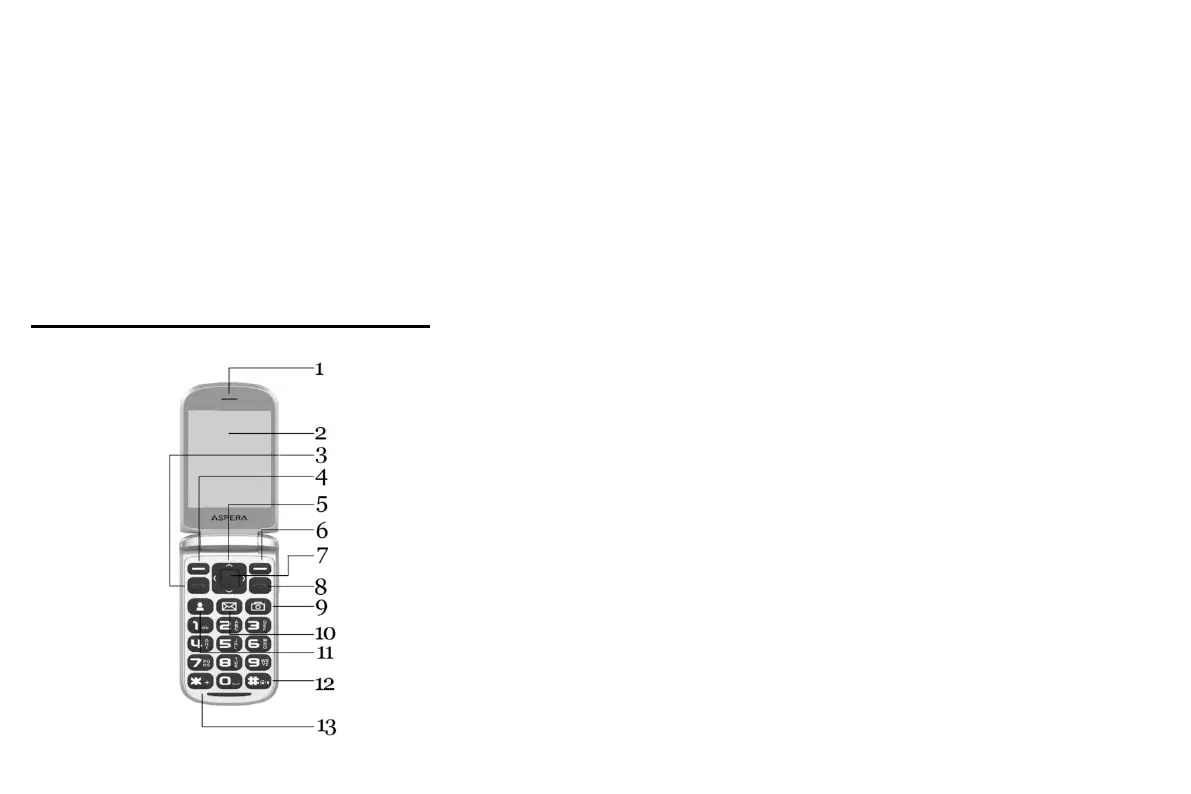
Getting to know your Aspera F40
1. In ear speaker
2. Screen
3. Green “Answer” key/button
4. Top left-hand “context” key/button
5. Arrow-keys (around Select key)
6. Top right-hand “context” key/button
7. Select key/button (between arrow keys)
8. Red “Hang-up”/Power on-off key/button
9. Camera Shortcut
10. Message Shortcut
11. Quick Contacts Shortcut
12. Hash/Meeting Mode key/button
13. Asterisk/Star key/button



 To Next Page