EN - 15
detergent properly.
WARNING: The drawer
should not be open while the product is
running.
Detergent drawer:
1. When you remove the drawer, make
sure that it is empty. Otherwise, you
may pour the detergent in it.
2. When the detergent drawer is full:
• Do not pull the machine.
• Do not move the machine.
• Do not lean or tilt the machine.
WARNING: Before doing
these processes, make sure you remove
the detergent drawer from the machine.
WARNING: If you added
detergent but the machine still does not
detect it, there may be dried detergent
inside the reservoir, preventing the
detergent dosing mechanism from
functioning properly. Clean the drawer.
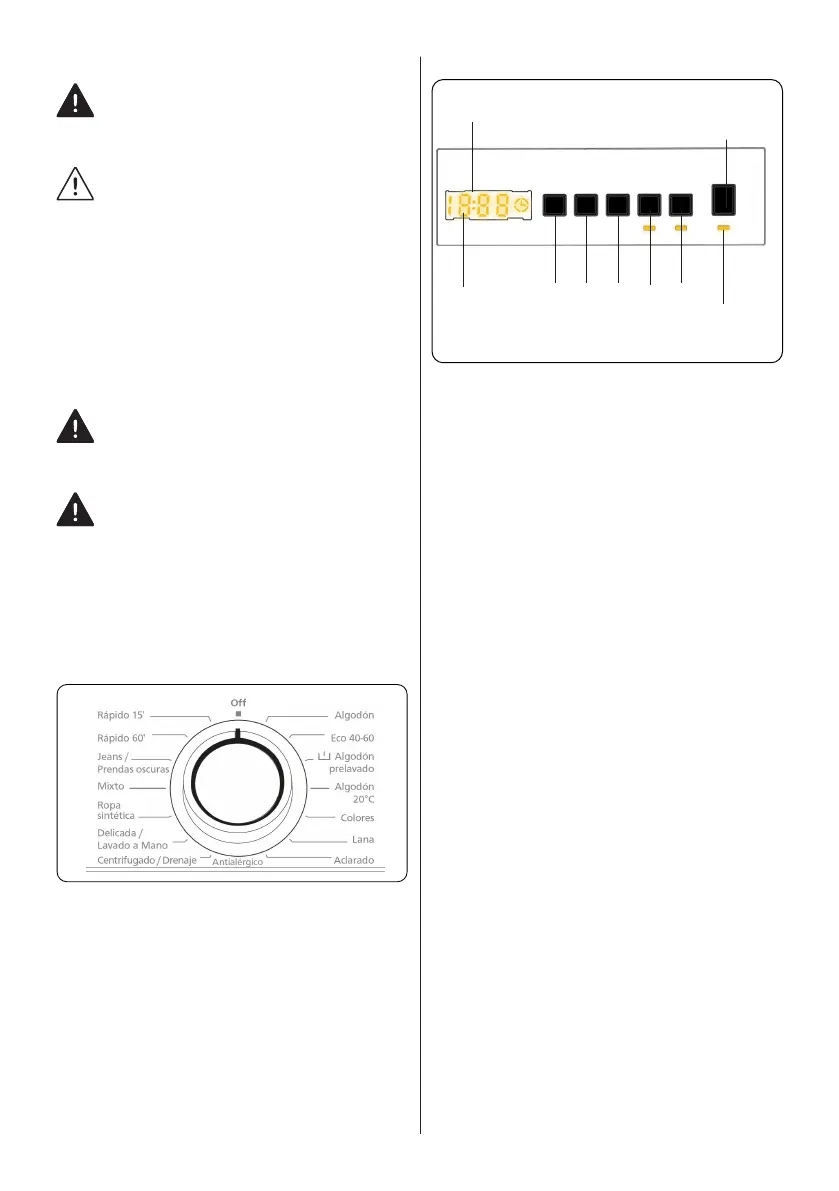
4.4 Program Dial
• To select the desired programme, turn
the programme dial either clockwise or
anti-clockwise until the marker on the
programme dial points to the chosen
programme.
• Make sure that the programme dial is
set exactly to the programme you want.
4.5 Electronic Display
1
8
2
3 4 6
5 7
9
1. Electronic Display
2. Digital Display
3. Water Temperature Adjustment Button
4. RPM Speed Adjustment Button
5. Delayed Start Additional Function
6. Additional Function Button 1
7. Additional Function Button 2
8. Start/Pause Button
9. Start/Pause Button Lamp
The display panel shows the washing delay
timer (if set), temperature selection, spin
speed, any additional functions selected.
The display panel shows “End” when the
selected programme is complete. The
display panel also indicates if a fault has
occurred with your machine.


 To Next Page