EN - 18
9h
3h
6h
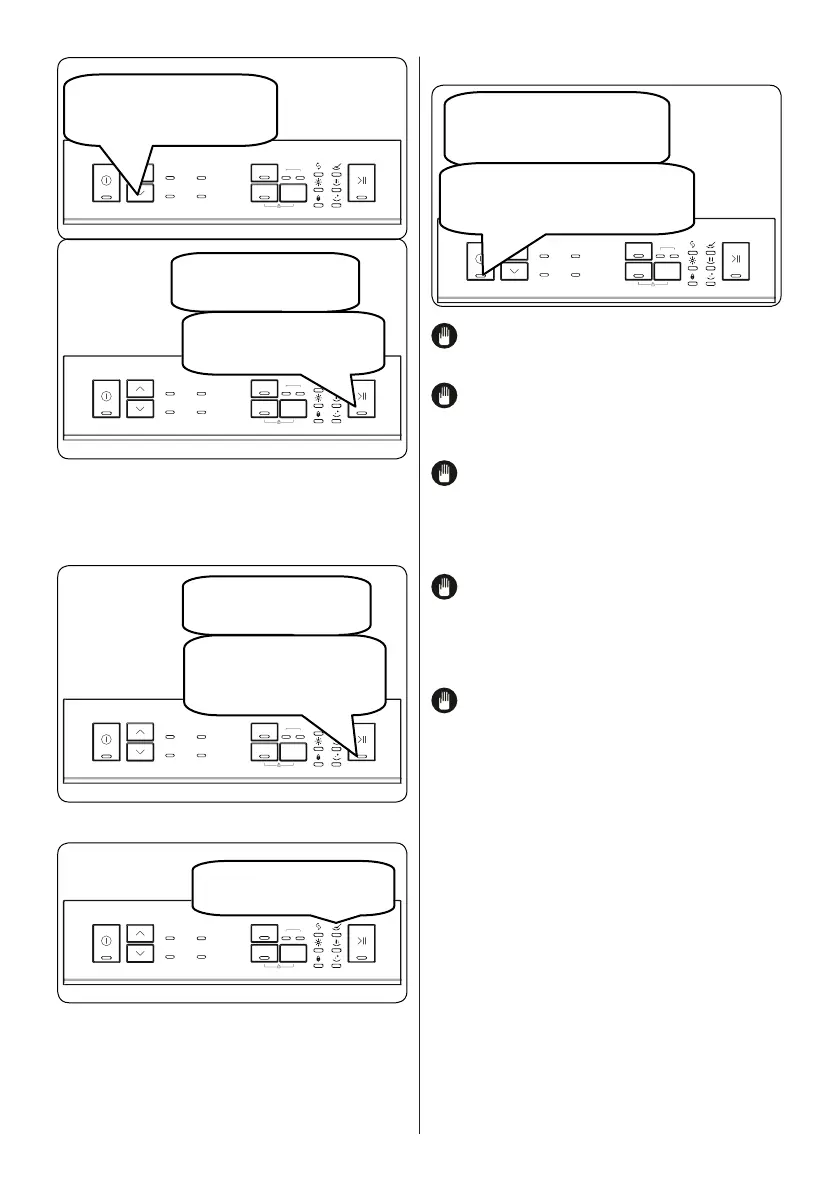
After the programme stops,
select a new programme using
the Programme Selection
Up/Down buttons.
9h
3h
6h
Press the Start/Pause button
to art the newly selected
programme.
The new programme will
resume the course of the
old programme.
7.2. Cancelling a Programme
Follow the steps below to cancel a
programme while in operation.
9h
3h
6h
Press and hold the Start/
Pause button for 3 seconds.
While the programme is
cancelling, the End led will blink.
The water discharge process will
start and continue for 30 seconds.
9h
3h
6h
When the programme is
cancelled, the End light will
illuminate.
7.3. Switching the Machine Off
9h
3h
6h
When the End light illuminates,
press On/Off button to switch
your machine off.
Disconnect the plug and
turn off the water tap.
NOTE: Do not open the door before the
programme is complete.
NOTE: Leave the door slightly open at
the end of a wash programme to speed up
the drying process.
NOTE: If the door of the machine is
opened or the power is cut off during a
wash programme, the programme will
continue when the door is closed or when
the power returns.
NOTE: If the power is interrupted
or if the machine door is opened during
the drying process, the programme will
terminate and your machine will now be
ready for a new programme selection.
NOTE: To save any program as
favourite program, press Up and Down
buttons (2) at the same time. To select
favou rite program, press Up button (2) for 3
seconds.


 To Next Page