EasyManua.ls Logo

Aspiring MAXI 3 - Settings

Aspiring MAXI 3
Print Icon
To Next Page IconTo Next Page
To Previous Page IconTo Previous Page
Loading...
24
4. Settings
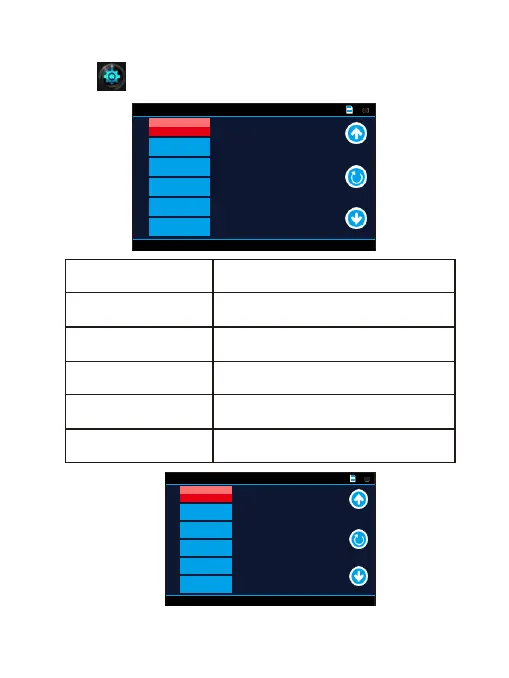
Tap this icon in the main menu go into settings interface shown as
below.
Movie Off Time
Set the recording time aGer the
ameout
Movie Clip Time
Select recording split duration, or
deactivate the cyclic recording function
Movie Mode
Select recording resolution
Sound Record
Activate / Deactivate recording
with sound
Language
Select the menu display language
Beep
O / On button pressing sounds
General Settings
1 /4
5 sec
3min
1296P
On
English
On
Movie Clip Time
Movie Mode
Sound Record
Language
Beep
Movie Off Time
General Settings
2 /4
5
O
O
5
0
LCD Power
Save
LED Light
Flicker
Protect Level
Parking
Monitoring
Volum
e

Related product manuals