25
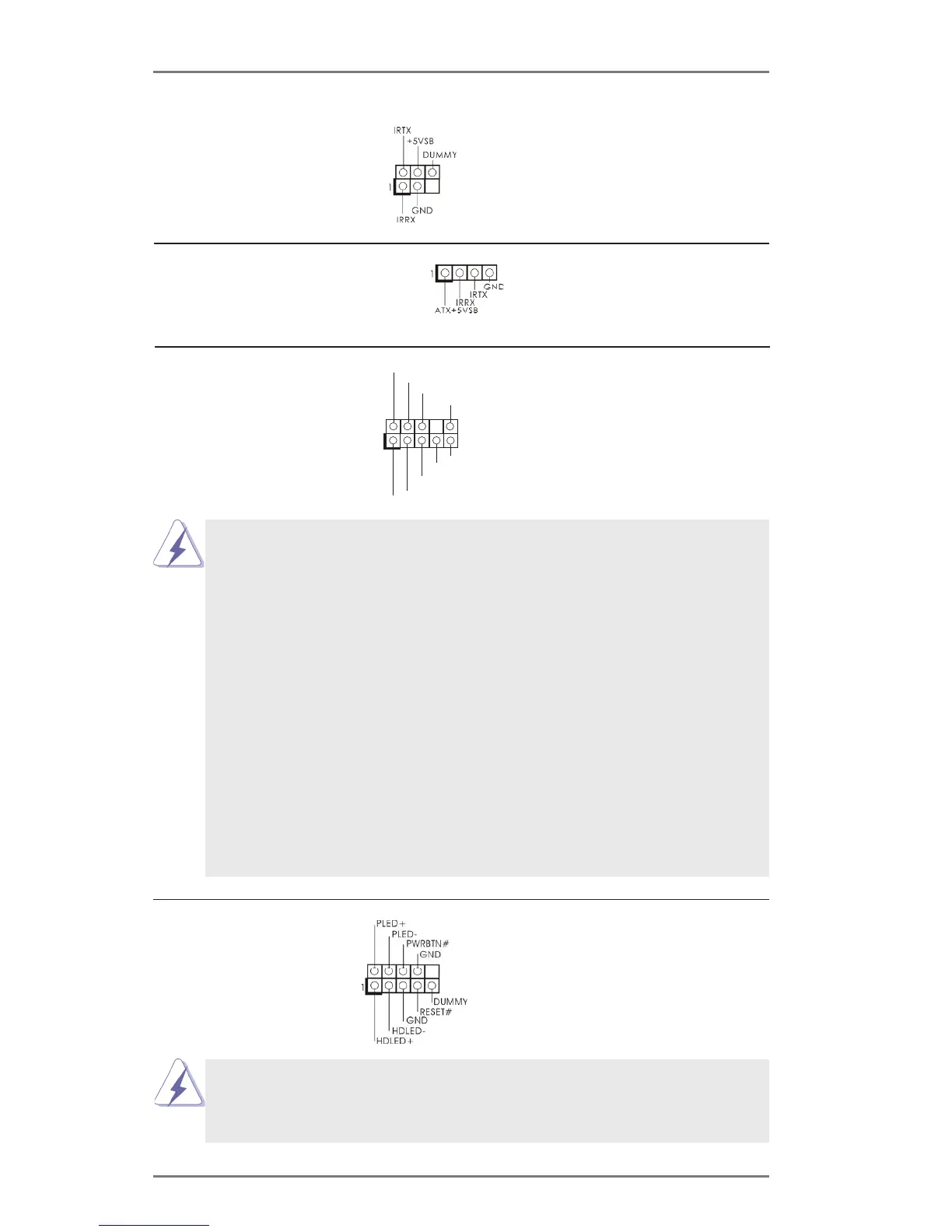
Infrared Module Header This header supports an
optional wireless transmitting
and receiving infrared module.
Front Panel Audio Header This is an interface for the front
panel audio cable that allows
convenient connection and
control of audio devices.
Consumer Infrared Module Header This header can be used to
connect the remote
controller receiver.
J_SENSE
OUT2_L
1
MIC_RET
PRESENCE#
GND
OUT2_R
MIC2_R
MIC2_L
OUT_RET
System Panel Header This header accommodates
several system front panel
functions.
Connect the power switch, reset switch and system status indicator
on the chassis to this header according to the pin assignments below.
Note the positive and negative pins before connecting the cables.
the chassis must support HDA to function correctly. Please follow the
instruction in our manual and chassis manual to install your system.
header as below:
E. To activate the front mic.
For Windows
®
XP / XP 64-bit OS:
Select “Mixer”. Select “Recorder”. Then click “FrontMic”.
For Windows
®
7 / 7 64-bit / Vista
TM
/ Vista
TM
64-bit OS:
Go to the "FrontMic" Tab in the Realtek Control panel. Adjust
“Recording Volume”.






 To Next Page