English
10
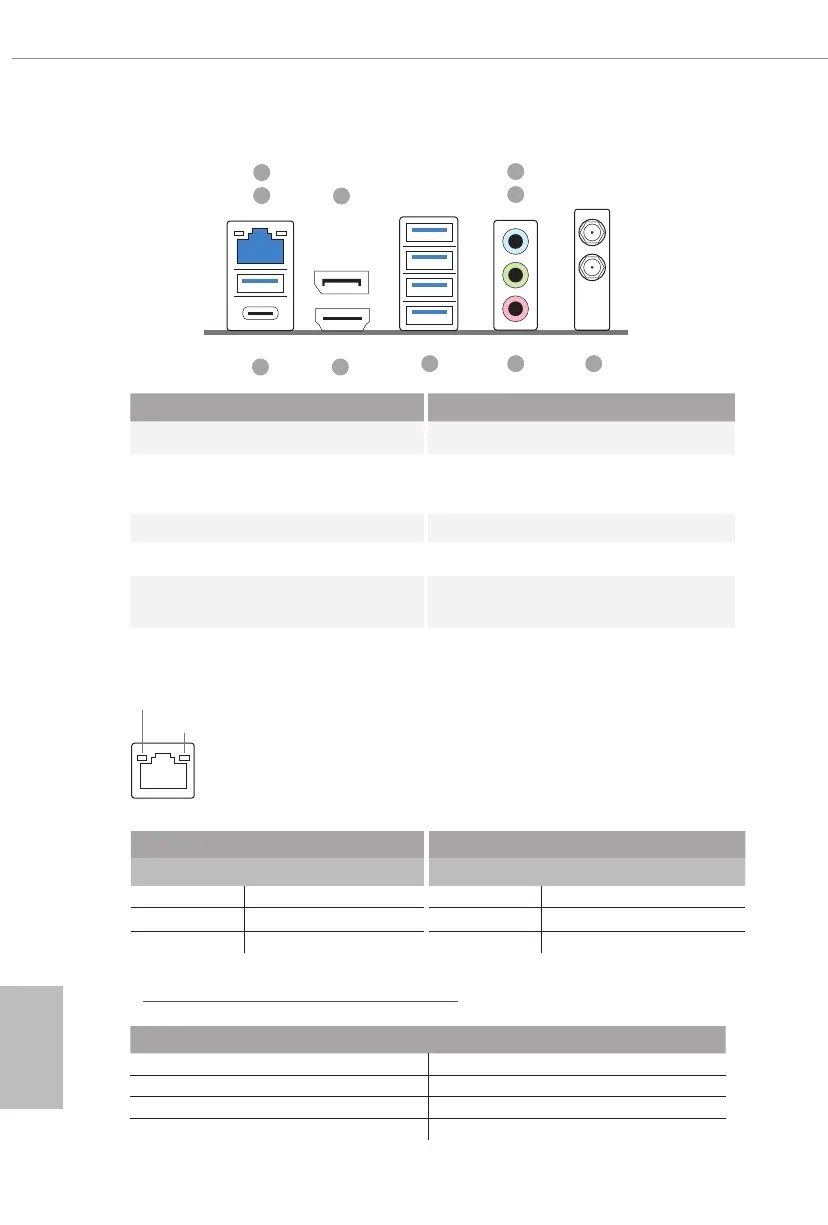
1.4 I/O Panel
No. Description No. Description
1 2.5G LAN RJ-45 Port (Intel® I225V)* 6 Antenna Ports
2
USB 3.2 Gen2 Type-A Port
(USB32_TA_1)
7 Microphone (Pink)**
3 DisplayPort 1.4 8 USB 3.2 Gen1 Ports
4 Line In (Light Blue)** 9 HDMI Port
5 Front Speaker (Lime)** 10
USB 3.2 Gen2 Type-C Port
(USB32_TC_1)
ACT/LINK LED
SPEED LED
LAN Port
* ere are two LEDs on each LAN port. Please refer to the table below for the LAN port LED indications.
Activity / Link LED Speed LED
Status Description Status Description
O No Link O 10Mbps connection
Blinking Data Activity Orange 100Mbps/1Gbps connection
On Link Green 2.5Gbps connection
7
5
4
6
9
3
8
2
1
10
** Function of the Audio Ports in 7.1-channel Conguration:
Port Function
Light Blue (Rear panel) Rear Speaker Out
Lime (Rear panel) Front Speaker Out
Pink (Rear panel) Central /Subwoofer Speaker Out
Lime (Front panel) Side Speaker Out


 To Next Page
 Loading...