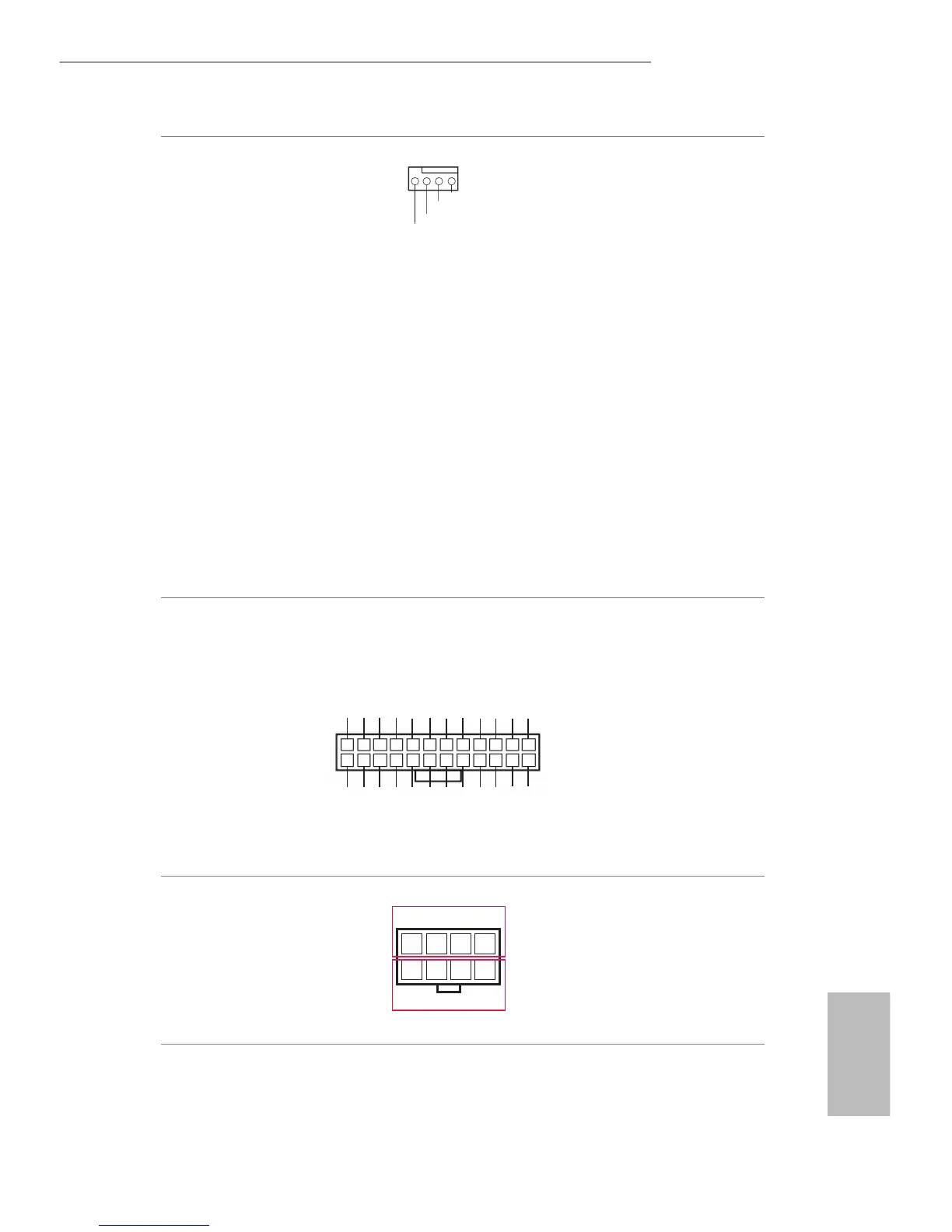
Please connect the CPU fan
cable to the connector and
match the black wire to the
ground pin.
ough this motherboard
provides a 4-Pin CPU fan
(Quiet Fan) connector, 3-Pin
CPU fans can still work
successfully even without the
fan speed control function.
If you plan to connect a
3-Pin CPU fan to the CPU
fan connector on this
motherboard, please connect
it to Pin 1-3.
*
For more details, please refer to the
Cooler QVL list on the ASRock Rack
website.
ATX Power Connector
(24-pin ATXPWR1)
(See p.7, 10, 13 or 16)
Please connect an ATX power
supply to this connector.
ough this motherboard
provides a 24-pin ATX power
connector, it can still work if
you adopt a traditional 20-
pin ATX power supply. To use
a 20-pin ATX power supply,
please plug your power supply
along Pin 1 and Pin 13.
ATX 12V Power
Connectors
(8-pin ATX12V1)
(See p.7, 10, 13 or 16)
4
8
1
5
+12V2
GND
is motherboard provides
one 8-pin ATX 12V power
connector.
1
3V
3V
GND
GND
5V
5V
GND
PWROK_PS
5VSB
12V
12V
3V
3V
-12V
GND
PSON#
GND
GND
GND
5V
5V
5V
GND
N/A
12
24 13



 To Next Page