16
2.8 Connectors
Connectors are NOT jumpers. DO NOT place jumper caps over
these connectors.
Connector Figure Description
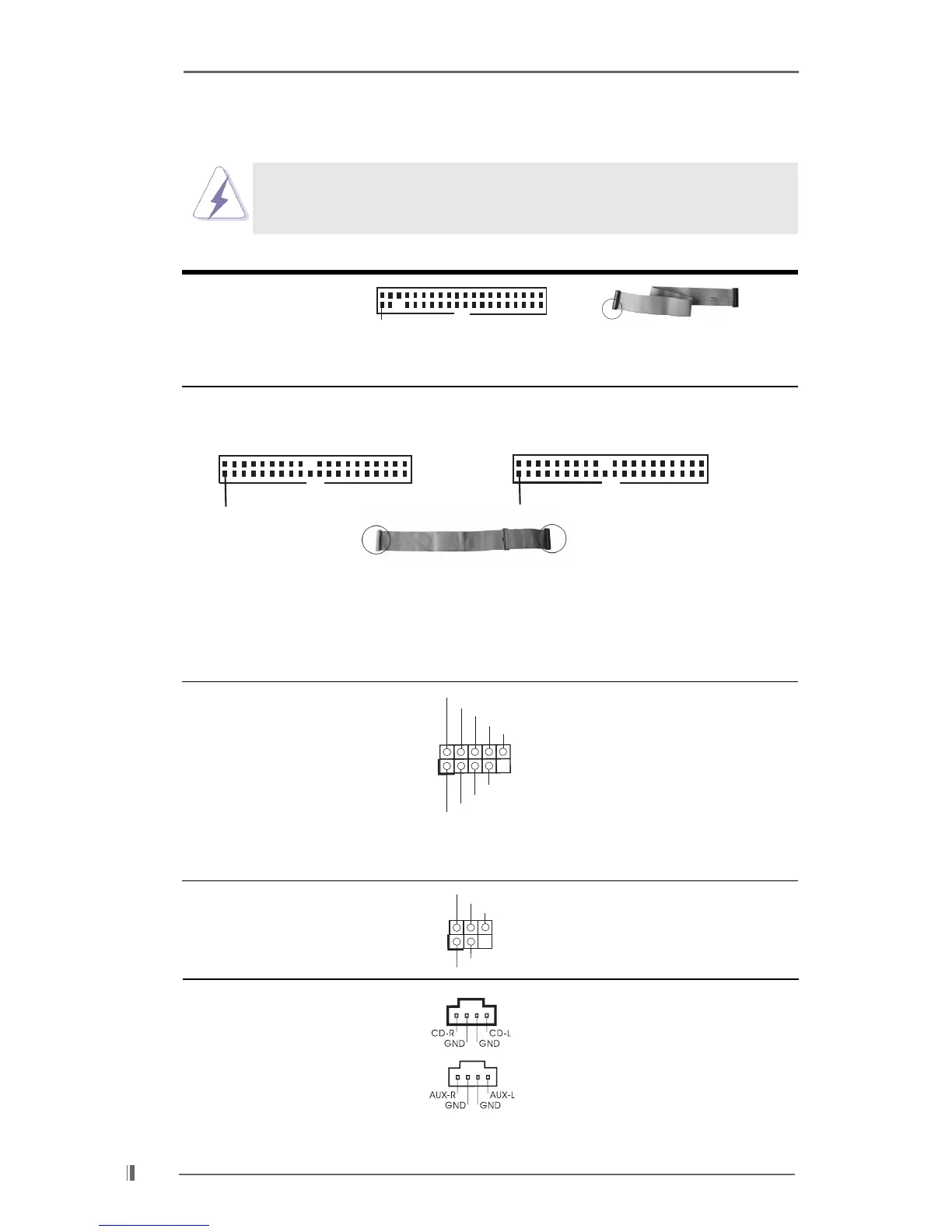
FDD connector
(33-pin FLOPPY1)
(see p.7 item 19)
Note: Match the red marking on the floppy ribbon cable with Pin1.
Primary IDE connector (Blue) Secondary IDE connector (Black)
(39-pin IDE1, see p.7 item 10) (39-pin IDE2, see p.7 item 9)
Note: To optimize compatibility and performance, please connect your hard disk
drive to the primary IDE connector (IDE1, blue) and CD-ROM to the
secondary IDE connector (IDE2, black).
USB 2.0 header ASRock I/O
TM
provides 4
(9-pin USB45) default USB 2.0 ports on the
(see p.7 item 20) rear panel. If those 4 USB 2.0
ports on the rear panel are not
sufficient, this USB 2.0 header
is available for 2 additional
USB 2.0 ports.
Infrared module connector This connector supports an
(5-pin IR1) optional wireless transmitting
(see p.7 item 21) and receiving infrared module.
Internal audio connectors These connectors allow you
(4-pin CD1, 4-pin AUX1) to receive stereo audio input
(CD1: see p.7 item 29) from sound sources such as
(AUX1: see p.7 item 30) a CD-ROM, DVD-ROM, TV
tuner card, or MPEG card.
FLOPPY1
Pin1
Red marking
IDE1
PIN1
IDE2
PIN1
connect the black end
to the IDE devices
connect the blue end
to the motherboard
80-Pin ATA 100/133 cable
USB_PWR
USB_PWR
P+5
P-5
P+4
P-4
GND
GND
DUMMY
1
DUMMY
GND
+5V
IRTX
IRRX
1
CD1
AUX1







 To Next Page