22
Resetting Lock to Factory Default
When lock is reset to factory defaults, all
programming features are reset to original default
settings (see below).
1. Remove battery cover and batteries.
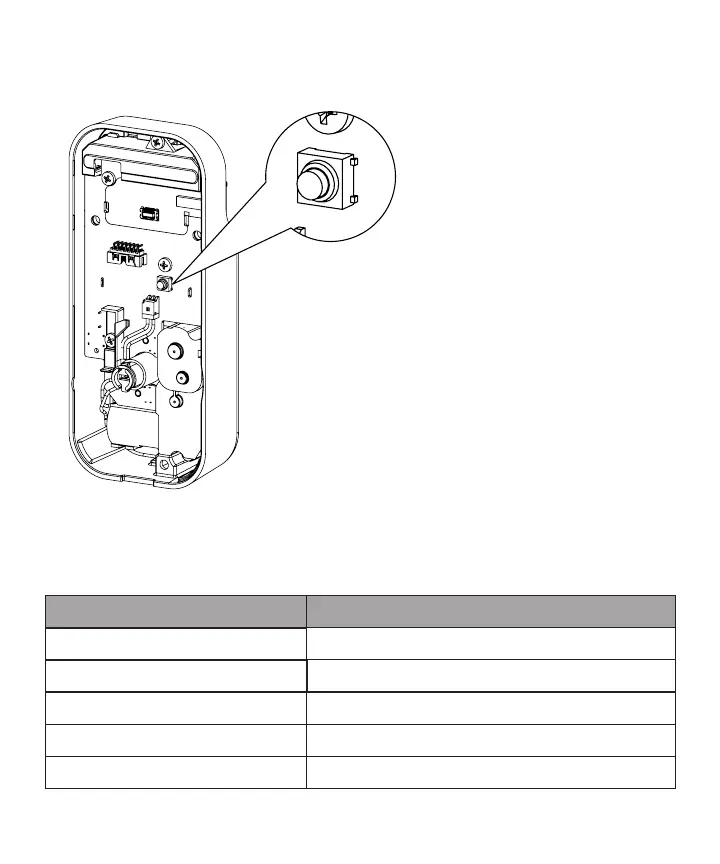
2. Remove the interior escutcheon to access the
reset button.
3. The reset button (see image) is located
beside the PCB cable connector.
4. While pressing the reset button
(Minimum of 3 seconds) reinstall batteries.
Release reset button.
5. Replace battery cover.
Factory Settings
Settings
Automatic Re-lock
Inside Indicator Light
Volume Setting
Lockout Mode
Automatic Re-lock Time
Factory Settings
Disabled
Disabled (O)
Enabled (Low)
Disabled
30 Seconds


 To Next Page
 Loading...