EasyManua.ls Logo

Associated Electrics RC10T - Page 29

Associated Electrics RC10T
45 pages
Print Icon
To Next Page IconTo Next Page
To Previous Page IconTo Previous Page
Loading...
0
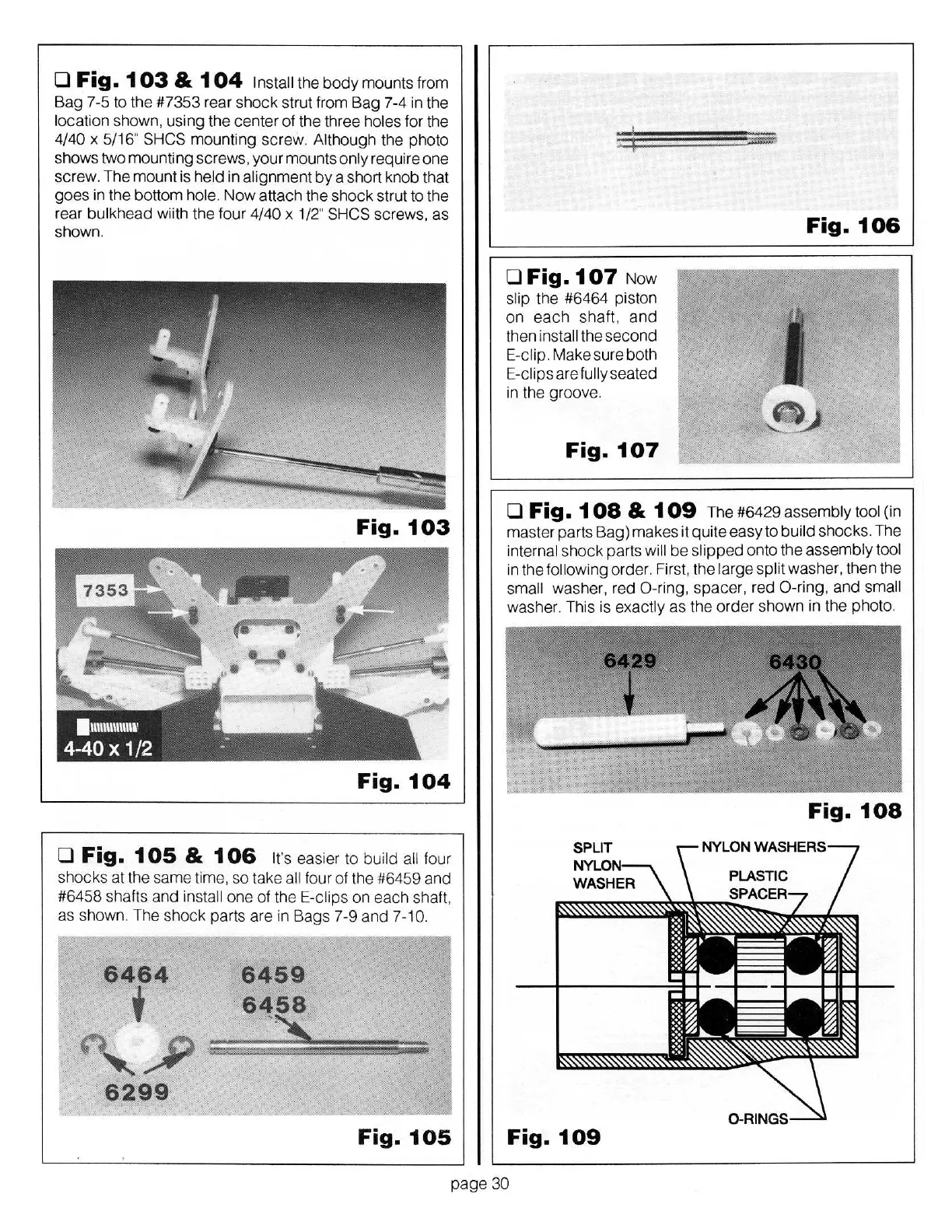
Fig.
1
03
&
1
04
Install
the
body
mounts from
Bag
7-5
to
the
#7353
rear shock strut from
Bag
7-4
in the
l
oca
ti
on shown, using the center
of
the three
holes
for the
4/40
x
5/
16"
SHCS
mounting screw. Although the photo
s
how
s two mounting
sc
rews, yo
ur
mounts
on
ly require one
sc
rew. The
mount
is
held
in
alignment
by
a short knob that
goes
in the bottom
hole.
Now
attach the sh
ock
strut to the
rear bulkhead wiith the f
our
4
/4
0
x
1/2"
SHCS
sc
rews,
as
shown.
Fig.
103
Fig.
104
0
Fig.
1
OS
&
1
06
It's
easier to
build all
four
shocks
at
the same time, so take
all
four of the
#6459
and
#6458
shafts and
install
one
of
the E-clips
on
each
shaft,
as sh
ow
n. The shock parts are in
Bags
7-9
and
7-10.
6464
i
~
6299
6459
6458
Fig.
105
0
Fig.
1
07
N
ow
slip
the
#6464
piston
on
each
shaft
,
and
then
install
the second
E-clip.
Make sure both
E-cli
ps
are
fully seated
in the groove.
Fig.
107
Fig.
106
0
Fig.
1
08
& 1
09
The
#6429
assembly tool (in
master parts
Bag)
makes it quite
easy
to
build
shocks. The
internal shock parts
will
be
sl
ipped
onto the assembly
tool
in the
following
order. First, the
larg
e
sp
lit
washer, then the
sma
ll
washer, red
0-r
ing
,
spacer, r
ed
0 -ring,
and
small
washe
r.
This is
exactly
as
the
order
shown in the
ph
oto
.
Fig.
108
Fig.
109
pag
e
30

Related product manuals