EasyManua.ls Logo

Associated Electrics RC10T - Page 36

Associated Electrics RC10T
45 pages
Print Icon
To Next Page IconTo Next Page
To Previous Page IconTo Previous Page
Loading...
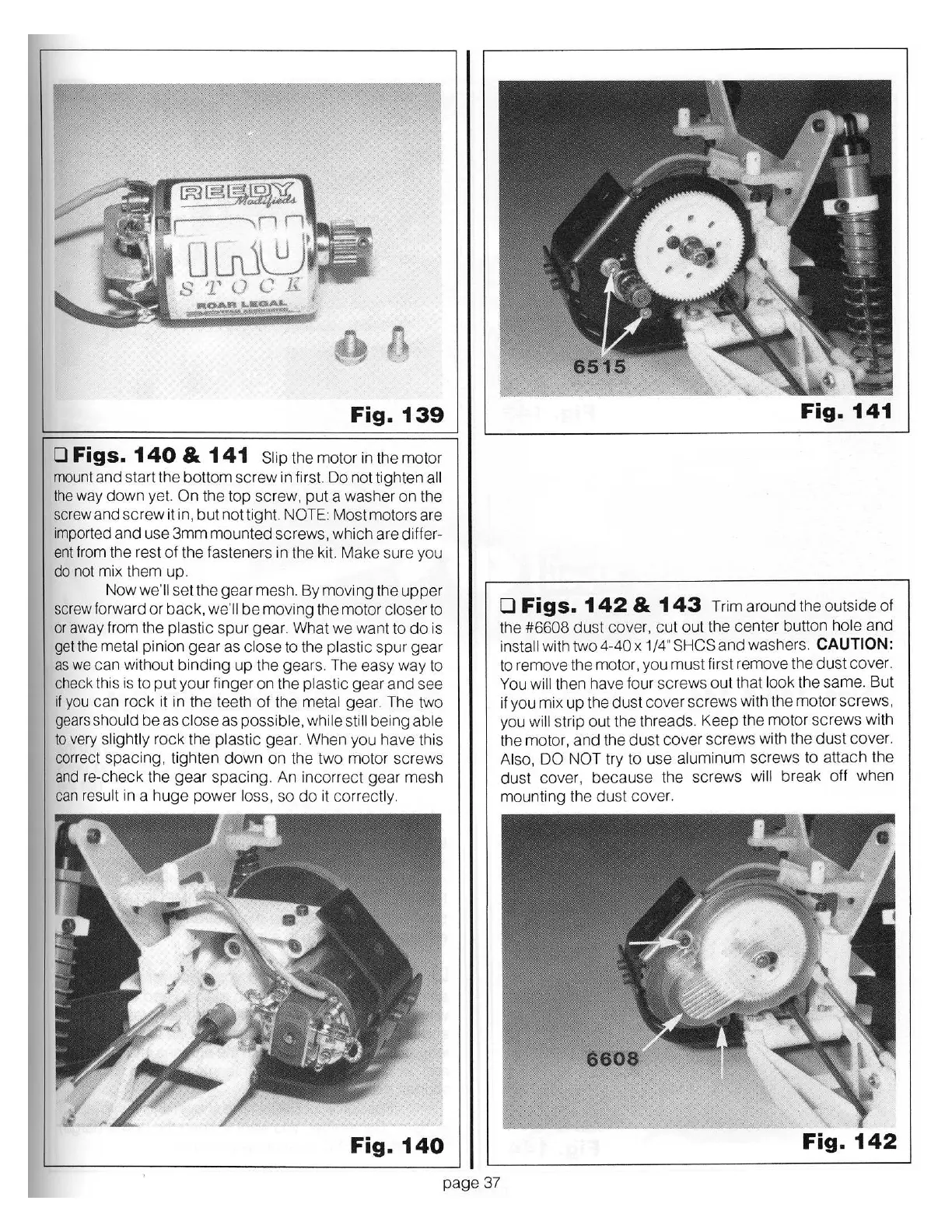
Fig.
139
0
Figs.
140
&
141
Slip
the motor in the
motor
mount
and
start the
bottom
screw
in first.
Do
not tighten
all
the
way
down
yet.
On
the top
screw,
put
a washer
on
the
screw
and
screw
it in,
but
not tight. NOTE: Most motors are
imported
and
use
3mm
mounted
screws
, which are differ-
ent
from the rest
of
the fasteners in the kit.
Make
sure you
do not mix them up.
Now
we'
ll
set
the
gear
mesh.
By
moving the
upper
screw forward
or
back,
we
'll
be
moving the motor
closer
to
or
away from the
plastic
spur
gear. What we want
to
do
is
get the metal
pinion
gear
as
close
to the
plastic
s
pur
gear
as
we can without
binding
up
the gears. The easy way to
check this is to
put
your finger
on
the
plastic
gear
and
see
if
you
can rock it in the teeth
of
the metal
gear. The two
gears
should
be
as cl
ose
as
possible, while still being
able
to
very
slightly
rock the
plastic
gear. When you have this
correct spacing, tighten
down
on
the two motor screws
and
re-check
the
gear
spacing. An incorrect
gear
mesh
can
result
in
a
huge
power
loss,
so
do
it
corre
ctly.
Fig.
140
page
37
Fig.
141
0
Figs
.
142
&
143
Trim around the outside
of
the
#6608
dust
cover,
cut out the center button
hole
and
install
with two
4-40
x 1 /4" SHCS
and
washers.
CAUTION:
to
remove
the motor, you
must
first
remove
the
dust
cover.
You will
then have four screws
out
that
look
the same.
But
if you mix
up
the
dust
cover
screws
with the motor screws,
you
wi
ll
strip out the threads.
Keep
the motor screws with
the motor,
and
the
dust
cover
screws
with the
dust
cover.
Also,
DO
NOT
try to use
aluminum
screws
to
attach the
dust
cover,
because the
screws
will
break off when
mounting the
dust
cove
r.
Fig.
142

Related product manuals