Infotainment System
4.7
Phone Media
Playing Screen
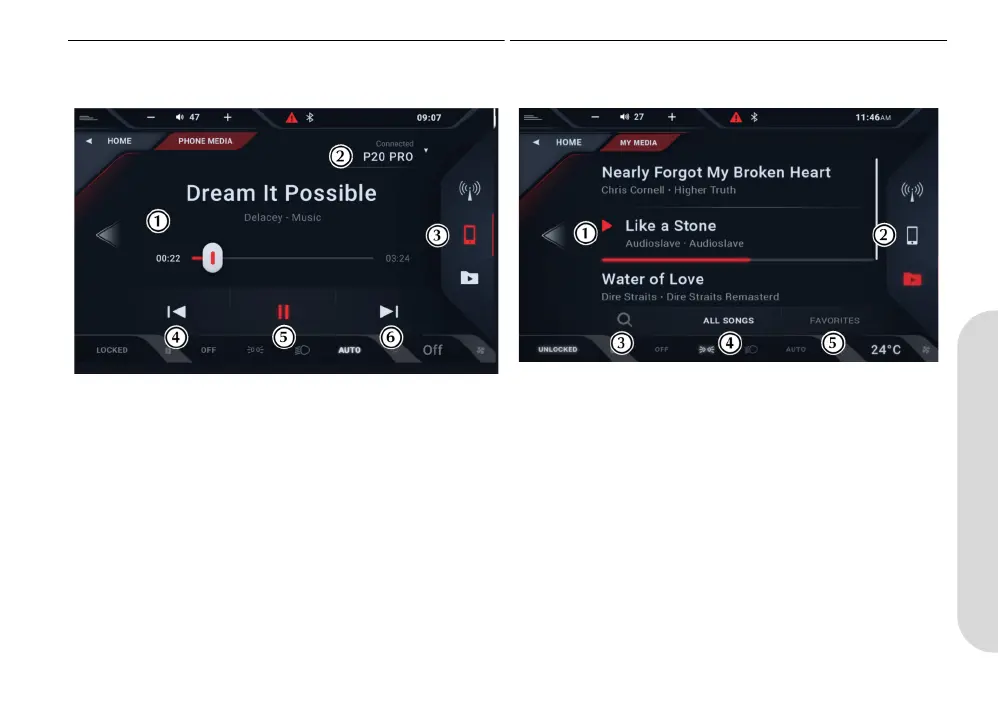
[1] TRACK INFORMATION: Shows track name, artist and album
name.
[2] DEVICE LIST: Open to select the device to be used as an
audio source.
[3] SOURCE PANEL: Shows media source options.
[4] PREVIOUS: Press to skip back to the start of the track. Press
at the start of the track to play the previous track. Press and hold
to rewind the track.
[5] PLAY/PAUSE: Press to play or pause the track.
[6] NEXT: Press to play the next track. Press and hold to fast
forward through the track.
My Media
Folder Search
[1] TRACK LIST: Shows track names, artist and album name. If
there is already playing this will shown along with a track progress
bar.
[2] SOURCE PANEL: Shows media source options.
[3] SEARCH: Search for track by search term.
[4] ALL SONGS: Show full list of available songs.
[5] FAVORITES: Shows the list of saved favorite songs. Songs
saved as favorites will be shown in the track list with a star symbol.
KY9Y-19A321-AA.book Page 7 Wednesday, November 3, 2021 8:41 AM














 To Next Page