4.8
Infotainment System
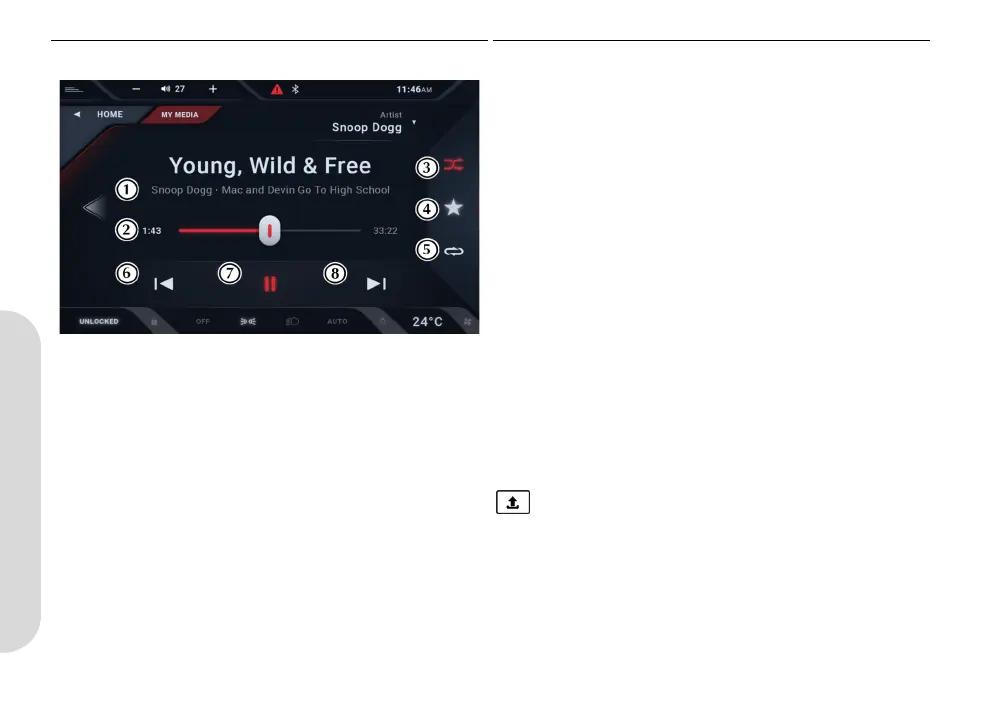
Playing Screen [1] TRACK LIST: Shows track names, artist and album name. If
there is already playing this will shown along with a track progress
bar.
[2] TRACK PROGRESS: Shows track length, progress and time
elapsed.
[3] SHUFFLE: Play tracks in a random order.
[4] FAVORITE (HARD DISC ONLY): Add current track favorite.
[5] REPEAT: Press to cycle between no repeat, repeat track or
repeat all in a given album or playlist.
[6] PREVIOUS: Press to skip back to the start of the track. Press
at the start of the track to play the previous track. Press and hold
to rewind the track.
[7] PLAY/PAUSE: Press to play or pause the track.
[8] NEXT: Press to play the next track. Press and hold to fast
forward through the track.
USB Transfer
Audio files can be transferred from a USB media source and
saved to the infotainment hard disk. To transfer tracks, press and
hold the track(s) in the track list whilst the source media is set to
USB or press select all to upload all tracks in that folder. Press
to begin uploading the file(s).
KY9Y-19A321-AA.book Page 8 Wednesday, November 3, 2021 8:41 AM










 To Next Page