Infotainment System
4.11
Phone System
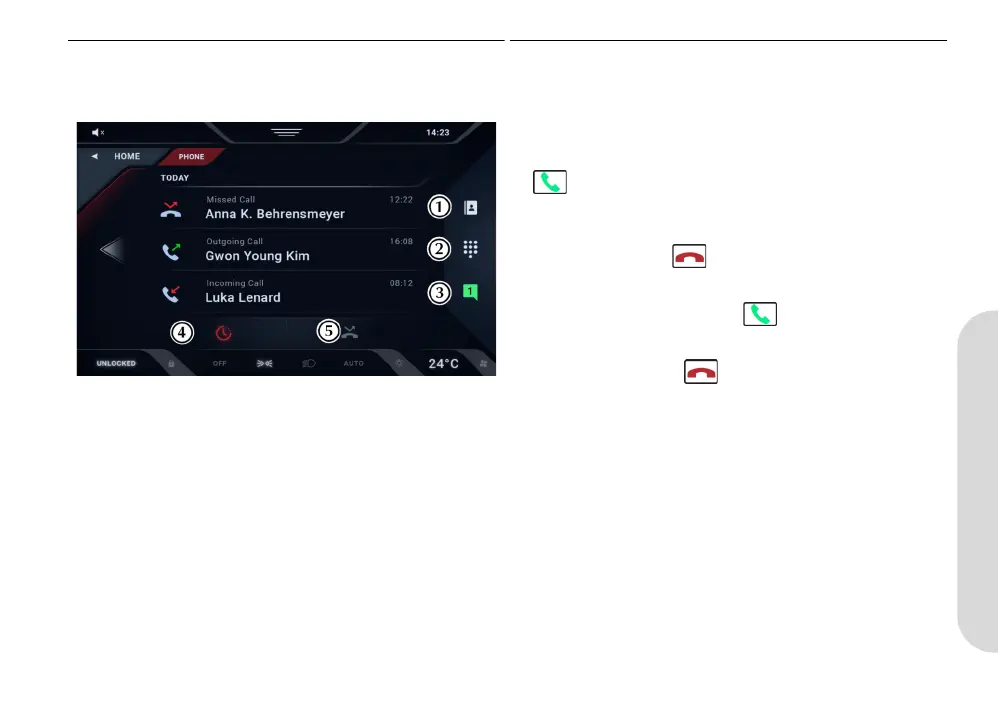
A bluetooth mobile device must first be connected. If a device is
not connected you will be prompted to connect a bluetooth
device.
[1] CONTACT LIST:
Opens the phones contact list.
[2] DIAL PAD:
Opens a number pad to manually dial a phone number.
[3] MESSAGES:
Opens message menu. The number shows number of unread
messages.
[4] CALL HISTORY:
Select to show the recent call history in the main window.
[5] MISSED CALLS:
Select to show the recent call history in the main window.
Calls
Make a Call
A call can be made in several ways:
• Choose a contact from the contacts list.
• Enter a number using the on screen number pad and press
.
• Select a contact from the call history/missed call window.
To End a Call
To end a call, press the button.
To Answer a Call
To answer an incoming call, press .
To Reject a Call
To reject a call, press the . You can also reject a call with a
preset text message.
KY9Y-19A321-AA.book Page 11 Wednesday, November 3, 2021 8:41 AM












 To Next Page