7
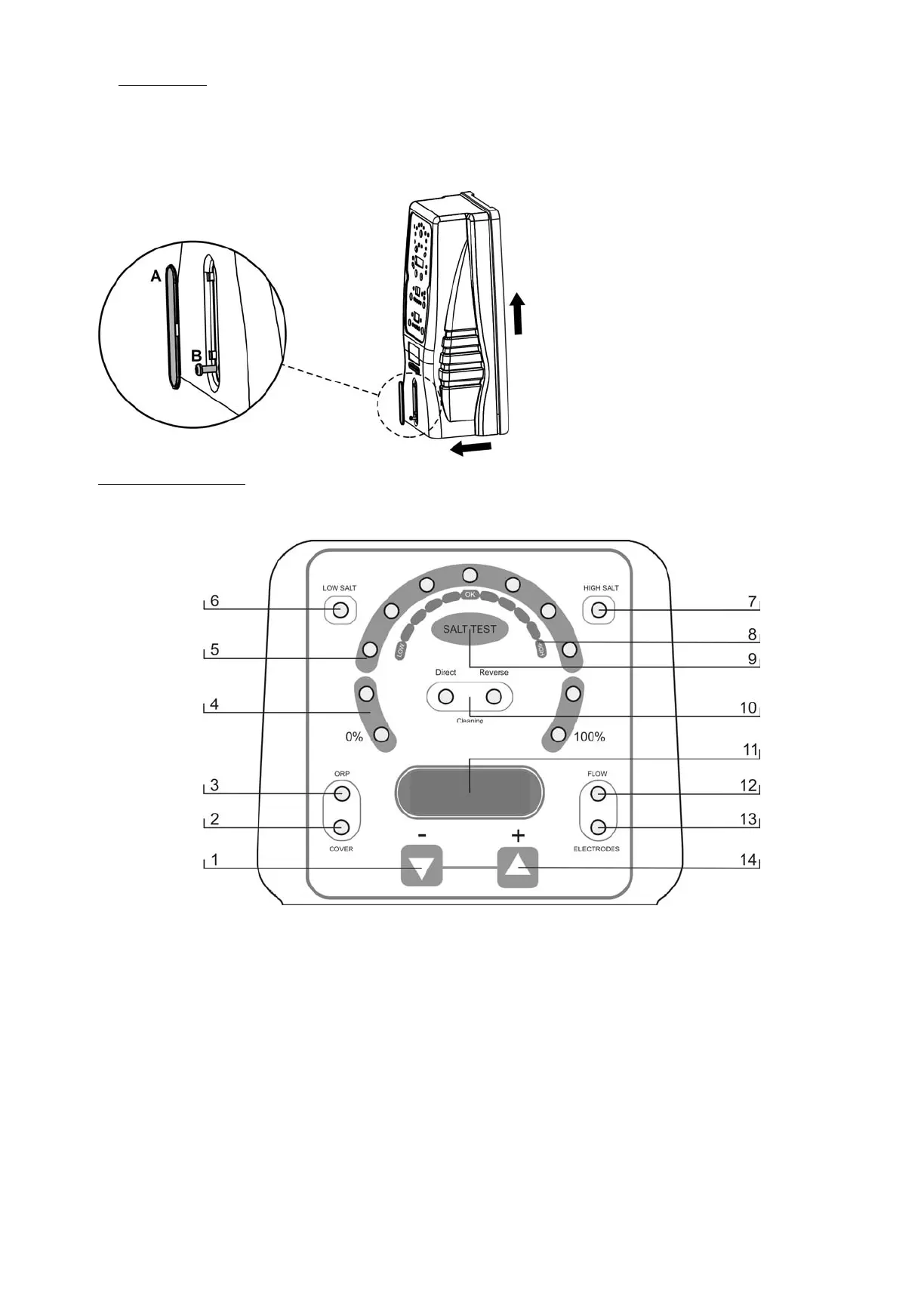
4.5 Cover detaching
1. Remove the embellisher (A) situated in the cover.
2. Unscrew the cover fixation screw (B).
3. Remove the cover by sliding it upwards and outwards.
4.6. Controls and indicators
AstralPool Chlore Smart+ Electrolysis systems are equipped with a control panel on the front (Fig. 12).
Fig. 12
1. Key “
-” (decrease production / programming menu navigation).
2. Indicator of activated AUTOMATIC COVER control.
3. Indicator of activated ORP CONTROL.
4. Production scale (%).
5. PRODUCTION+SALINITY TEST scale.
6. Indicator of LOW SALINITY.
7. Indicator of HIGH SALINITY.
8. SALINITY scale (qualitative).
9. Key for “SALINITY TEST”.
10. SELF-CLEANING indicators
(DIRECT/REVERSE) polarity.
11. Display of SYSTEM INFORMATION.
12. Indicator of FLOW ALARM.
13. Indicator of ELECTRODE passivation ALARM.
14. Key “
+” (increase production / programming menu navigation).



 To Next Page