EasyManua.ls Logo

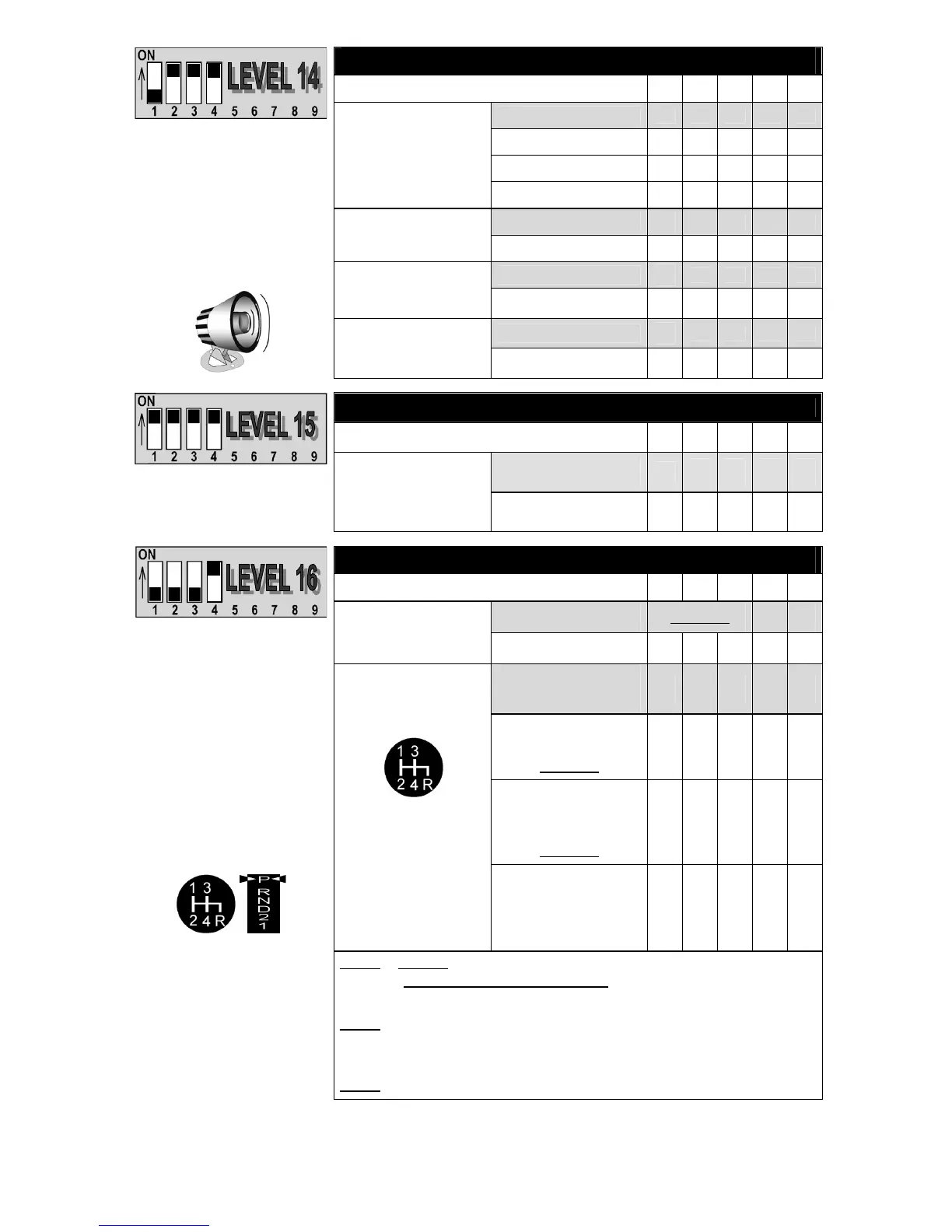
AstroStart BBK - Programming Tables: Stage 1 Levels 14-16; Levels 14-16: Alarm, Remote & Vehicle Type

AstroStart BBK
30 pages
Print Icon
To Next Page IconTo Next Page
To Previous Page IconTo Previous Page
Loading...
22
ALARM
STAGE 1 - LEVEL 14 5 6 7 8 9
Alarm Disabled
Active Arming
Semi-Passive Arming
AstroStart Alarm
Passive Arming
Enabled
Chirp
Disabled
Other sensor
Default settings:
AstroStart Alarm: Disabled
Chirp: Enabled
Additional sensor
programmed in: Other Sensor
OEM alarm detection through
the horn (Alarm Link): Disabled
Additional Sensor
configuration
Trunk supervision
Disabled
OEM alarm detection
(Alarm Link)
Enabled-See page 9
REMOTE SETTING
STAGE 1 - LEVEL 15 5 6 7 8 9
Activates Trunk output
Default settings:
Trunk command:
activates Trunk output
Trunk command
Activates Utility 1 output
VEHICLE TYPE
STAGE 1 - LEVEL 16 5 6 7 8 9
Manual Transmission
See Note 1
Vehicle Type
Automatic transmission
2 Parking
brake activation
1 Parking
brake activation
See Note 2
Activation and
deactivation by
Remote control
See Note 3
Manual sequence
initialized by:
Activation by
Remote control
and deactivation when
door is closed
Default settings:
Vehicle Type = Manual
Transmission
Manual safety sequence
initialized by:
2 Parking brake activation
Note 1
: If any one of the Dipswitches 5, 6 or 7 is in the OFF position, level is set
to MANUAL TRANSMISSION MODE
. The module automatically sets to
Manual Transmission mode when an interface is connected.
Note 2
: The safety sequence initialized by a single parking brake activation
is less recommended since it is transparent and users could release the
clutch pedal before realizing the engine is still running.
Note 3
: The Turbo mode cannot be used with this mode


Table of Contents

Related product manuals