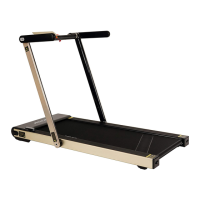
The ASUNA 7750 Spaceflex Motorized Treadmill is a fitness equipment designed for indoor and home use, offering a range of features for effective workouts.
Function Description:
This motorized treadmill allows users to engage in walking, jogging, or running exercises with adjustable speed and incline settings. It features a display meter that provides real-time workout data, including speed, time, distance, calories burned, pulse, incline level, and step count. The treadmill supports both manual and pre-programmed workout modes, as well as user-customized programs. A safety key mechanism ensures immediate shutdown in case of emergencies. The Spaceflex design indicates a foldable structure, allowing for easier storage and movement.
Important Technical Specifications:
- Assembly Size (INCHES): 57.3(L) x 29.3(W) x 48(H)
- Folded Standing Size (INCHES): 29.3(L) x 10.4(W) x 57.3(H)
- Running Size (INCHES): 51.2(L) x 19(W)
- N.W. (LBS): 126.7
- Max User Weight (LBS): 220 (100 KG)
- Speed Range (MI/H): 0.6 - 8.0
- Rating: 930W
- Motor Spec (HP): 2.5HP (PEAK)
- Input Volt (V): 100-120V
- Operating Temperature: 0-82°F
- Incline: 0-12%
- Display: Blue Single Display showing Speed, Time, Distance, Calorie, Pulse, Incline, Step Count
- Power Source: Requires a 10 amps (100-120V) power source.
- Safety Features: Safety Key for immediate stop, Overload Protector.
Usage Features:
- Assembly: The treadmill requires assembly, which involves attaching handlebars and handrails, and connecting the power cord and safety key. Plugs are provided to cover screw holes when handrails are removed for folding.
- Folding and Moving: The treadmill is designed for space-saving storage. To fold, users must remove the handrails, press the foot lever, and lower the handlebars. For movement, the treadmill can be tilted onto its transportation wheels (No. 33) and supporting transportation wheels (No. 36) to roll it in various directions.
- Starting a Workout: After plugging in the power cord, turning on the power switch, and inserting the Safety Key (No. 128) into the meter, users can press the "Start" key. It is recommended to stand on the side plastic non-slip rails until the running belt starts moving, then step onto the belt.
- Speed and Incline Adjustment: Speed can be adjusted using +/- buttons on the right handrail, and incline using +/- buttons on the left handrail. Quick speed and incline settings (e.g., Incline 3, Incline 5, Speed 3, Speed 5) are available on the display meter.
- Workout Modes:
- Manual Mode: Allows users to set exercise time, distance, or calorie countdowns using handrail buttons and then start the treadmill.
- Built-in Automatic Programs (P1-P8): Eight pre-designed programs with varying speed and incline segments. Each program is divided into 10 segments, with changes in speed and incline indicated by beeps.
- User Customized Programs (U1-U3): Users can create and save their own programs by setting speed and incline for 10 segments. These settings are saved permanently even after a power outage.
- Pulse Measurement: To measure pulse, users hold the pulse sensors for 5 seconds, and the pulse icon will light up on the display.
- Audio and USB: The treadmill includes an MP3 line for connecting to an audio device to play music. A USB interface is available for charging devices but not for playing music.
- Metric/Imperial Unit Change: The display units can be switched between Metric ("SI") and Imperial ("Eng") by removing and reinserting the Safety Key while holding the "Start" button, then using handrail buttons to select the desired unit.
- Power Saving Mode: The system automatically enters power saving mode and shuts off the display after 4 minutes of inactivity. Pressing any button reactivates the system.
- Emergency Stop: Removing the Safety Key (No. 128) immediately stops the treadmill and triggers a "SAFE" message on the display.
Maintenance Features:
- Lubrication: The running belt is pre-lubricated, but it's recommended to lubricate before the first use and regularly thereafter. Lubrication frequency depends on usage:
- Light user (less than 3 hours/week): Every six months
- Medium user (3-5 hours/week): Every three months
- Heavy user (more than 5 hours/week): Every two months
- To lubricate, raise the Running Belt (No. 25) and apply lubricant to the Running Board (No. 24), then wipe thoroughly with a rag.
- WARNING: Always unplug the treadmill before lubricating. Do not loosen or adjust the running belt while applying lubricant.
- Cleaning: Regular cleaning by dusting components and wiping the Running Belt (No. 25) with a damp cloth helps prolong the treadmill's life. Keep liquids away from electrical parts.
- Motor Maintenance: At least once a year, remove the Motor Under Cover & Motor Upper Cover (No. 30 & 31) and vacuum underneath.
- Running Belt Adjustment:
- Centering: If the Running Belt (No. 25) deviates to the right or left, use the Allen Wrench (No. 20) to turn the adjusting bolts (clockwise for right deviation, counter-clockwise for left deviation) by 1/4 circle until the belt is centered. This should be done with the power off and Safety Key removed.
- Tightness: If the running belt becomes loose (e.g., runner slides off), turn the left and right adjusting bolts clockwise by 1/4 circle with the power off and Safety Key removed, until moderate tightness is achieved (pulled out 50-75mm from the running board).
- Cool-down: It is suggested to power off the treadmill for 10 minutes every 2 hours of continuous use and fully power off when not in use to maintain its lifespan.
- Error Codes: The display meter may show error codes (e.g., Er1, Er3, Er4, Er5, Er6, Er7, Er8, Er13, Er14) indicating various issues. Users are advised to contact customer service for assistance with these errors.
- Incline Self-Adjustment: The treadmill has an incline self-adjustment feature accessible from standby mode by pressing "Stop" and "Speed 5" buttons.

 Need help?

 To Next Page

 General