2-20
Chapter 2: Hardware information
2.7 Connectors
2.7.1 Rear panel connectors
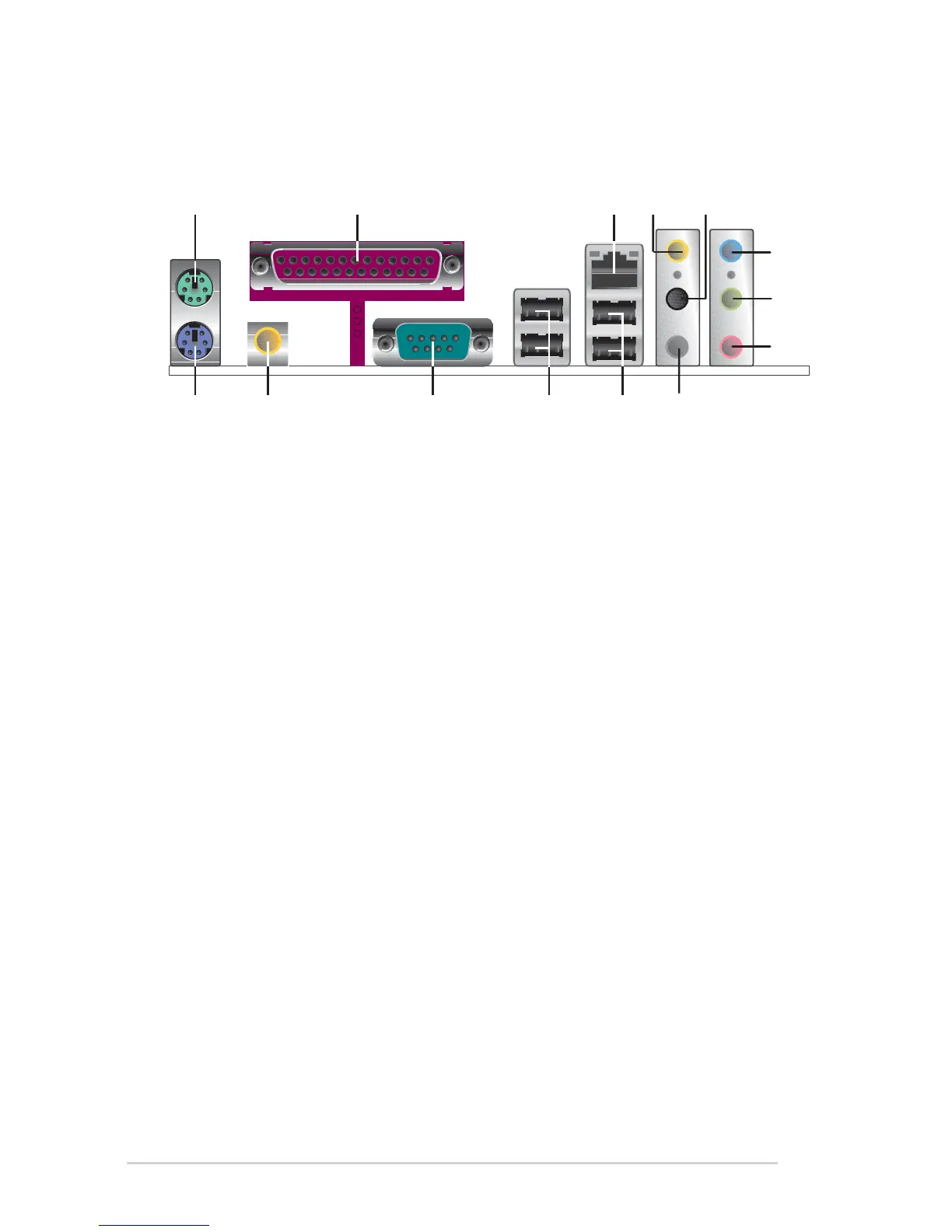
1. PS/2 mouse port. This green 6-pin connector is for a PS/2 mouse.
2. Parallel port. This 25-pin port connects a parallel printer, a scanner, or
other devices.
3. RJ-45 port. This port allows connection to a Local Area Network (LAN)
through a network hub.
4. Rear Speaker-Out port. This Rear Speaker (gray) port connects to the
rear speakers on a 4-channel, 6-channel or 8-channel audio
configuration.
5. Side Speaker-Out port. This Side Speaker out (black) port connects
to the side speakers in an 8-channel audio configuration.
6. Line-In port. This Line In (light blue) port connects a tape player or
other audio sources.
7. Line-Out port. This Line Out (lime) port connects a headphone or a
speaker. In 4-channel, 6-channel and 8-channel mode, the function of
this jack becomes Front Speaker Out.
8. Microphone port. This Mic (pink) port connects a microphone.
9. Center/Subwoofer port. This Center/Subwoofer (yellow orange) port
connects to the center/subwoofer speakers on a 6-channel or
8-channel audio configuration.
1
14
10
2 3
1213
6
7
8
45
9
11


 To Next Page