ROG Blitz Formula 4-33
Chassis Q-Fan Control [Disabled]
Allows you to enable or disable the chassis Q-Fan controller.
Conguration options: [Disabled] [Enabled]
The following two items appear when you enable the Chassis Q-Fan Control
feature.
Chassis Fan Ratio [Auto]
Conguration options: [Auto] [90%] [80%] [70%] [60%]
Chassis Target Temperature [21ºC]
Conguration options: [12ºC] [15ºC] [18ºC] [21ºC] [24ºC] [27ºC] [30ºC]
Chassis Fan 4 Speed [xxxxRPM] or [Ignored] / [N/A]
The onboard hardware monitor automatically detects and displays the
chassis fan speed in rotations per minute (RPM). If the fan is not connected
to the motherboard, the eld shows N/A.
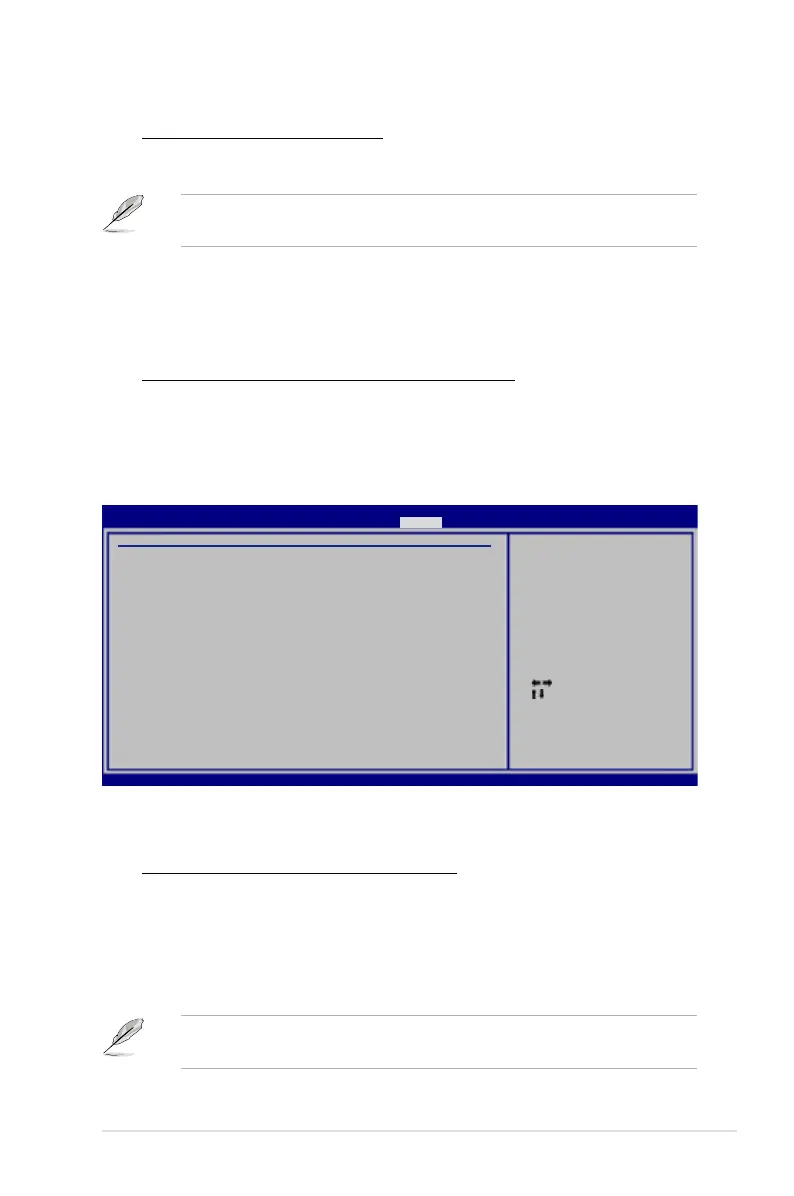
OPT Fan and Power Fan
Select Screen
Select Item
+- Change Field
F1 General Help
F10 Save and Exit
ESC Exit
OPT_Fan 1 Speed :N/A
OPT_Fan1 Q-Fan Control [DUTY CYCLE]
Duty Cycle Mode [90%]
OPT_Fan 2 Speed :N/A
OPT_Fan2 Q-Fan Control [DUTY CYCLE]
Duty Cycle Mode [90%]
Power Fan Speed :N/A
Fan conguration
mode setting
BIOS SETUP UTILITY
Power
v02.58 (C)Copyright 1985-2007, American Megatrends, Inc.
The onboard hardware monitor automatically detects the optional fan speed. If the
fan is not connected to the motherboard, the eld shows N/A.
OPT_Fan1/2 Q-Fan Control [DUTY CYCLE]
Allows you to select the optional fan control mode. When this item is set to
[DUTY CYCLE], you can congure the Duty Cycle Mode item. If you set this
item to [Q-FAN], you are allowed to congure the TargetTemp Value item.
The Q-Fan detects the temperature of the fan connected to the OPT_FAN1/2
connector and adjusts the fan speed.
Conguraiton options: [DUTY CYCLE] [Q-FAN]
You need to connect the thermal sensor cables to the OPT_TEMP1/2
connectors to enable this function.




 To Next Page