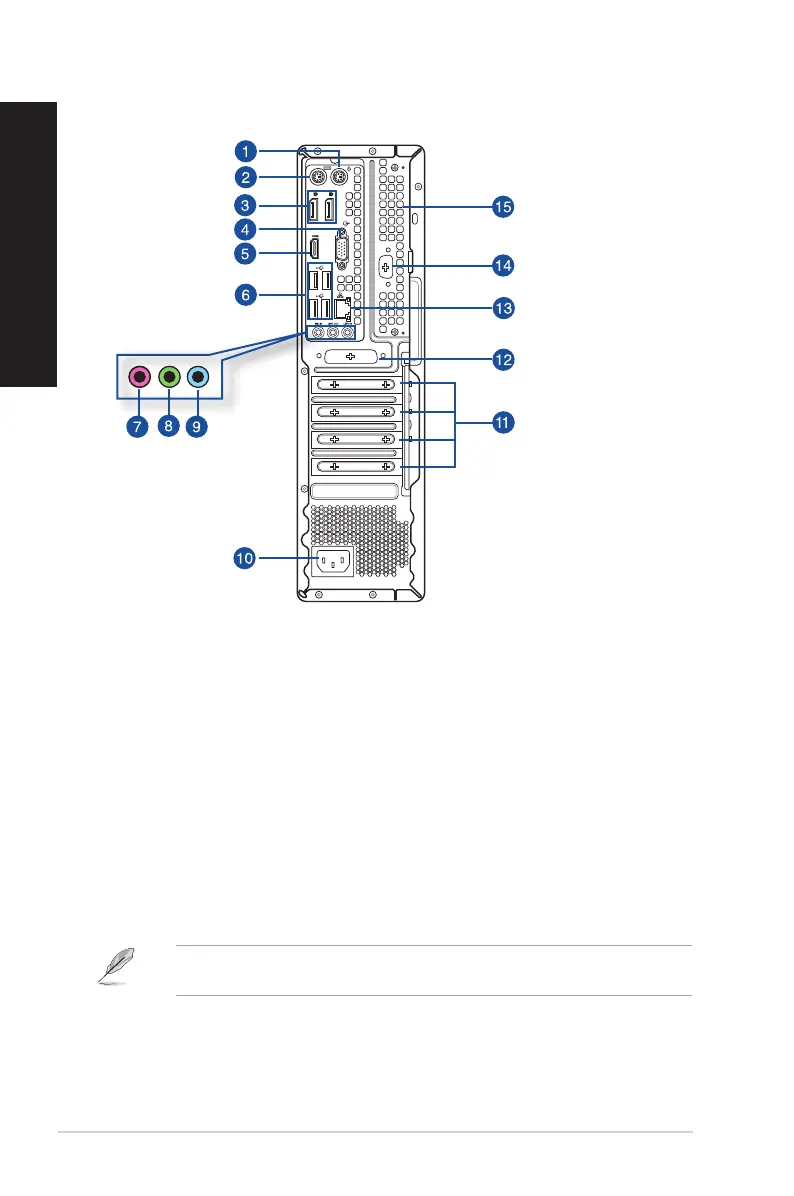
D700SD/S700SD/D700SDES/M700SD/D700SD_CZ Rear panel
1. PS/2 mouse port (green). This port is for a PS/2 mouse.
2. PS/2 keyboard port (purple). This port is for a PS/2 keyboard.
3. DisplayPorts. These ports are for DisplayPort-compatible devices.
4. VGA port. This port is for VGA-compatible devices such as a VGA monitor.
5. HDMI® port. This port is for a High-Denition Multimedia Interface (HDMI®) connector, and is
HDCP compliant allowing playback of HD DVD, Blu-ray, and other protected content.
6. USB 2.0 ports. These Universal Serial Bus 2.0 (USB 2.0) ports connect to USB 2.0 devices such
as a mouse, printer, scanner, camera, PDA, and others.
7. Microphone port (pink). This port connects to a microphone.
8. Line Out port (lime). This port connects to a headphone or speaker. In a 4, 5.1, or
7.1-channel conguration, the function of this port becomes Front Speaker Out.
9. Line In port (light blue). This port connects to a tape, CD, DVD player, or other audio
sources.
Refer to the audio conguration table below for the function of the audio ports in the 2, 4, 5.1, or
7.1-channel conguration.
18 Chapter 1: Getting started
ENGLISH
ENGLISH



 To Next Page