Chapter 1: Knowing the Parts
1-12
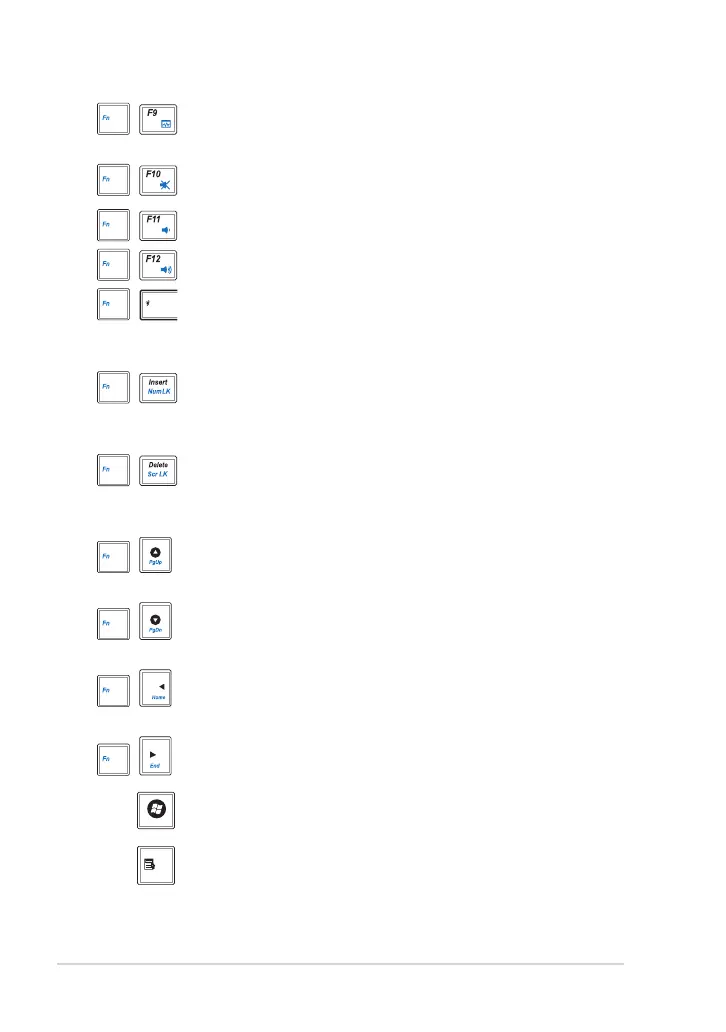
Task Manager Icon (F9): Initiates the Task Manager to
view the application process or terminates applications.
Crossed Speaker Icon (F10): Mutes the speaker.
Volume Down Icon (F11): Decreases speaker volume.
Volume Up Icon (F12): Increases the speaker volume.
Super Hybrid Engine (Fn+Space Bar): Toggles among
various power saving modes. The selected mode is shown
on the display.
Num Lk (Insert): Toggles the numeric keypad
(number lock) ON and OFF. Allows use of a larger portion of
the keyboard for number entering.
Scr Lk (Delete): Toggles the “Scroll Lock” ON and OFF.
Allows you to use a larger portion of the keyboard for cell
navigation.
Pg Up (
↑
): Press to scroll up in documents or the web
browser.
Pg Dn (
↓
): Press to scroll down in documents or the web
browser.
Home (
←
): Press to move the pointer to the beginning of
the line.
End (
→
): Press to move the pointer to the end of the line.
Windows icon: Displays the start menu.
Menu with pointer icon : Activates the properties menu
and is equivalent to right-clicking the touchpad/mouse on
an object.



 To Next Page