ASUS Eee PC
1-15
Tablet PC Mode
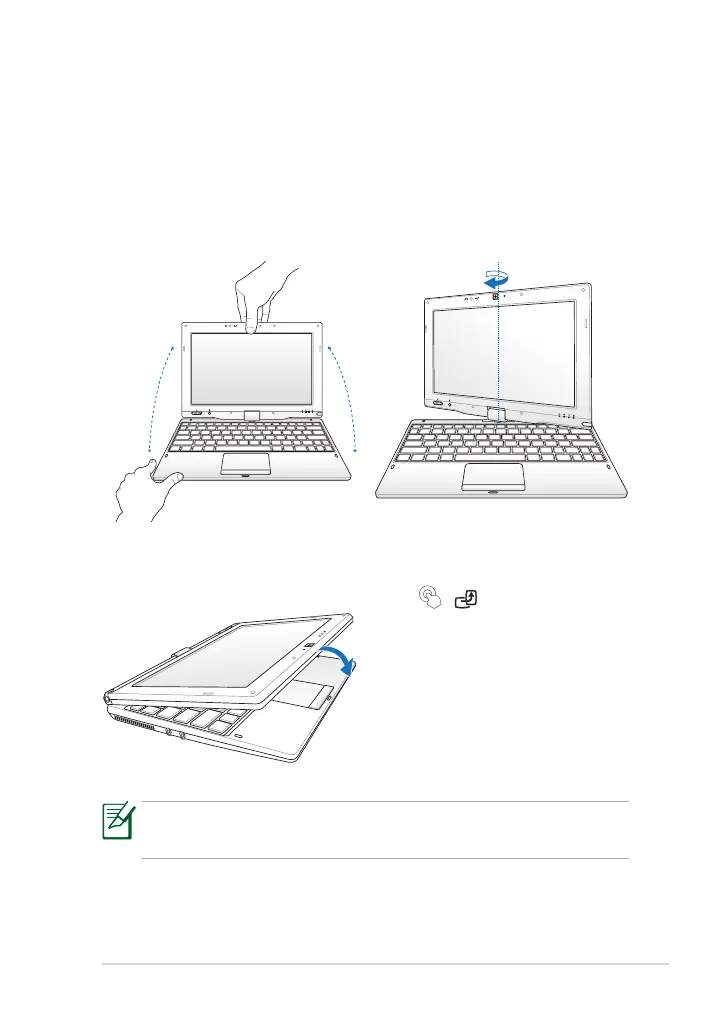
The following are illustrations for using the tablet PC function.
2. Rotate the display panel
clockwise and vertically to a
180° angle.
1. Firmly hold the edge of your
Eee PC, and then open the
display panel to a 90° angle, as
shown in the following figure.
3. Close down the display panel. 4. Press and hold the Home Key
( / ) to preview desktop
rotation, and then release the
key to finish desktop rotation.
Some applications may not work properly under the desktop
rotation angle of 90
°
and 270
°.



 To Next Page