English
17
All-in-One PC ET232 Series
Chapter 2: Using your All-in-One PC
Assembling the base of your All-in-One PC
1. Place the All-in-One PC on a at and
stable surface such as a table or desk.
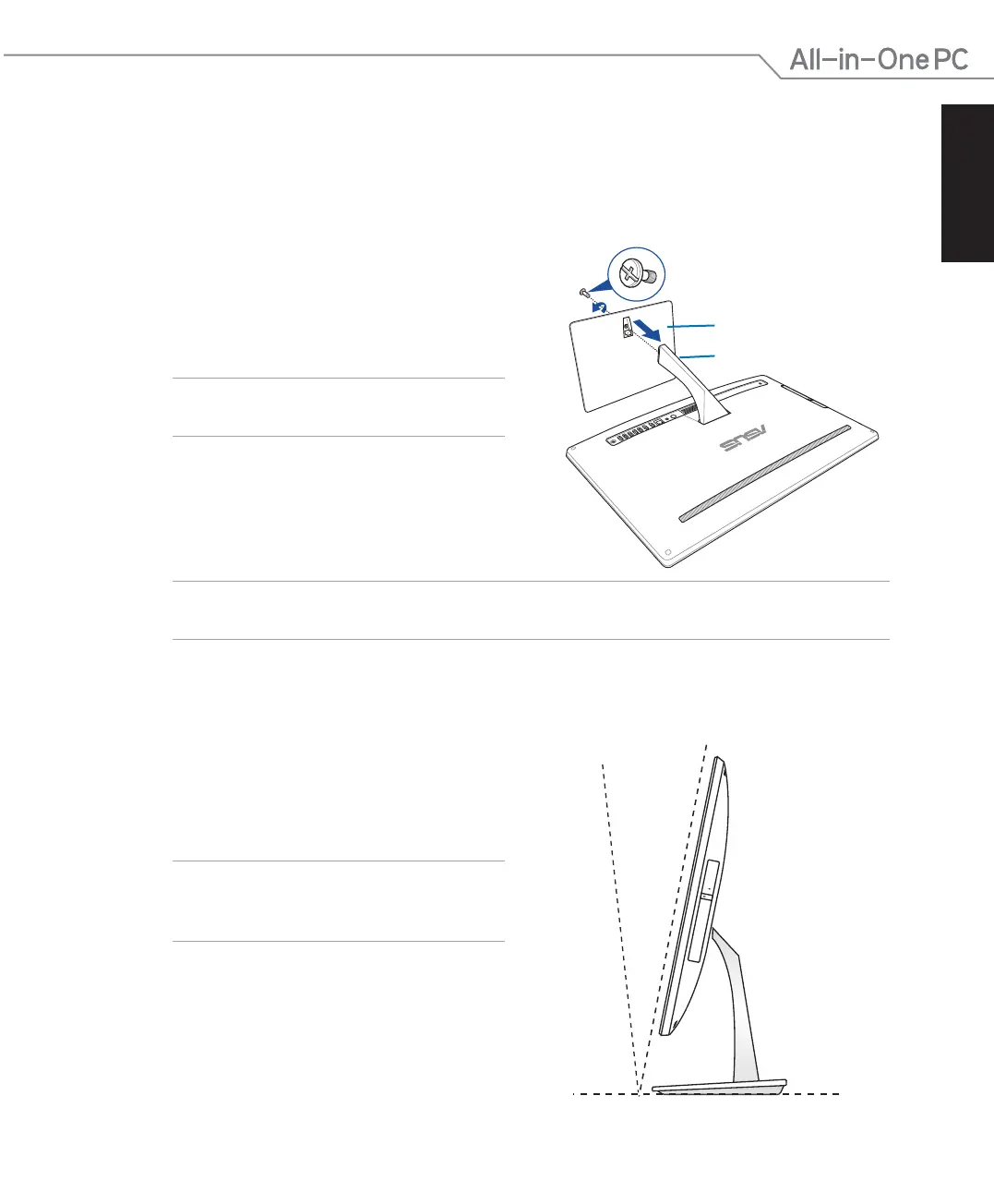
2. Align and attach the base to the stand.
Ensure that the stand is tted rmly and
aligned properly to the base.
NOTE: The stand ts to the base in one
orientation only.
3. Secure the base to the stand with the
bundled screw using a Phillips or a at
screwdriver. You can also use a coin or
token.
base
stand
screw
NOTE: The illustration above are for reference only. The actual base of your AiO may vary
depending on the model but the installation steps remains the same.
1. Place your All-in-One PC on a at surface
such as a table or desk.
2. Tilt the display to an angle between -5
o
to
25
o
.
IMPORTANT! Avoid adjusting the display to
an angle beyond the recommended values or
you may risk damaging the All-in-One PC.
25
O
-5
O
Positioning your All-in-One PC



 To Next Page